
1. Giriş
The Focusrite Scarlett 2i2 (1st Gen) is a compact and robust 2-input, 2-output USB audio interface designed for musicians and producers. It provides high-quality audio recording capabilities for microphones and instruments directly to your computer. This manual outlines the setup, operation, and maintenance of your Scarlett 2i2 to ensure optimal performance.

Figure 1: Focusrite Scarlett 2i2 (1st Gen) USB Audio Interface
2. Kurulum
2.1 Sürücü Kurulumu
Before connecting your Scarlett 2i2 to your computer, it is recommended to download and install the latest drivers from the official Focusrite website. This ensures compatibility and optimal performance with your operating system (Windows or macOS).
2.2 Connecting the Scarlett 2i2
- Connect the Scarlett 2i2 to your computer using the supplied USB cable. The device is bus-powered, meaning it draws power directly from the USB connection.
- Connect your microphones or instruments to the input jacks on the front panel. The Scarlett 2i2 features two combination XLR/TRS inputs.
- Connect your studio monitors to the balanced 1/4" TRS outputs on the rear panel, or headphones to the front panel headphone jack.

Figure 2: Front Panel Connections and Controls
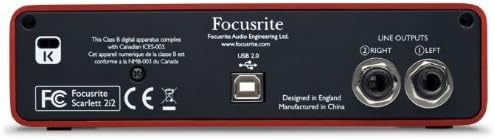
Şekil 3: Arka Panel Bağlantıları
3. Operating the Scarlett 2i2
3.1 Input Gain and "Halo" Indicators
Each input channel has a dedicated gain control knob. Around each gain knob is a unique "Halo" indicator that provides visual feedback on your input signal level:
- Yeşil: Signal present at a healthy level.
- Kehribar: Signal is approaching clipping. Reduce gain.
- Kırmızı: Signal is clipping. Immediately reduce gain to prevent distortion.
3.2 Line/Instrument Switches
Below each gain knob, there is a switch to select between Line level input (for keyboards, preamps, etc.) and Instrument level input (for guitars, basses, etc.). Ensure the correct setting for your connected device.
3.3 Phantom Power (48V)
The 48V button activates phantom power for condenser microphones. Press this button only when using microphones that require phantom power. Ensure your microphone is connected before activating 48V.
3.4 Direct Monitor Function
The "DIRECT MONITOR" switch allows you to monitor your input signal directly through your headphones or speakers without any latency. This is useful for recording to hear your performance in real-time without delay from your computer's software.
3.5 Monitor and Headphone Outputs
The large "MONITOR" knob controls the output level to your main studio monitors. The smaller knob next to the headphone jack controls the volume for your headphones.
4. Özellikler Bittiview
- High-Quality Mic Preamps: Equipped with two award-winning Focusrite mic preamps for clear and detailed recordings.
- Excellent Digital Performance: desteklerample rates up to 96 kHz for high-fidelity audio capture.
- Rugged Metal Unibody Case: Durable construction designed for portability and longevity.
- Truly Portable Interface: USB bus-powered, eliminating the need for an external power supply.
- Kapsamlı Yazılım Paketi: Includes an authorization code for Ableton Live Lite, Scarlett Plug-in Suite (RTAS/AU/VST), Red 2 & Red 3 Plug-in Suite (AAX/AU/VST), the Softube Time and Tone Bundle, Novation Bass Station, and 1GB of Loopmasters samples.
5. Bakım
To ensure the longevity and optimal performance of your Scarlett 2i2, follow these maintenance guidelines:
- Cihazınızı yumuşak ve kuru bir bezle silerek temiz tutun. Aşındırıcı temizleyiciler veya çözücüler kullanmaktan kaçının.
- Protect the unit from dust, moisture, and extreme temperatures.
- Yeterli havalandırma sağlayın ve havalandırma deliklerinin tıkanmamasına özen gösterin.
- Hasar görmemesi için tüm kabloları ve konektörleri özenle tutun.
6. Sorun Giderme
6.1 Driver Issues (Windows)
Some users may experience driver-related issues, particularly on Windows operating systems. If you encounter problems such as audio dropouts or software not recognizing the interface:
- Ensure you have downloaded and installed the en son sürücüler directly from the Focusrite webalan.
- Verify that the Scarlett 2i2 is set as the default audio input/output device in your computer's sound settings.
- Adjust the buffer length in the Focusrite USB 2.0 Audio Control Panel (if applicable) and your Digital Audio Workstation (DAW) to optimize latency.
- A system reboot after driver installation can resolve many issues.
6.2 Gecikme
If you experience noticeable delay (latency) during recording:
- Kullanın Doğrudan Monitör function to hear your input signal directly without computer processing delay.
- In your DAW settings, reduce the audio buffer size. Lower buffer sizes decrease latency but require more CPU power.
- Ensure your computer meets the minimum system requirements for your DAW and the Scarlett 2i2.
6.3 No Sound/Distorted Sound
- Check all cable connections (USB, inputs, outputs).
- Verify gain levels using the "Halo" indicators; reduce gain if the halo is red.
- Ensure the correct input type (Line/Instrument) is selected for your source.
- Confirm phantom power (48V) is only enabled for condenser microphones that require it.
- Check volume controls on the Scarlett 2i2 (Monitor and Headphone knobs) and within your operating system/DAW.
7. Özellikler
| Özellik | Detay |
|---|---|
| Marka | Odaklanma |
| Model Numarası | SCARLETT2I2 |
| Uyumlu Cihazlar | Kişisel Bilgisayar |
| Desteklenen Yazılımlar | Ableton Live Lite, Focusrite Studio |
| Bağlantı Teknolojisi | USB |
| Kanal Sayısı | 2 |
| İşletim Sistemi | Windows, macOS |
| Ses Girişi | XLR, Instrument (1/4" TRS) |
| Maksimum Sample Oranı | 96 KHz |
| Ürün Ağırlığı | 2 pound |
8. Resmi Ürün Videosu
Watch this official video from Focusrite for an overview of the Scarlett 2i2 USB Audio Interface and its key features.
Video 1: Focusrite Scarlett 2i2 2 In/2 Out USB Recording Audio Interface Overview
9. Garanti ve Destek
The Focusrite Scarlett 2i2 (1st Gen) comes with a 2 yıllık garanti. For detailed warranty information, technical support, driver downloads, and further assistance, please visit the official Focusrite webalan.
Ayrıca ek kaynaklara ve sıkça sorulan sorulara da buradan ulaşabilirsiniz. Focusrite Store on Amazon.