
giriiş
This manual provides comprehensive instructions for the proper use, setup, and maintenance of your Leica Pinmaster II Metric/Yard Version 40533 rangefinder. Please read this manual thoroughly before operating the device to ensure optimal performance and safety.
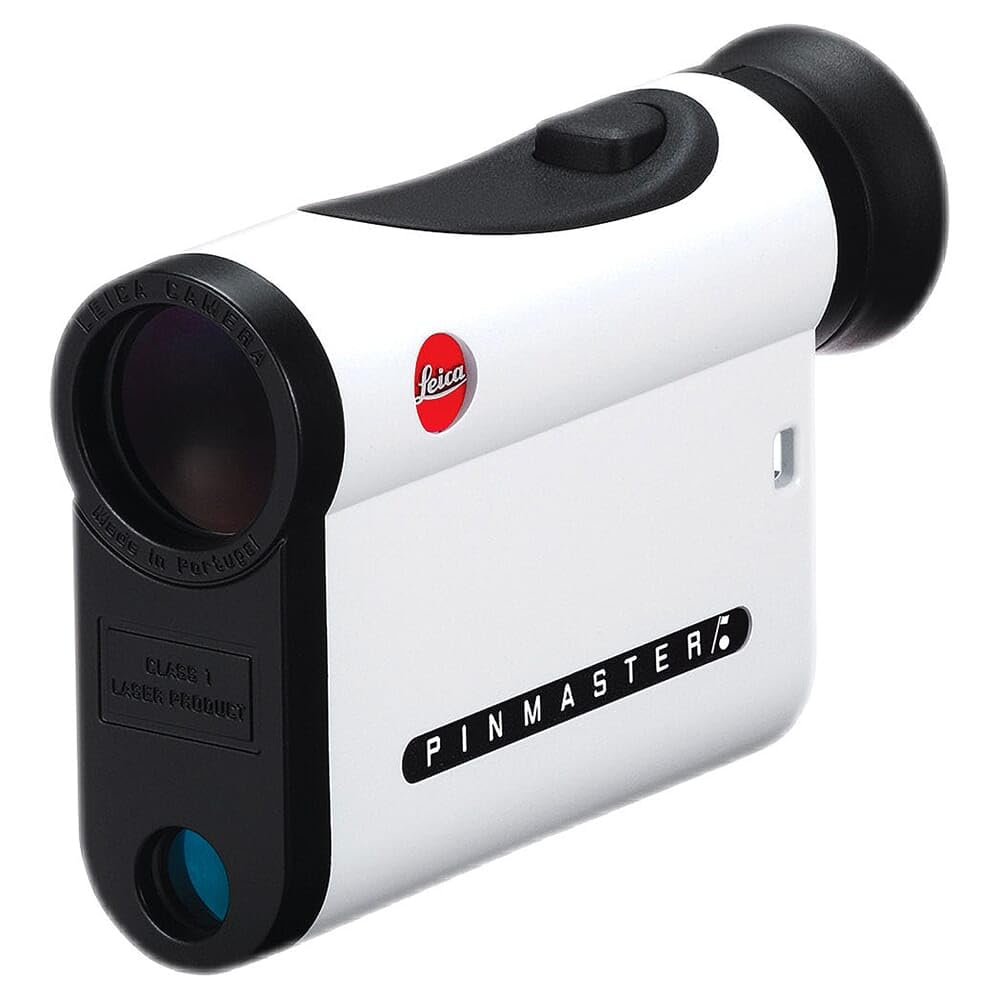
Image: The Leica Pinmaster II rangefinder, a compact device designed for precise distance measurement in golf.
Güvenlik Bilgileri
- Lazer Güvenliği: The Leica Pinmaster II uses an invisible Class 1 laser. Do not look directly into the laser beam or point it at others.
- Pil Güvenliği: Use only the specified Lithium-Ion battery. Do not attempt to open, crush, or expose the battery to extreme temperatures. Dispose of batteries according to local regulations.
- Genel İşleme: Avoid dropping the device or subjecting it to severe impacts. Keep the device away from direct sunlight for prolonged periods.
- Suya Dayanıklılık: The device is waterproof to 3 feet. Do not submerge it beyond this depth or for extended periods. Ensure the battery compartment is securely closed before exposure to water.
Paket İçeriği
Paketin içinde tüm öğelerin mevcut olduğundan emin olun:
- Leica Pinmaster II Rangefinder (Model 40533)
- Lityum İyon Pil (önceden takılı veya ayrı)
- Taşıma Çantası
- Boyun Askısı
- Lens Temizleme Bezi
- Hızlı Başlangıç Kılavuzu
Kurmak
Pil Kurulumu
The Leica Pinmaster II operates on a single Lithium-Ion battery. If the battery is not pre-installed, follow these steps:
- Pil bölmesi kapağını bulun; genellikle cihazın yan veya alt kısmında bulunur.
- Turn the cover counter-clockwise to open it.
- Insert the Lithium-Ion battery with the positive (+) terminal facing the direction indicated inside the compartment.
- Replace the cover and turn it clockwise until it is securely tightened to ensure water resistance.
Not: A low battery indicator will appear in the display when the battery needs replacement.
İlk Güç Açık
After installing the battery, press the main operating button (usually located on the top of the device) to power on the Pinmaster II. The display will illuminate, showing the reticle and measurement units.
Kullanım Talimatları
Açma ve Kapatma
- Açmak İçin: Press the main operating button briefly. The device will power on and the display will activate.
- Otomatik Kapanma: The Pinmaster II will automatically power off after approximately 10-15 seconds of inactivity to conserve battery life.
Mesafe Ölçümü
To obtain a single distance measurement:
- Look through the eyepiece and aim the reticle (crosshairs or aiming circle) at the desired target.
- Press and release the main operating button. The distance to the target will be displayed instantly in yards or meters.
- Ensure a steady hand for accurate readings. For small targets like flagsticks, aim carefully.
Tanım: The Pinmaster II features a bright, clear display with a precise aiming reticle, allowing users to target objects up to 825 yards away. The 7x magnification aids in target acquisition.
Tarama Modu
Scan mode allows for continuous measurement of multiple targets or a moving target:
- Press and hold the main operating button for approximately 2 seconds.
- While holding the button, pan the device across different targets. The display will continuously update with the distances to the objects in the reticle's path.
- Release the button to stop scanning. The last measured distance will remain displayed for a few seconds before automatic shut-off.
Unit Selection (Metric/Yard)
Yarda ve metre arasında geçiş yapmak için:
- With the device powered on, press and hold the main operating button and a secondary function button (if available, refer to the quick start guide for exact button location) simultaneously for a few seconds.
- The unit of measurement (Y or M) in the display will change. Release the buttons when the desired unit is shown.
Ekran Parlaklığını Ayarlama
The Pinmaster II features an adjustable display brightness for optimal visibility in various lighting conditions. To adjust:
- Cihazı açın.
- Press the secondary function button (if available) repeatedly to cycle through different brightness levels.
- Select the brightness level that provides the clearest view without causing glare.
Bakım
Optikleri Temizleme
To maintain clear vision, keep the objective and eyepiece lenses clean:
- Ürünle birlikte verilen lens temizleme bezini veya yumuşak, tüy bırakmayan bir bez kullanın.
- Lens yüzeylerini nazikçe silerek toz ve lekeleri temizleyin.
- For stubborn dirt, use a small amount of optical lens cleaning fluid applied to the cloth, not directly to the lens.
- Aşındırıcı malzemeler veya sert kimyasallar kullanmaktan kaçının, çünkü bunlar lens kaplamalarına zarar verebilir.
Depolamak
When not in use, store the Leica Pinmaster II in its protective carrying case in a cool, dry place. Avoid extreme temperatures and high humidity.
Pil Değişimi
When the low battery indicator appears, replace the Lithium-Ion battery promptly to ensure continued operation. Follow the battery installation steps outlined in the 'Setup' section.
Sorun giderme
| Sorun | Olası Neden | Çözüm |
|---|---|---|
| Cihaz açılmıyor. | Pil bitmiş veya yanlış takılmış. | Pil yönünü kontrol edin. Gerekirse pili değiştirin. |
| Mesafe ölçümlerinin hatalı olması. | Unsteady hand, obstructed laser path, or target too far/close. | Ensure a steady aim. Clear any obstructions. Verify target is within the 5-825 yard range. |
| Ekran soluk veya okunaksız. | Pil zayıf veya parlaklık ayarı yanlış. | Replace battery. Adjust display brightness using the function button. |
| Fogging on lenses. | Rapid temperature change or high humidity. | Allow the device to acclimate to the ambient temperature. Wipe lenses with a dry, lint-free cloth. |
Özellikler
| Özellik | Detay |
|---|---|
| Model Numarası | 40533 |
| Büyütme | 7x |
| Ölçüm Aralığı | 5-825 yarda (5-750 metre) |
| Kesinlik | ±1 yard up to 400 yards, ±2 yards up to 800 yards, ±0.5% beyond 800 yards (typical) |
| Pil Türü | Lityum-İyon |
| Suya Dayanıklılık | 3 feet'e kadar su geçirmez |
| Malzeme | Carbon fiber housing |
| Boyutlar (U x G x Y) | 2.95"U x 4.44"G x 1.07"Y (75 x 113 x 27 mm) |
| Ağırlık | 8 ons (227 gram) |
Garanti ve Destek
Leica products are manufactured to the highest quality standards and come with a limited warranty. For detailed warranty information, product registration, or technical support, please refer to the official Leica website or contact Leica customer service. Keep your purchase receipt as proof of purchase for warranty claims.
Çevrimiçi Kaynaklar: For additional information, FAQs, and software updates, visit the official Amazon'daki Leica Mağazası or the main Leica webalan.