
giriiş
This manual provides essential instructions for setting up, operating, and maintaining your Canon PowerShot ELPH 310 HS digital camera. Please read this manual thoroughly to ensure proper use and to maximize your camera's performance.
Kutuda Neler Var?
Paketi açtığınızda aşağıdaki tüm öğelerin mevcut olduğundan emin olun:
- Canon PowerShot ELPH 310 HS Camera
- Pil Paketi NB-4L
- Battery Charger CB-2LV
- Bilek Kayışı
- USB kablosu
- CD-ROM (Software/Drivers)
Kurmak
1. Pilin Şarj Edilmesi
Insert the Battery Pack NB-4L into the Battery Charger CB-2LV. Plug the charger into a power outlet. The charging indicator light will show the charging status. Once fully charged, remove the battery.
2. Pil ve Hafıza Kartının Takılması
Open the battery/card compartment cover on the camera. Insert the charged battery pack, ensuring correct orientation. Insert a compatible SD/SDHC/SDXC memory card into the card slot until it clicks into place. Close the compartment cover securely.

Resim: Ön view of the Canon PowerShot ELPH 310 HS digital camera, showcasing its silver finish and lens.
Kameranın Çalıştırılması
1. Güç Açma/Kapatma
Basın AÇIK/KAPALI button located on the top or side of the camera to power it on or off. The lens will extend when powered on.
2. Temel Fotoğrafçılık
- Odaklanma: Gently press the shutter button halfway down to focus. The camera will emit a beep and display a green frame when focus is achieved.
- Fotoğraf Çekmek: Görüntüyü yakalamak için deklanşöre tam basın.
- Yakınlaştır: Use the zoom lever around the shutter button to adjust the optical zoom (8x).
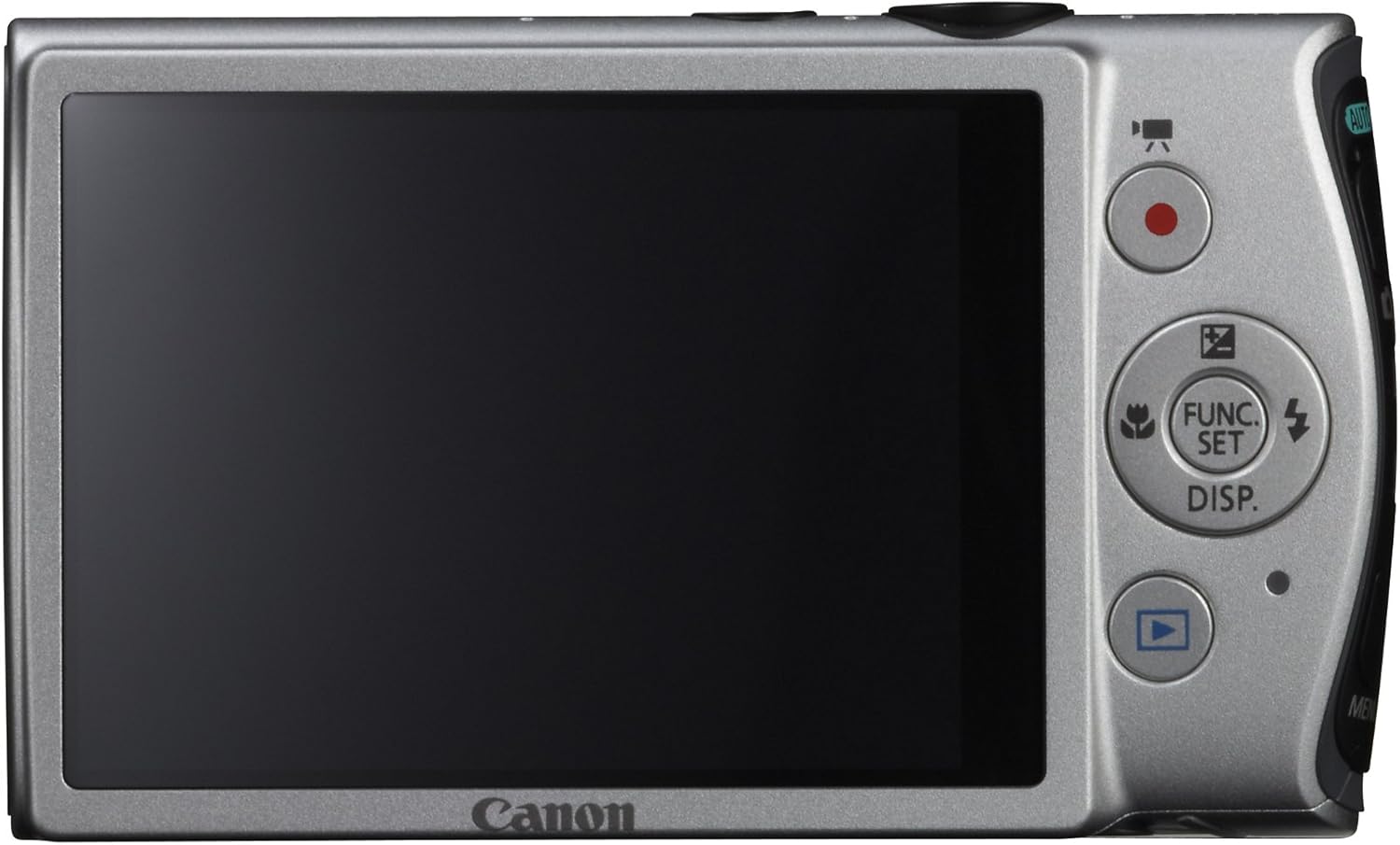
Resim: Arka view of the Canon PowerShot ELPH 310 HS, displaying the 3.0-inch LCD screen and various control buttons for navigation and function selection.
3. Çekim Modları
The PowerShot ELPH 310 HS offers various shooting modes to suit different situations. Use the mode dial or menu to select:
- Akıllı OTOMATİK: Automatically detects scenes and applies optimal settings for point-and-shoot simplicity.
- Program (P): Allows for automatic aperture/shutter speed selection based on conditions, with some user control.
- Movie Digest: Records a short video clip before each still image, combining them into a daily video.
- Yüksek Hızlı Patlama: Captures rapid action at approximately 8.7 frames per second.
- Super Slow Motion Movie: Records video at high frame rates (up to 240 fps) for slow-motion playback.
- Özel Sahne Modları: Includes options like Handheld Night Scene, Portrait, Beach, Snow, Fireworks, Fisheye Effect, Miniature Effect, Toy Camera Effect, and more for specific photographic effects.
4. Video Kaydı
To record videos, press the dedicated movie button. The camera supports Full HD 1080p video at 24 fps and 720p HD video at 30 fps. The iFrame movie format is also supported for easier editing.
5. Image Stabilization (Intelligent IS)
The camera features Intelligent IS, which automatically selects the best shake correction method for your shooting situation. This includes modes for stills (Normal, Panning, Macro, Tripod) and videos (Dynamic, Powered, Macro, Tripod) to ensure steady images and footage.
Bakım
1. Kamerayı Temizleme
- Mercek: Use a soft, lint-free cloth specifically designed for camera lenses. Avoid touching the lens directly with fingers.
- LCD Ekran: Wipe gently with a soft, dry cloth. Do not use abrasive cleaners.
- Kamera Gövdesi: Use a soft, dry cloth to wipe away dust and smudges.
2. Pil Bakımı
- Pilleri kullanılmadığı zaman serin ve kuru bir yerde saklayın.
- Pilinizin ömrünü uzatmak için sık sık tamamen boşaltmaktan kaçının.
- Pilleri aşırı sıcaklıklara maruz bırakmayın.
3. Depolama
Fotoğraf makinesini uzun süre saklayacaksanız, pili ve hafıza kartını çıkarın. Fotoğraf makinesini kuru, tozsuz bir ortamda, tercihen bir fotoğraf makinesi çantası veya kılıfı içinde saklayın.
Sorun giderme
| Sorun | Olası Neden / Çözüm |
|---|---|
| Kamera açılmıyor. | Battery may be depleted or incorrectly inserted. Ensure battery is charged and inserted correctly. |
| Görüntüler bulanık. | Camera shake, subject movement, or incorrect focus. Ensure proper grip, use Intelligent IS, or check focus settings. |
| Hafıza kartı hatası. | Memory card may be full, corrupted, or incompatible. Try formatting the card (this will erase all data) or use a different card. |
| Flaş çalışmıyor. | Flash may be set to OFF or Red-Eye Reduction mode. Check flash settings in the menu. |
| Video kaydedilemiyor. | Memory card may be full or too slow. Ensure sufficient space and use a high-speed memory card. |
Özellikler
| Özellik | Detay |
|---|---|
| Model Adı | Canon PowerShot ELPH 310 HS |
| Görüntü Sensörü | 12.1 Megapiksel CMOS |
| Görüntü İşlemcisi | DIGIC 4 |
| Optik Yakınlaştırma | 8x |
| Mercek | 28 mm Geniş Açılı (35 mm eşdeğeri: 28-224 mm) |
| Görüntü Sabitleme | Optik (Akıllı Bilgi Sistemleri) |
| Video Kaydı | Full HD 1080p (24 fps), HD 720p (30 fps) |
| LCD Ekran | 3.0-inch PureColor LCD (461,000 dots) |
| Depolama Ortamı | SD, SDHC, SDXC Memory Cards |
| Bağlantı | HDMI, USB |
| Pil | NB-4L Lithium-ion Battery Pack |
| Ağırlık | Approx. 0.31 Pounds (including battery and memory card) |
Garanti ve Destek
For warranty information and technical support, please refer to the documentation included with your product or visit the official Canon webSite. Satın alma fişinizi, garanti talepleriniz için satın alma belgeniz olarak saklayın.
Canon Desteği Webalan: www.usa.canon.com/support