
giriiş
Thank you for choosing the Casio G-Shock GW-M5600A-7ER. This watch combines robust G-Shock durability with advanced radio-controlled timekeeping and solar power technology. This manual provides essential information for proper setup, operation, and maintenance of your watch. Please read it carefully to ensure optimal performance and longevity.
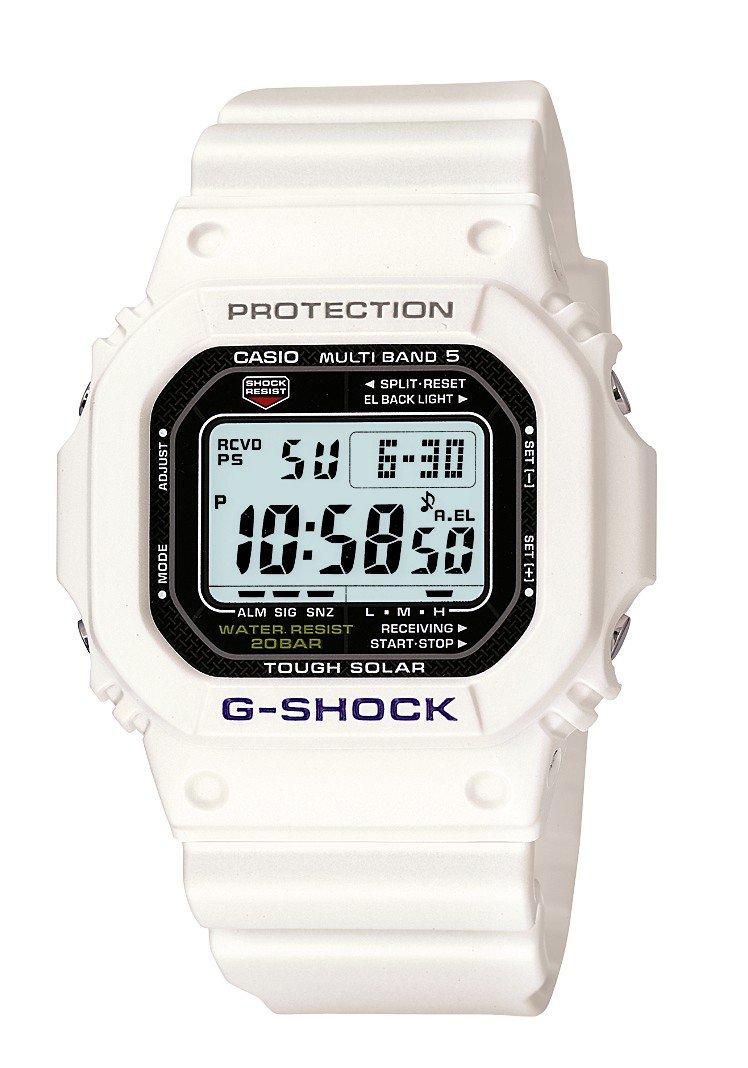
Resim: Ön view of the Casio G-Shock GW-M5600A-7ER watch, showcasing its digital display and resin strap.
Temel Özellikler
- Radyo Kontrollü Zaman Tutma: Automatically receives time calibration signals for accurate timekeeping.
- Güneş Enerjili: Equipped with a solar panel that converts light into electrical power, eliminating the need for battery replacement.
- 200 Metre Su Geçirmezlik: Suitable for swimming, snorkeling, and diving (excluding saturation diving).
- Şok direnci: Designed to withstand impacts and vibrations.
- Dijital gösterge: Clear and easy-to-read digital time and function display.
- Kronometre İşlevi: Geçen süre, ara süre ve 1.-2. sıra sürelerini ölçer.
- Alarm Fonksiyonu: Birden fazla günlük alarm ve bir evurly zaman sinyali.
- Dünya Saati: Displays current time in major cities and specific areas around the world.
- Mineral Cam: Protective, scratch-resistant hard mineral lens.
- Dayanıklı Reçine Yapısı: High-performance and durable resin case and strap.
Kurmak
1. İlk Şarj
Your watch is powered by a solar cell. Before initial use, expose the watch face to bright light for several hours to ensure it is sufficiently charged. The watch may arrive with a low charge, indicated by a flashing 'CHG' or 'LOW' indicator on the display. Avoid prolonged storage in dark places.
2. Ev Şehrinizi Belirleme
The Home City setting is crucial for correct time calibration and World Time functionality. Refer to the detailed instructions in the full manual for specific button operations to set your Home City. This setting determines which time calibration signal the watch attempts to receive.
3. Time Calibration Signal Reception
The watch automatically attempts to receive a time calibration signal up to six times a day (or five times a day for the Chinese calibration signal). For optimal reception, place the watch near a window at night, away from metal objects and electronic devices. Manual reception can also be initiated:
- In Timekeeping Mode, hold down the 'A' button (top left) for several seconds until the current time calibration status appears.
- Press the 'D' button (bottom right) to initiate manual reception.
- The watch will display 'RCVD' upon successful reception.
Kullanım Talimatları
Mod Navigasyonu
Press the 'C' button (bottom left) to cycle through the different modes:
- Zaman İşleyişi Modu: Geçerli saati ve tarihi görüntüler.
- Dünya Saatleri Modu: Geçerli saati çeşitli saat dilimlerinde gösterir.
- Alarm Modu: Günlük alarmları ayarlayın ve etkinleştirin.
- Kronometre Modu: Geçen süreyi ölçün.
- Geri Sayım Sayacı Modu: Belirli bir zamandan itibaren geri sayım ayarlayın.
Kronometreyi Kullanma
- Navigate to Stopwatch Mode using the 'C' button.
- Press the 'D' button (bottom right) to start/stop the stopwatch.
- Press the 'B' button (top right) to record split times or reset the stopwatch when stopped.
Alarmları Ayarlama
- Navigate to Alarm Mode using the 'C' button.
- Hold down the 'A' button (top left) until the alarm time starts flashing.
- Use the 'B' and 'D' buttons to adjust the hour and minute settings.
- Press 'A' to confirm and exit the setting screen.
- Press 'D' to toggle the alarm ON/OFF.
Aydınlatma
Press the 'B' button (top right) to illuminate the display for easy viewing in low light conditions. The duration of illumination can be adjusted in the watch settings.
Bakım
Saati Şarj Etme
To maintain optimal performance, ensure your watch is regularly exposed to light. The power indicator on the display shows the current charge level. If the charge level is low, expose the watch to direct sunlight or strong artificial light. Avoid covering the watch face when charging.
Temizlik
Saati, kir ve nemden arındırmak için yumuşak, kuru bir bezle silin. İnatçı kirler için yumuşak bir bez kullanın.ampSu ve hafif nötr bir deterjanla durulayın, ardından kurulayın. Tiner veya benzin gibi uçucu maddeler kullanmaktan kaçının, çünkü bunlar reçine bileşenlerine zarar verebilir.
Suya Dayanıklılık Önlemleri
While your watch is water-resistant to 200 meters, it is important to observe the following:
- Saat ıslakken veya suyun altındayken düğmelere basmayın.
- Avoid exposing the watch to hot water or steam (e.g., in showers, saunas) as this can compromise seals.
- After exposure to saltwater, rinse the watch thoroughly with fresh water and wipe dry.
Sorun giderme
Time Not Syncing
- Check Home City Setting: Ensure your Home City is correctly set to a region that receives time calibration signals.
- Reception Environment: Move the watch to a location with better signal reception, ideally near a window, away from electronic interference.
- Manuel Alım: Attempt a manual time calibration signal reception (refer to Setup section).
- Şarj Seviyesi: Ensure the watch has sufficient charge. Low power can affect signal reception.
Ekran Boş veya Soluk
- Şarj Seviyesi: The watch may be in power-saving mode or have a very low charge. Expose it to bright light for an extended period.
- Güç tasarrufu: The watch enters power-saving mode when left in the dark for a certain period. Press any button or expose it to light to reactivate the display.
Düğmeler Yanıt Vermiyor
- Reset: In rare cases, a full reset might be necessary. Consult the full Casio manual for your specific module number (usually found on the watch's case back) for detailed reset procedures.
- Su: Ensure the watch is completely dry if it has been exposed to water.
Özellikler
| Model Numarası | GW-M5600A-7ER |
| Üretici | G-ŞOK |
| Görüntü Türü | Dijital |
| Hareket | Kuvars |
| Güç Kaynağı | Güneş Enerjili |
| Suya Dayanıklılık Derinliği | 200 Metre |
| Kasa Malzeme Türü | Reçine |
| Bant Malzeme Türü | Reçine |
| Kadran Penceresi Malzeme Türü | Mineral |
| Kasa Çapı | 49 mm |
| Kasa Kalınlığı | 17 mm |
| Bant Genişliği | 25 mm |
| Toka Tipi | Tang Tokası |
| Öğe Şekli | Kare |
| Bant Rengi | Beyaz |
| Kadran Rengi | Gri |
Garanti ve Destek
Your Casio G-Shock GW-M5600A-7ER watch comes with a 2 yıllık üretici garantisiBu garanti, normal kullanım koşullarındaki malzeme ve işçilik kusurlarını kapsar. Garanti talepleriniz için lütfen satın alma belgenizi saklayın.
For detailed warranty terms, service, or technical support, please refer to the official Casio website or contact your local authorized Casio service center. Contact information can typically be found in the full product manual or on the manufacturer's webalan.