
giriiş
The GIGABYTE GM-M7600 is a wireless precision optical mouse designed for comfortable and reliable use. This manual provides instructions for setting up, operating, maintaining, and troubleshooting your device.
Paket İçeriği
Lütfen paket içeriğini kontrol ederek tüm öğelerin mevcut olduğundan emin olun:
- GIGABYTE GM-M7600 Wireless Optical Mouse
- Portable Nano USB Receiver
- 2 x AAA Pil
Kurmak
1. Pillerin Takılması
The GM-M7600 mouse requires two AAA batteries for operation. The batteries are included in the package.
- Farenin alt tarafındaki pil bölmesi kapağını bulun.
- Bölmeyi açmak için kapağı yavaşça kaydırın veya kaldırın.
- İki adet AAA pili takın ve pozitif (+) ve negatif (-) kutupların bölmenin içindeki işaretlerle doğru şekilde hizalandığından emin olun.
- Pil bölmesi kapağını sıkıca kapatın.
2. USB Alıcısını Bağlama
The mouse connects to your computer via a portable Nano USB receiver.
- Locate the Nano USB receiver. It may be stored inside the mouse's battery compartment or packaged separately.
- Plug the Nano USB receiver into an available USB port on your computer (Laptop or Personal Computer).
- Your operating system (e.g., Windows XP, Linux) should automatically detect and install the necessary drivers. This process may take a few moments.
- Sürücüler yüklendikten sonra fare kullanıma hazırdır.
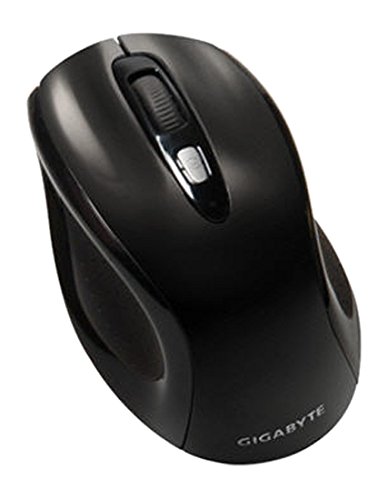
Şekil 1: GIGABYTE GM-M7600 Wireless Optical Mouse. This image displays the ergonomic design of the mouse, highlighting its form factor and the location of its buttons. The Nano USB receiver is typically stored within the mouse or connected to a computer's USB port.
Kullanım Talimatları
1. Açma/Kapama
The mouse typically has a power switch on its underside. Slide the switch to the 'ON' position to activate the mouse. Slide it to 'OFF' when not in use to conserve battery life.
2. DPI (Hassasiyet) Ayarı
The GM-M7600 features an adjustable DPI switch, allowing you to change the mouse sensitivity between 800 DPI and 1600 DPI. This switch is usually located near the scroll wheel. Press the DPI button to toggle between the two sensitivity settings.
3. Temel Fare İşlevleri
- Sol tık: Öğeleri seçmek ve açmak için kullanılan ana düğme. fileve yazılımla etkileşim kurma.
- Sağ tık: Bağlam menülerine ve ek seçeneklere erişim için ikincil düğme.
- Kaydırma tekerleği: Belgeler arasında gezinmek için kullanılır ve web Sayfalar. Ayrıca orta tıklama düğmesi olarak da işlev görebilir.
Bakım
1. Temizlik
Optimum performans ve görünümü korumak için:
- Disconnect the mouse from your computer and turn off the power switch.
- Yumuşak, tiftiksiz bir bez kullanın ve hafifçe kurulayın.ampFarenin yüzeyini silmek için su veya hafif bir temizleme solüsyonu kullanın.
- Fareyi temizlerken sert kimyasallar, aşındırıcı temizleyiciler kullanmaktan veya sıvıları doğrudan farenin üzerine püskürtmekten kaçının.
- Clean the optical sensor area on the underside of the mouse with a dry cotton swab to remove any dust or debris.
2. Pil Değişimi
When the mouse performance degrades or it stops responding, it may be time to replace the batteries.
- Turn off the mouse using the power switch.
- Open the battery compartment as described in the 'Installing Batteries' section.
- Eski AAA pilleri çıkarın.
- Insert two new AAA batteries, observing the correct polarity (+/-).
- Close the battery compartment and turn the mouse back on.
Sorun giderme
If you encounter issues with your GIGABYTE GM-M7600 mouse, try the following solutions:
- Fare yanıt vermiyor:
- Farenin açık olduğundan emin olun.
- Pillerin doğru şekilde takılıp takılmadığını ve yeterli şarja sahip olup olmadığını kontrol edin. Gerekirse değiştirin.
- Ensure the Nano USB receiver is securely plugged into a working USB port on your computer. Try a different USB port.
- Bilgisayarınızı yeniden başlatın.
- İmlecin düzensiz hareketi:
- Farenin alt tarafındaki optik sensörü temizleyin.
- Fareyi uygun bir yüzeyde kullandığınızdan emin olun. Çok yansıtıcı veya şeffaf yüzeylerden kaçının.
- Check for any wireless interference. Move the mouse closer to the receiver or away from other wireless devices.
- DPI switch not working:
- Farenin açık ve bağlı olduğundan emin olun.
- DPI düğmesine sıkıca basın.
Özellikler
| Model Adı | GM-M7600 |
| Marka | GIGABYTE |
| Bağlantı Teknolojisi | 2.4GHz Radio Frequency Wireless |
| Hareket Algılama | Optik |
| Ayarlanabilir DPI | 800 / 1600 Çözünürlük |
| Düğme Sayısı | 3 (Left, Right, Scroll Wheel/Middle Click) |
| Güç Kaynağı | 2 x AAA Pil (dahil) |
| Alıcı Tipi | Portable Nano USB Receiver |
| Uyumlu Cihazlar | Dizüstü Bilgisayar, Kişisel Bilgisayar |
| İşletim Sistemi Desteği | Linux, Windows XP |
| Muhafaza Malzemesi | Plastic with Rubberized Finish |
| Renk | Siyah |
Garanti ve Destek
For warranty information and technical support, please refer to the warranty card included with your product or visit the official GIGABYTE webalan. Garanti talepleri için satın alma makbuzunuzu saklayın.