
1. Giriş
The BUFFALO Giga Switching Hub LSW3-GT-24NSR is a 24-port Gigabit Ethernet switch designed for high-speed network environments. It is ideal for small to medium-sized offices and workplaces requiring robust and reliable network connectivity. This device supports full Gigabit speeds across all ports, ensuring efficient data transfer.
Key features include a fanless design for silent operation and enhanced reliability, as well as a loop detection function to prevent network disruptions caused by accidental network loops.
2. Güvenlik Bilgileri
Please read and understand the following safety precautions before using the device to prevent injury or damage.
- Güç Kaynağı: Use only the provided power adapter. Ensure the power outlet meets the specified voltage gereksinimleri.
- Havalandırma: Havalandırma açıklıklarını kapatmayın. Aşırı ısınmayı önlemek için cihazın etrafında yeterli hava akışı sağlayın.
- Çevre: Avoid exposing the device to water, high humidity, extreme temperatures, or direct sunlight.
- İşleme: Do not drop or subject the device to strong impacts. Do not attempt to open or repair the device yourself. Refer all servicing to qualified personnel.
- Kablolar: Ensure all network cables are properly connected and secured.
3. Paket İçeriği
Paketin içinde tüm öğelerin mevcut olduğundan emin olun:
- BUFFALO Giga Switching Hub LSW3-GT-24NSR Unit
- Güç kablosu
- Rack Mount Brackets (if included with your model)
- Kauçuk Ayaklar (masaüstü yerleştirme için)
4. Kurulum
4.1 Fiziksel Kurulum
The LSW3-GT-24NSR can be installed on a desktop or mounted in a 19-inch equipment rack.
Masaüstü Yerleşimi:
- Attach the included rubber feet to the bottom of the unit to prevent slipping and provide stability.
- Place the unit on a flat, stable surface with adequate ventilation.
Raf Montajı:
- Attach the rack mount brackets to the sides of the unit using the provided screws.
- Secure the unit into a standard 19-inch equipment rack using appropriate rack screws (not included).
4.2 Ağ Kablolarını Bağlama
Connect your network devices (computers, servers, other switches) to any of the 24 RJ-45 ports on the front panel using standard Ethernet cables (Category 5e or higher recommended for Gigabit speeds).

Şekil 1: Ön Panel Üstüview with 24 Ethernet Ports and Status LEDs.
4.3 Gücün Bağlanması
- Connect the power cable to the AC IN port on the rear of the device.
- Güç kablosunun diğer ucunu uygun bir elektrik prizine takın.
- The device will power on automatically. The POWER LED on the front panel should illuminate.

Şekil 2: Arka Panel Üzeriview with AC IN Power Port.
5. Kullanım Talimatları
5.1 LED Göstergeleri
The front panel features several LED indicators to monitor the status of the switch and its ports.
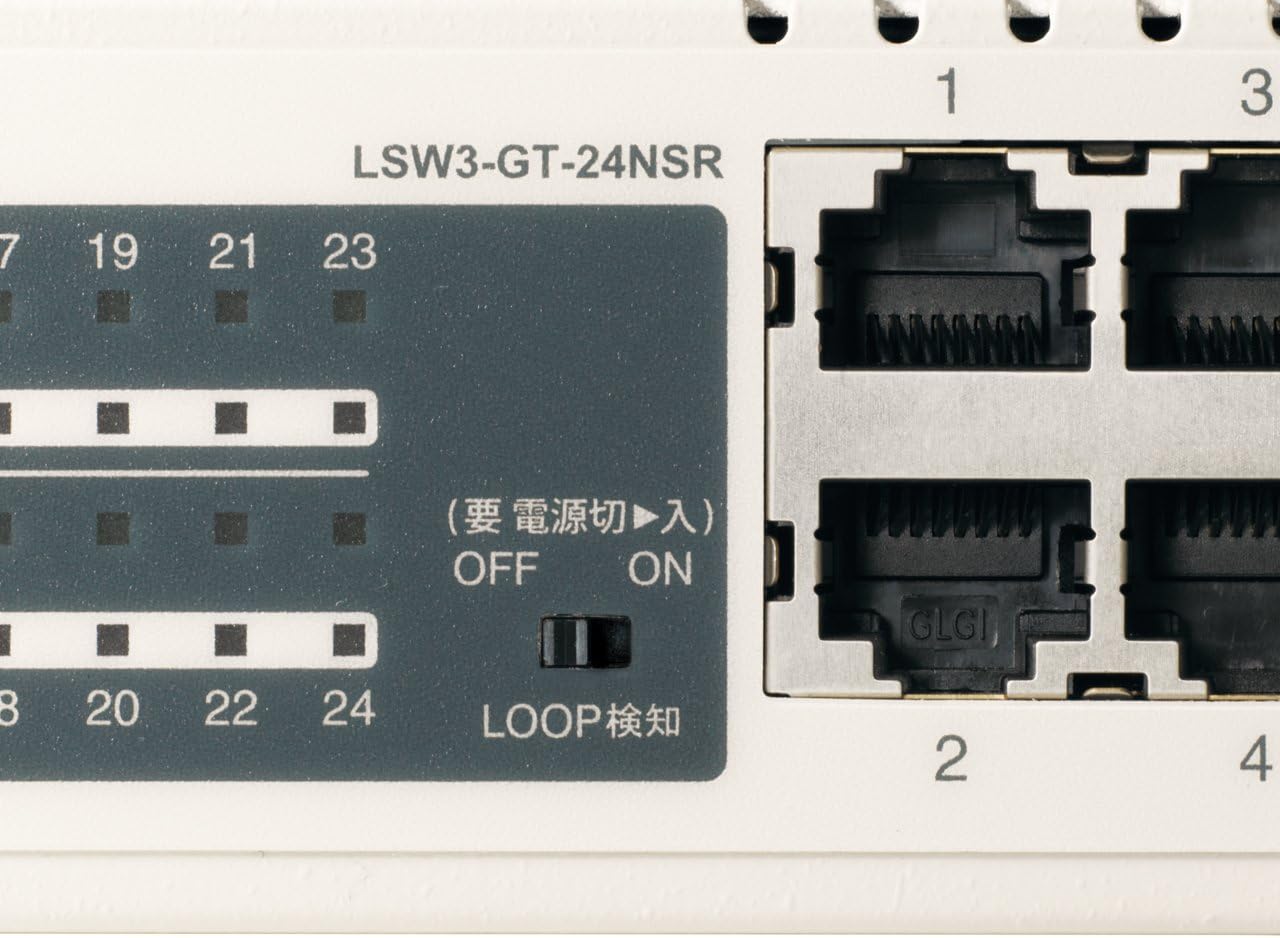
Şekil 3: Ayrıntılı view of LED Indicators and Loop Detection Switch.
| LED Adı | Durum | Tanım |
|---|---|---|
| GÜÇ | On | Cihaz açık. |
| BAĞLANTI/GERÇEKLEŞTİR (bağlantı noktası başına) | On | A network device is connected and a link is established. |
| Yanıp sönen | Port üzerinden veri iletiliyor veya alınıyor. | |
| 1000/100/10M (bağlantı noktası başına) | Yeşil | Port is operating at 1000 Mbps (Gigabit Ethernet). |
| Turuncu | Port is operating at 100 Mbps (Fast Ethernet). | |
| Kapalı | Port is operating at 10 Mbps (Ethernet). | |
| LOOP DETECT | On | A network loop has been detected. |
5.2 Loop Detection Function
The LSW3-GT-24NSR features a hardware switch for enabling or disabling the loop detection function. This function helps prevent network instability caused by accidental network loops.
Figure 4: Loop Detection Switch (ON/OFF).
- AÇIK: Loop detection is active. If a loop is detected, the corresponding port will be automatically shut down to prevent network broadcast storms, and the LOOP DETECT LED will illuminate.
- KAPALI: Loop detection is disabled.
It is recommended to keep the loop detection function ON for network stability.
6. Bakım
6.1 Cihazın Temizlenmesi
To maintain optimal performance, periodically clean the exterior of the switch.
- Temizlemeden önce güç kablosunu çıkarın.
- Yüzeyi silmek için yumuşak, kuru bir bez kullanın.
- Do not use liquid cleaners, aerosols, or solvents, as these may damage the casing veya dahili bileşenler.
6.2 Çevresel Hususlar
Ensure the device is operated within its specified environmental conditions:
- Sıcaklık: 0°C ila 40°C (32°F ila 104°F)
- Nem: %10 ila %85 (yoğuşmasız)
7. Sorun Giderme
If you encounter issues with your BUFFALO Giga Switching Hub, refer to the following common problems and solutions.
7.1 Güç Yok
- semptom: GÜÇ LED'i kapalı.
- Çözüm: Check if the power cable is securely connected to both the device and the power outlet. Ensure the power outlet is functional.
7.2 No Link or Slow Speed on a Port
- semptom: The LINK/ACT LED for a connected port is off, or the 1000/100/10M LED indicates a lower speed than expected (e.g., 100M instead of 1000M).
- Çözüm:
- Verify the Ethernet cable is securely connected at both ends.
- Try a different Ethernet cable. Ensure it is a Category 5e or higher cable for Gigabit speeds.
- Cihazı anahtardaki farklı bir porta bağlayın.
- Check the network adapter settings on the connected device (computer, server) to ensure it is configured for auto-negotiation or the correct speed.
7.3 Network Instability / LOOP DETECT LED is On
- semptom: The LOOP DETECT LED is illuminated, and network performance is degraded or unstable.
- Çözüm:
- A network loop has been detected. This typically occurs when two ports on the same switch (or different switches) are connected to each other, creating an infinite data path.
- Carefully inspect your network cabling to identify and remove any redundant connections that form a loop.
- If the loop detection switch is ON, the affected port will be automatically shut down. Once the loop is resolved, the port should resume normal operation.
8. Özellikler
| Özellik | Tanım |
|---|---|
| Marka | BIZON |
| Model Numarası | LSW3-GT-24NSR |
| Bağlantı Noktası Sayısı | 24 x 10/100/1000BASE-T RJ-45 bağlantı noktası |
| Anahtarlama Kapasitesi | 48 Gbps (Non-blocking) |
| Yönlendirme Oranı | 35.7 Mp/sn |
| MAC Adres Tablosu Boyutu | 8K giriş |
| Jumbo Çerçeve Desteği | 9KB'ye kadar |
| Özellikler | Auto-MDI/MDIX, Auto-Negotiation, Loop Detection Function, Fanless Design |
| Güç Kaynağı | Dahili AC güç kaynağı |
| Boyutlar (G x D x Y) | (Specific dimensions not provided in source, typical for 1U rackmount) |
| Ağırlık | (Specific weight not provided in source) |
| Çalışma Sıcaklığı | 0°C ila 40°C |
| Çalışma Nemi | %10 ila %85 (yoğuşmasız) |
9. Garanti ve Destek
This BUFFALO product is covered by a manufacturer's warranty. Please refer to the warranty card included with your product or visit the official BUFFALO webAyrıntılı garanti şartları ve koşulları için siteyi ziyaret edin.
For technical support, product registration, or further assistance, please visit the official BUFFALO support webweb sitesini ziyaret edin veya müşteri hizmetleri departmanıyla iletişime geçin. İletişim bilgileri genellikle üreticinin web sitesinde bulunabilir. webSitede veya ürün ambalajında.