
1. Giriş
Thank you for choosing the Takstar E 340 Karaoke Microphone. This manual provides essential information for the proper setup, operation, and maintenance of your microphone. Please read this manual thoroughly before using the product to ensure optimal performance and longevity.
2. Ürün Bittiview
The Takstar E 340 is a high-quality unidirectional handheld dynamic microphone designed for clear vocal reproduction, ideal for karaoke and general speech applications. It features a robust construction and a design focused on user comfort and sound clarity.
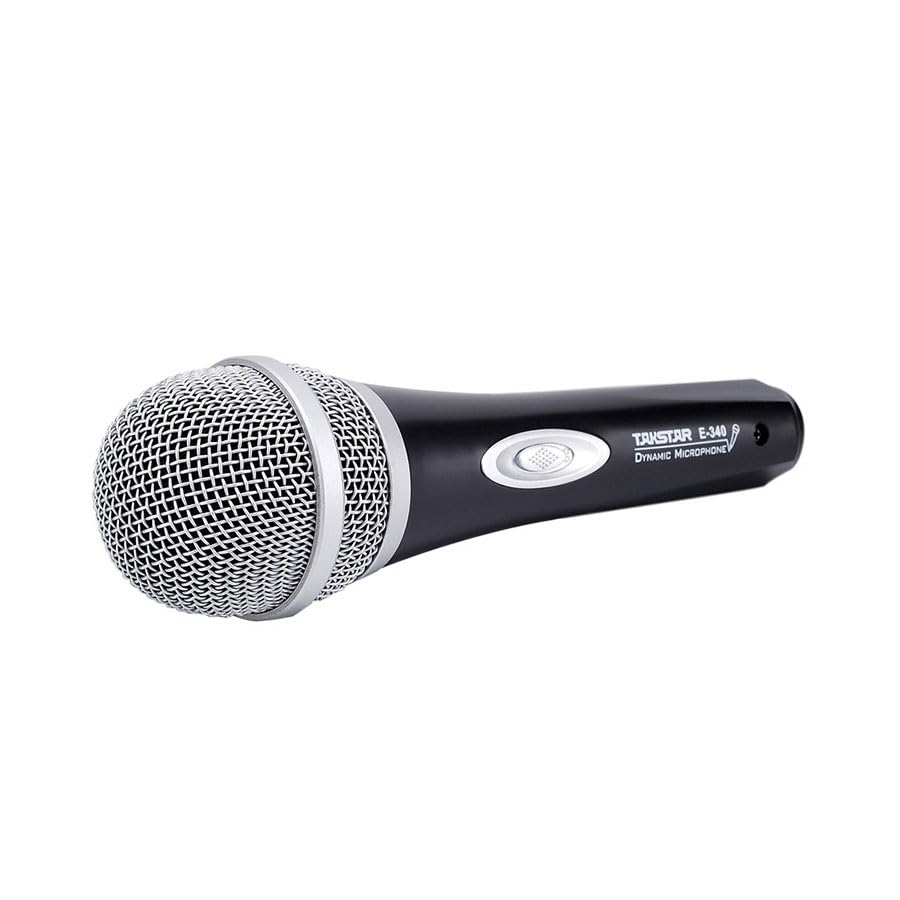
Figure 2.1: Takstar E 340 Handheld Dynamic Microphone. This image shows the full view of the microphone, highlighting its black body and silver grille.
Temel Özellikler:
- Tek Yönlü Kutupsal Desen: Önden gelen sese odaklanarak arka plan gürültüsünü azaltır.
- Dinamik Kapsül: Provides clear and powerful sound reproduction.
- Dayanıklı Yapı: Plastic housing with a paint finish for comfortable handling and durability.
- XLR Bağlantısı: Utilizes a dual-core XLR cable for clear signal transmission and noise interference shielding.
- Hafif Tasarım: Ensures ease of use and portability.

Şekil 2.2: Ayrıntılı view of the Takstar E 340 microphone highlighting its internal dynamic capsule and the robust construction. This image illustrates the quality components and design features.
Bileşen Tanımlaması:
- Mikrofon Izgarası: Protects the microphone capsule and helps shape the sound.
- Mikrofon Gövdesi: Houses the internal components and provides a comfortable grip.
- Açma/Kapama Anahtarı: Controls the microphone's power.
- XLR Output Connector: For connecting the microphone to an audio interface or karaoke machine.
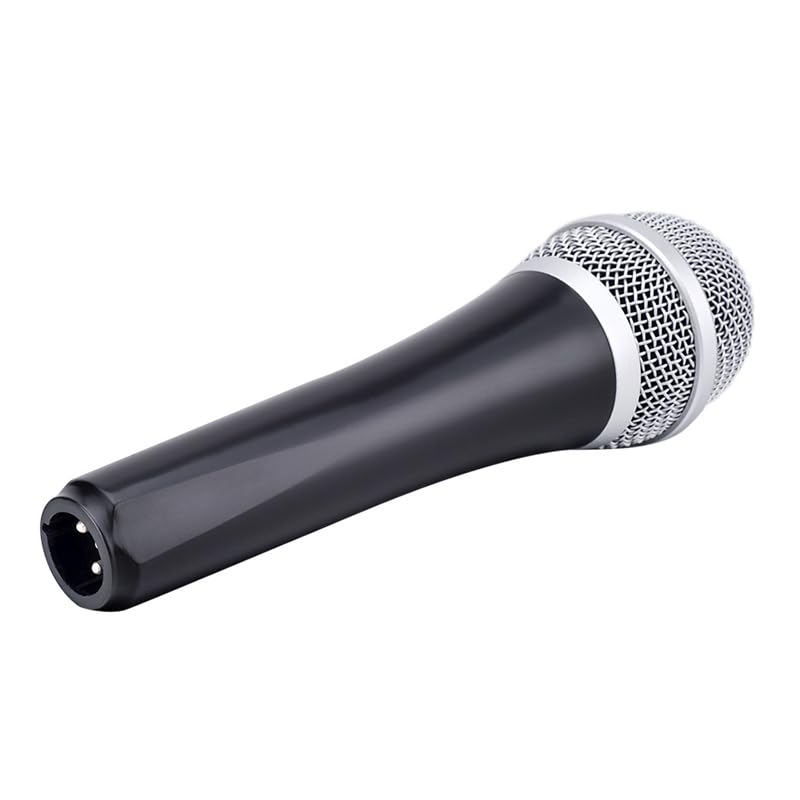
Figure 2.3: The XLR output connector located at the base of the Takstar E 340 microphone. This is where the microphone cable connects.
3. Kurulum Talimatları
- Mikrofonu Paketinden Çıkarın: Carefully remove the Takstar E 340 microphone and any included accessories from its packaging.
- Kabloyu bağlayın: Insert the XLR end of your microphone cable into the XLR output connector at the base of the microphone. Ensure it clicks securely into place.
- Ses Aygıtına Bağlan: Connect the other end of the microphone cable (e.g., 1/4-inch jack or USB Type-C, depending on your cable) to the microphone input of your karaoke machine, mixer, or audio interface.
- Güç Açık: Ensure your audio device is powered on and its volume is set to a low level before activating the microphone.
4. Kullanım Talimatları
- Turn On the Microphone: Locate the On/Off switch on the microphone body and slide it to the 'ON' position.
- Konumlandırma: Hold the microphone approximately 2-6 inches (5-15 cm) from your mouth for optimal sound pickup. Experiment with distance to find the best sound for your voice and environment.
- Ses Ayarı: Gradually increase the volume on your connected audio device until the desired sound level is achieved. Avoid setting the volume too high to prevent feedback or distortion.
- Tek Yönlü Alma: The E 340 is a unidirectional microphone, meaning it primarily picks up sound from the front. Point the top of the microphone directly towards the sound source (your mouth) for the clearest audio.
- Kapatma: When finished, slide the On/Off switch to the 'OFF' position and then turn off your audio device.
5. Bakım ve Onarım
- Temizlik: Use a soft, dry cloth to clean the microphone body. For the grille, a soft brush can be used to gently remove dust or debris. Do not use liquid cleaners or solvents.
- Depolamak: Store the microphone in a dry, cool place away from direct sunlight and extreme temperatures. If possible, use a protective case to prevent physical damage.
- İşleme: Mikrofonu düşürmekten veya sert darbelere maruz bırakmaktan kaçının, çünkü bu iç bileşenlere zarar verebilir.
- Kablo Bakımı: Always grasp the connector, not the cable, when plugging or unplugging. Avoid bending or kinking the cable excessively.
6. Sorun Giderme
| Sorun | Olası Neden | Çözüm |
|---|---|---|
| Ses çıkışı yok | Mikrofon anahtarı KAPALI konumda. Kablo düzgün bağlanmamış Ses cihazı giriş ses seviyesi çok düşük Faulty cable or audio device input | Sürgülü anahtarı 'AÇIK' konumuna getirin. Kablonun her iki ucunun da sağlam bir şekilde bağlı olduğundan emin olun. Increase input volume on audio device Test with a different cable or audio input |
| Düşük veya bozuk ses | Mikrofon ses kaynağından çok uzakta. Input volume too high (distortion) Damaged microphone capsule | Hold microphone closer to mouth Reduce input volume on audio device Contact customer support if damage is suspected |
| Geri bildirim (uğultu sesi) | Mikrofon hoparlörlere çok yakın. Ses çok yüksek Microphone pointed at speakers | Increase distance between microphone and speakers Toplam hacmi azaltın Ensure microphone is not pointed directly at speakers |
7. Teknik Özellikler
| Özellik | Şartname |
|---|---|
| Örnek | E340 |
| Kutup Deseni | Tek yönlü |
| Mikrofon Form Faktörü | Elde taşınabilir |
| Empedans | 600 Ohm |
| Sinyal-Gürültü Oranı (SNR) | 72 dB |
| Frekans Tepkisi | 16 KHz |
| Ses Hassasiyet | 54 Desibel |
| Bağlantı Teknolojisi | UHF (via cable) |
| Bağlayıcı Türü | USB Type-C (implied for cable connection, typically XLR on mic) |
| Uyumlu Cihazlar | Karaoke makinesi |
| Güç Kaynağı | Kablolu Elektrik |
| Ürün Ağırlığı | 580 gr |
| Paket Boyutları | 24.8x12.6x8 cm |
| Özel Özellik | Adjustable Headband (Note: This feature is typically associated with headsets, but listed in product specifications.) |
8. Garanti ve Destek
For warranty information and customer support, please refer to the documentation provided at the time of purchase or visit the official Takstar webSite. Satın alma belgenizi herhangi bir garanti talebi için saklayın.


