
1. Giriş
This manual provides detailed instructions for the setup, operation, and maintenance of your Vivitek D511 Portable DLP Projector. The D511 is designed to deliver sharp, detailed images with 2600 lumens of brightness and a 3000:1 contrast ratio, utilizing DLP and BrilliantColor technologies. It is also 3D-ready, supporting future media content. Please read this manual thoroughly before using the projector to ensure proper and safe operation.
2. Güvenlik Bilgileri
- Havalandırma: Ensure adequate ventilation around the projector. Do not block any ventilation openings. Overheating can cause damage to the projector and pose a fire hazard.
- Güç Kaynağı: Yalnızca belirtilen güç adaptörünü kullanın ve topraklı bir elektrik prizine bağlayın.
- Lamp Emniyet: projektör lamp operates at high temperatures and pressure. l'yi değiştirmeye çalışmayınamp Kullanımdan hemen sonra. Allow the projector to cool down for at least 20 minutes before handling the lamp. Refer to the "Maintenance" section for lamp değiştirme talimatları.
- Göz Koruması: l olduğunda projektör merceğine doğrudan bakmaktan kaçının.amp Göz hasarına neden olabilecek yoğun ışık nedeniyle, ışık açık bırakılmalıdır.
- Atama: Projeksiyon cihazını sabit ve düz bir yüzeye yerleştirin. Doğrudan güneş ışığına, ısı kaynaklarının yakınına veya yüksek nemli ya da tozlu ortamlara koymaktan kaçının.
- Temizlik: Temizlemeden önce güç kablosunu çıkarın. Yumuşak, kuru bir bez kullanın. Sıvı veya aerosol temizleyiciler kullanmayın.
3. Ürün Bittiview
3.1 Ön View
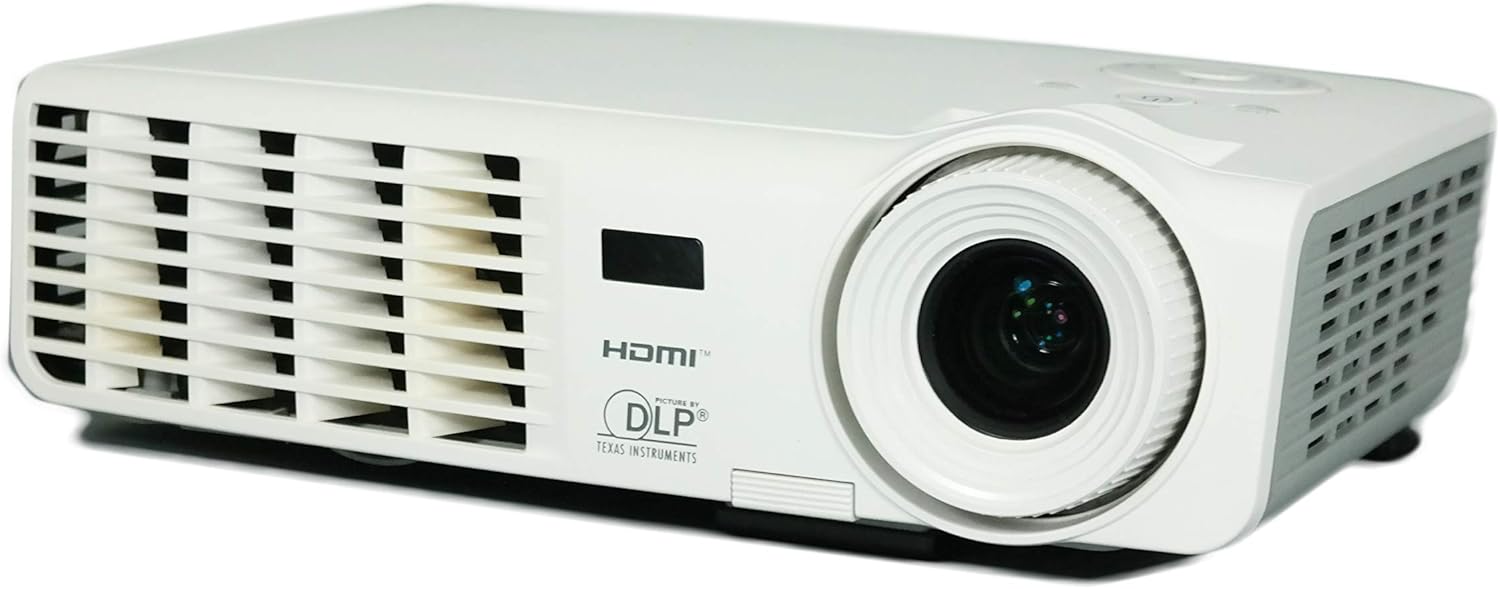
Resim 3.1: Ön view of the Vivitek D511 projector, showing the projection lens and front ventilation grille.
The front of the projector features the main projection lens, which is used to focus the image onto your screen or surface. The front also includes ventilation openings to ensure proper airflow and cooling during operation.
3.2 Arka Panel (Bağlantı)

Resim 3.2: Rear panel of the Vivitek D511 projector, displaying various input and output ports.
The rear panel provides a range of connectivity options for various devices:
- HDMI: High-Definition Multimedia Interface for digital audio and video input.
- VGA (Input 1 & 2): D-sub 15-pin connectors for analog video input from computers.
- Kompozit video: RCA yellow jack for standard definition video input.
- S-Video: Mini-DIN 4-pin connector for enhanced standard definition video input.
- Audio In (L-Audio-R & Mini-Jack): RCA red/white jacks and a 3.5mm mini-jack for audio input.
- RS-232: Serial port for projector control via a computer or control system.
- Güç Girişi: AC güç konektörü.
3.3 Top Panel (Control Buttons)

Resim 3.3: Top panel of the Vivitek D511 projector, showing the control buttons and indicator lights.
The top panel houses the primary control buttons for operating the projector without the remote control. These include the Power button, Source selection, Menu access, Auto adjustment, and navigation buttons. Indicator lights for LAMP and TEMP provide status information.
3.4 Taraf Views (Ventilation)

Resim 3.4a: Sol taraf view havalandırmalı.

Resim 3.4b: Sağ taraf view havalandırmalı.
Both sides of the projector feature ventilation grilles crucial for dissipating heat generated during operation. Ensure these areas are unobstructed to maintain optimal performance and prevent overheating.
3.5 Alt View (Label and Lamp Erişim)

Resim 3.5: Alt view of the Vivitek D511 projector, showing the product label and lamp erişim paneli.
The bottom of the projector contains the product information label, including the model number (D511), serial number, and regulatory compliance marks. It also features an access panel for lamp yenisiyle değiştirme. Always refer to the safety warnings regarding lamp replacement on this label.
4. Kurulum
4.1 Projeksiyon Cihazının Yerleştirilmesi
Place the projector on a stable, flat surface. The D511 is designed for tabletop mounting. Ensure the projector is positioned at an appropriate distance from the screen to achieve the desired image size. Avoid placing it where ventilation grilles could be blocked.
4.2 Cihazları Bağlama
Connect your source devices (e.g., laptop, gaming console, DVD player) to the appropriate input ports on the projector's rear panel (refer to Image 3.2).
- HDMI: For high-quality digital video and audio, connect an HDMI cable from your source device to the projector's HDMI port.
- VGA: For analog video from a computer, connect a VGA cable to one of the VGA ports. If connecting a computer, you may also need to connect an audio cable to the Audio In mini-jack.
- Composite/S-Video: For older video sources, connect the appropriate cable to the Composite Video or S-Video port. Connect audio cables to the L-Audio-R RCA jacks.
4.3 Açma/Kapatma
- Güç Açık: Connect the power cord to the projector and a power outlet. Press the Güç button on the top panel or the remote control. The projector will initiate its startup sequence.
- Kapat: Basın Güç button again. A confirmation message may appear. Press the Power button a second time to confirm shutdown. The projector will enter a cooling cycle before completely shutting down. Do not unplug the projector during the cooling cycle.
5. Projektörün Çalıştırılması
5.1 Temel Kontroller
The projector can be controlled using the buttons on the top panel (refer to Image 3.3) or the included remote control.
- KAYNAK: Press to cycle through available input sources (HDMI, VGA, Composite, S-Video).
- MENÜ: Press to open the On-Screen Display (OSD) menu for advanced settings. Use the arrow buttons to navigate and GİRMEK (often the central button) to select.
- OTO: Automatically adjusts the image for optimal display, particularly useful for VGA sources.
- Ok Tuşları (Yukarı/Aşağı/Sol/Sağ): Menülerde gezinin ve ayarları düzenleyin.
5.2 Görüntüyü Ayarlama
- Odak: Görüntü net ve berrak görünene kadar projektör merceğindeki odak halkasını çevirin.
- Keystone Düzeltmesi: If the image appears trapezoidal (wider at the top or bottom), use the keystone correction function (usually found in the OSD menu) to adjust it. The D511 supports vertical keystone correction up to 30 inches.
- Yakınlaştır: If available, use the zoom ring on the lens to adjust the image size without moving the projector.
5.3 3B İşlevselliği
The Vivitek D511 is 3D-ready. To experience 3D content, you will need compatible 3D source material, a 3D-capable player, and active shutter 3D glasses (sold separately). Refer to your 3D source device's manual for specific setup instructions. The projector will automatically detect and display 3D signals when properly configured.
6. Bakım
6.1 Lamp Yenisiyle değiştirme
projektör lamp has an operating life of approximately 4000 hours. When the lamp ömrünün sonuna ulaşan LAMP indicator light may illuminate, or the image brightness may significantly decrease. Refer to the caution label on the bottom of the projector (Image 3.5) before attempting replacement.
- Sakin ol: Ensure the projector has been powered off and allowed to cool for at least 20 minutes before proceeding. The lamp operates at high temperatures.
- Gücü Kesin: Güç kablosunu projektörden çıkarın.
- Erişim paneli: l'yi bulunamp access panel on the bottom of the projector. Unscrew the retaining screw(s) and carefully remove the cover.
- Eski L'yi Kaldıramp: Unscrew the screws holding the lamp module in place. Carefully pull the lamp module out by its handle.
- Yeni L'yi yükleyinamp: Yeni l'yi ekleamp module, ensuring it is seated correctly. Secure it with the screws.
- Paneli Kapat: l'yi değiştirinamp access cover and secure it with its screw(s).
- L'yi sıfırlaamp Zamanlayıcı: l'yi değiştirdikten sonraamp, you must reset the lamp timer in the projector's OSD menu to accurately track the new lamp's life.
6.2 Temizlik
- Projektör Casing: Use a soft, lint-free cloth to wipe the exterior of the projector. For stubborn marks, slightly dampBezi suyla yıkayın. Sert kimyasallardan kaçının.
- Projeksiyon Lensi: Gently clean the lens with a lens cleaning cloth or a soft, dry, lint-free cloth specifically designed for optical surfaces. Do not use abrasive materials or excessive force.
- Havalandırma Izgaraları: Periodically check the ventilation grilles for dust accumulation. Use a soft brush or compressed air to clear any blockages.
7. Sorun Giderme
| Sorun | Olası Neden | Çözüm |
|---|---|---|
| Ekranda görüntü yok |
|
|
| Görüntü bulanık |
|
|
| Görüntü yamuk şeklindedir. |
|
|
| Projector overheats / TEMP indicator on |
|
|
| Ses yok |
|
|
8. Özellikler
| Özellik | Detay |
|---|---|
| Marka | Vivitek |
| Model Numarası | D511 |
| Görüntü Türü | DLP |
| Yerel Çözünürlük | 1024x768 (XGA) |
| Maksimum Ekran Çözünürlüğü | 1600x1200 |
| Parlaklık | 2600 Lümen |
| Kontrast Oranı | 3000:1 |
| Özel Özellik | 3D-Hazır |
| Bağlantı Teknolojisi | HDMI, VGA, Composite Video, S-Video, RS-232 |
| Lamp Netage | 180 Watt |
| Işık Kaynağı Çalışma Ömrü | 4000 Saat |
| Form Faktörü | Taşınabilir |
| Montaj Tipi | Masa Üstü Montaj |
| Ürün Ağırlığı | 4.2 Pound |
| Renk | Beyaz |
| Kontrol Yöntemi | Uzaktan Kumanda, Cihaz Üzerindeki Düğmeler |
| Picture Quality Enhancement | BrilliantColor |
9. Garanti ve Destek
For warranty information, technical support, or service inquiries, please contact Vivitek customer support. Details regarding your product's specific warranty period and terms can typically be found on the Vivitek official website or included in your product packaging. Please have your model number (D511) and serial number ready when contacting support.