
1. Giriş
This manual provides essential information for the proper installation, operation, and maintenance of your Western Digital WD1600HLFS hard drive. The WD1600HLFS is a high-performance 3.5-inch internal hard disk drive designed for demanding applications, featuring a 160GB storage capacity, SATA 3Gb/s interface, and a 10,000 RPM spindle speed for rapid data access.
2. Güvenlik Bilgileri
Please read and understand all safety precautions before installing or operating this device. Failure to do so may result in personal injury or damage to the product or other components.
- Elektrostatik Deşarj (ESD) Önlemleri: Always handle the hard drive by its edges and avoid touching the circuit board or connector pins. Use an anti-static wrist strap or ground yourself by touching a metal object before handling the drive to prevent ESD damage.
- Güç Bağlantısının Kesilmesi: Ensure your computer system is completely powered off and unplugged from the electrical outlet before installing or removing the hard drive.
- Fiziksel İşleme: Hard drives are delicate. Avoid dropping, striking, or exposing the drive to excessive vibration or shock.
- Havalandırma: Ensure adequate airflow around the hard drive within your computer case to prevent overheating.
- Veri Yedekleme: Seller is not responsible for data loss. Always back up your data before servicing or making changes to your hard disk.
3. Paket İçeriği
Paketinizin aşağıdaki öğeleri içerdiğini doğrulayın:
- Western Digital WD1600HLFS 160GB Hard Drive
- Note: Additional accessories such as mounting screws, SATA data cables, or power adapters are typically supplied with your computer system or sold separately. The inclusion of a mounting tray may vary.
4. Kurulum ve Kurulum
4.1 Sistem Gereksinimleri
- Available 3.5-inch drive bay in your computer case.
- Available SATA port on your motherboard.
- Available SATA power connector from your power supply.
- Compatible operating system (e.g., Windows, macOS, Linux).
4.2 Fiziksel Kurulum
- Sisteminizi Hazırlayın: Power off your computer and unplug the power cord. Open the computer case according to your system's instructions.
- Sürücüyü Monte Edin: Slide the WD1600HLFS hard drive into an available 3.5-inch drive bay. Secure it with screws on both sides of the drive bay. If your system uses a tool-less mounting mechanism, follow its specific instructions.
- Veri Kablosunu Bağlayın: Connect one end of a SATA data cable to the SATA data port on the hard drive and the other end to an available SATA port on your motherboard.
- Güç Kablosunu Bağlayın: Connect a SATA power connector from your power supply to the SATA power port on the hard drive.

Şekil 1: Ön view of the WD1600HLFS with its mounting tray, highlighting the SATA data and power interfaces.

Şekil 2: Alt view of the WD1600HLFS, illustrating the printed circuit board (PCB) and screw points for secure installation.
4.3 İlk Sistem Kurulumu
- BIOS/UEFI Yapılandırması: After reassembling your computer and powering it on, enter your system's BIOS or UEFI settings. Ensure the new hard drive is detected and configured correctly (e.g., SATA mode set to AHCI for optimal performance).
- İşletim Sistemi Kurulumu:
- Yeni Kurulum: If installing an operating system on this drive, follow your OS installation media's instructions for partitioning and formatting the drive.
- Adding as Secondary Drive: If adding as a secondary drive, boot into your existing operating system. Use Disk Management (Windows) or Disk Utility (macOS/Linux) to initialize, partition, and format the new drive before use.
5. Operasyon
The Western Digital WD1600HLFS functions as a standard internal hard disk drive. Once properly installed and formatted, it can be used for:
- Operating System Storage: Install your operating system for fast boot times and application loading due to its 10,000 RPM speed.
- Veri Depolama: Mağaza filee-postalar, uygulamalar ve medya.
- Oyun: Benefit from quicker game loading times compared to slower drives.
- Workstation Applications: Ideal for applications requiring high I/O performance.
Access the drive through your operating system's file explorer or command line interface, just like any other storage device.
6. Bakım
To ensure the longevity and optimal performance of your WD1600HLFS hard drive, consider the following maintenance practices:
- Regular Data Backups: Periodically back up critical data to another storage device. Hard drives can fail, and backups are your only protection against data loss.
- Sürücü Sağlığını İzleyin: Utilize SMART (Self-Monitoring, Analysis and Reporting Technology) tools available in many operating systems or third-party utilities to monitor the drive's health status.
- Uygun Soğutmayı Sağlayın: Ensure your computer case has adequate ventilation to prevent the drive from overheating, which can reduce its lifespan.
- Disk birleştirme (HDD'ler için): While modern operating systems often handle this automatically, occasional defragmentation can help maintain performance on traditional hard drives.
- Fiziksel şoklardan kaçının: Protect your computer from drops or impacts while the drive is operating.
7. Sorun Giderme
If you encounter issues with your WD1600HLFS hard drive, refer to the following common problems and solutions:
- Sürücü Algılanmadı:
- Tüm SATA veri ve güç kablosu bağlantılarını kontrol edin.
- Verify the drive is enabled in your system's BIOS/UEFI settings.
- Sürücüyü farklı bir SATA portuna bağlamayı veya farklı kablolar kullanmayı deneyin.
- Ensure your power supply is providing sufficient power.
- Yavaş Performans:
- Check for excessive background processes or malware.
- Ensure the drive is not nearly full.
- Verify SATA drivers are up to date.
- Run a disk defragmenter (if applicable).
- Monitor drive temperature; overheating can cause throttling.
- Alışılmadık Sesler (Tıklama, Gıcırdama):
- Immediately back up any accessible data.
- Unusual noises often indicate a mechanical failure. Discontinue use to prevent further damage.
- Contact Western Digital support if the drive is under warranty.
- Veri Bozulması:
- Run disk error checking utilities (e.g., CHKDSK on Windows).
- Ensure proper system shutdown to prevent data loss.
If these steps do not resolve your issue, consult the Western Digital support webyerinde veya yetkili bir teknisyene.
8. Özellikler
Below are the technical specifications for the Western Digital WD1600HLFS hard drive:

Figure 3: Product label of the WD1600HLFS, detailing model, serial, and part numbers.
- Seri Numarası (S/N): WXE0C79C3272
- Parça Numarası (P/N): 490581-001
- Controller (CT): 2AHER013HY10B9
- Model (MDL): WD1600HLFS-60G6U1
- Spare Part Number (S/C): 8509C309GRH
| Özellik | Tanım |
|---|---|
| Model Numarası | WD1600HLFS |
| Depolama Kapasitesi | 160 GB |
| Arayüz | SATA 3Gb/s (SATA/300) |
| Mil Hızı | 10,000 RPM |
| Arabellek Boyutu | 16 MB |
| Form Faktörü | 3.5 inç |
| Average Read Speed | 80.5 MB/s |
| Random Access (Read/Write) | 8.1 ms |
| Güç Özellikleri | 5VDC, 0.90A; 12VDC, 0.30A |
| Ürün Ağırlığı | 1.25 pound (0.57 kg) |
| Ürün Boyutları (UxGxY) | 0.09 x 0.07 x 0.04 inç (yaklaşık) |
| Düzenleyici Onaylar | BSMI, cULus, C-Tick, MIC, CE, WEEE |
| İlk Mevcut Tarih | 4 Nisan 2010 |
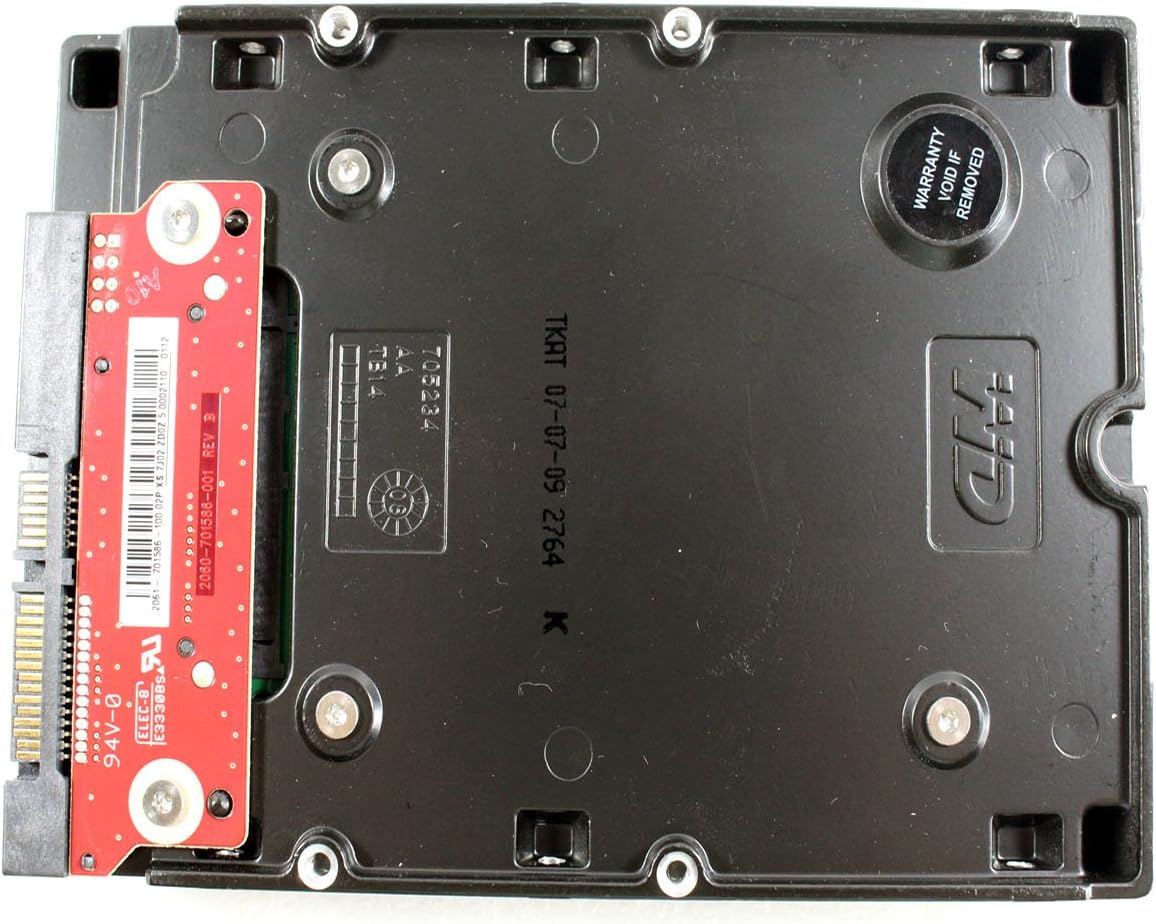
Şekil 4: Alt view of the WD1600HLFS without the tray, showing the PCB and a warranty sticker.

Şekil 5: Ayrıntılı view of the WD1600HLFS PCB, including component markings.
9. Garanti ve Destek
Yasal Uyarı: Seller is not responsible for data loss. Always back up your data before servicing your hard disk.
The WD1600HLFS hard drive is manufactured by Western Digital. For specific warranty terms, conditions, and duration, please refer to the documentation provided with your purchase or visit the official Western Digital website. Note that tampering with the drive, such as removing certain labels or components, may void the warranty, as indicated by the 'Warranty Void If Removed' sticker on the drive.
For technical assistance, driver downloads, or further support, please visit the official Western Digital support portal:
- Western Digital Desteği: https://support.wdc.com