
KILOTECH KWS 1000
Kilotech Platform Scale - KWS 1000 User Manual
Model: KWS 1000 | Capacity: 300 Lb / 150 kg
1. Ürün Bittiview
The Kilotech KWS 1000 Platform Scale is designed for accurate and reliable weighing of various items up to 300 pounds or 150 kilograms. It features a robust stainless steel platform and a clear, backlit digital display for easy readability. This scale is suitable for industrial, commercial, and general weighing applications requiring precision and durability.
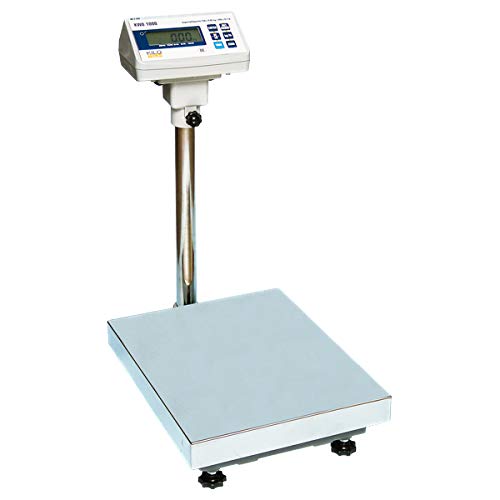
Image 1.1: The Kilotech KWS 1000 Platform Scale, showing the large weighing platform, the sturdy vertical support pole, and the digital display unit with a backlit screen and control buttons.
2. Kurulum Talimatları
- Paketin açılması: Carefully remove all components from the packaging. Verify that all parts are present: weighing platform, display unit, support pole, and power adapter.
- Toplantı:
- Attach the support pole to the weighing platform using the provided fasteners. Ensure it is securely tightened.
- Mount the display unit onto the top of the support pole. Secure it in place with the locking mechanism or screws.
- Connect the cable from the weighing platform to the designated port on the display unit.
- Atama: Place the scale on a firm, level, and stable surface to ensure accurate readings. Avoid locations with excessive vibrations, drafts, or extreme temperature fluctuations.
- Seviyelendirme: Adjust the four adjustable feet located on the underside of the platform until the scale is perfectly level. Use a spirit level if available.
- Güç Bağlantısı: Plug the power adapter into the DC input port on the display unit, then connect it to a suitable electrical outlet.
- İlk Güç Açma: Basın AÇIK/KAPALI button. The display should light up and perform a self-test before showing "0.00".
3. Kullanım Talimatları
3.1 Temel Tartım
- Ensure the scale is powered on and displays "0.00". If not, press the SIFIR düğme.
- Tartılacak nesneyi tartım platformunun ortasına nazikçe yerleştirin.
- Wait for the reading to stabilize. The weight will be displayed on the screen.
- Remove the item from the platform. The display should return to "0.00" or a negative value if the item was removed before stabilization.
3.2 Birim Dönüşümü
To switch between weighing units (e.g., pounds (lb) and kilograms (kg)):
- With the scale displaying "0.00", press the BİRİM düğme.
- The display will cycle through available units (e.g., lb, kg). Stop when the desired unit is shown.
3.3 Dara İşlevi
Dara alma fonksiyonu, kabın ağırlığını çıkararak kaptaki eşyaların ağırlığını hesaplamanıza olanak tanır.
- Place the empty container on the weighing platform. The display will show its weight.
- Basın DARA button. The display will reset to "0.00", effectively subtracting the container's weight.
- Place the items to be weighed into the container. The display will show only the net weight of the items.
- To clear the tare, remove both the container and the items, then press the DARA button again, or power cycle the scale.
4. Bakım
- Temizlik: Wipe the scale's platform and display unit with a soft, damp Bez kullanın. Aşındırıcı temizleyiciler, çözücüler kullanmayın ve cihazı suya batırmayın.
- Depolamak: Uzun süre kullanılmadığı zamanlarda, teraziyi kuru ve tozsuz bir ortamda saklayın.
- Kalibrasyon: Regular calibration is recommended to maintain accuracy, especially after relocation or significant temperature changes. Refer to the advanced user manual or contact Kilotech support for calibration procedures.
- Pil (varsa): If your model uses internal rechargeable batteries, ensure it is charged regularly to prolong battery life. Avoid complete discharge.
5. Sorun Giderme
| Sorun | Olası Neden | Çözüm |
|---|---|---|
| Terazi açılmıyor. | No power, faulty power adapter, or discharged battery. | Check power connection. Ensure adapter is working. Charge battery if applicable. |
| Hatalı okumalar. | Terazi düzgün hizalanmamış, yüzey dengesiz veya kalibrasyona ihtiyaç duyuyor. | Adjust leveling feet. Place on a stable surface. Perform calibration. |
| Ekranda "AŞIRI YÜKLEME" veya "HATA" yazısı görünüyor. | Ağırlık maksimum kapasiteyi aşıyor. | Remove excess weight. Do not exceed 300 lb / 150 kg. |
| Ekran sıfıra dönmüyor. | Residual weight on platform or tare function active. | Ensure platform is clear. Press the SIFIR or DARA düğme. |
6. Özellikler
| Özellik | Detay |
|---|---|
| Örnek | KWS 1000 |
| Marka | KİLOTECH |
| Maksimum Kapasite | 300 Pounds (lb) / 150 Kilograms (kg) |
| Okuma Doğruluğu | 100 gr |
| Görüntülemek | Backlit Digital Display |
| Form Faktörü | Mini Platform Scale |
| Üretici Referansı | 851685 |
| ASIN | B003DWP28M |
7. Garanti ve Destek
For warranty information, technical support, or service inquiries, please contact Kilotech customer service. Keep your purchase receipt and product serial number handy for faster assistance.
- Üretici: Kilotech
- İade politikasi: 30-day refund/replacement (as per Amazon.ca policy at time of purchase)
- Temas etmek: Refer to the official Kilotech website or your product documentation for current contact details.
Ask a question about this manual
Ask about setup, troubleshooting, compatibility, parts, safety, or missing instructions. Manuals+ will review the question and use this page’s manual context to help answer it.