
1. Giriş
This manual provides comprehensive instructions for the setup, operation, and maintenance of your URC SR3 Big Button Universal Remote Control. The URC SR3 is designed for ease of use, featuring large buttons and simplified programming to control up to three devices.
2. Ürün Bittiview ve Özellikler
The URC SR3 remote control offers several features designed to enhance your entertainment system experience:
- Large Numeric Keypad: Features large, easy-to-read numeric buttons with tactile feedback for effortless channel selection.
- Ergonomik Tasarım: Lightweight and sculpted for comfortable one-hand operation, with ergonomic finger relief for two-handed use.
- Çoklu Cihaz Kontrolü: Capable of controlling up to three devices, including televisions, cable/satellite boxes, and DVD players.
- "My Button" Feature: Allows users to program a single button to turn on the TV and tune to a favorite channel or activity.
- Four Favorite Channel Buttons: Dedicated buttons for quick access to your most-watched channels without needing to remember channel numbers.
- "ALL OFF" Button: A single button to power down your entire entertainment system.
- SimpleSound: Provides total volume control across all connected components, including those without built-in volume control.
- Simple Programming: Supports both preprogrammed codes and a learning function to adapt to existing remotes.
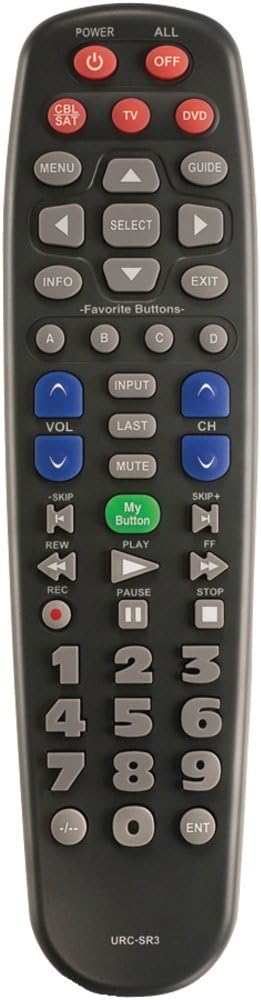
Resim 1: Ön view of the URC SR3 remote control, highlighting the large buttons and layout.

Resim 2: Arka view of the URC SR3 remote control, showing the ergonomic shape and battery compartment.
3. Kurulum Talimatları
The URC SR3 remote can be set up using preprogrammed codes or by learning commands from your existing remotes.
3.1. Pil Kurulumu
- Uzaktan kumandanın arkasındaki pil bölmesini bulun.
- Pil kapağını açmak için aşağı doğru kaydırın.
- İki adet AA alkalin pili, doğru kutuplara (+/-) dikkat ederek takın.
- Pil kapağını yerine takın.
3.2. Programming Devices
The remote supports controlling up to three devices: TV, Cable/Satellite (CBL/SAT), and DVD. Refer to the included quick setup guide for specific preprogrammed codes for common brands. If a code is not available or does not work, use the learning function.
3.2.1. Using Preprogrammed Codes (Quick Setup)
- Programlamak istediğiniz cihazı (örneğin, televizyonu) açın.
- Press and hold the desired device button (TV, CBL/SAT, or DVD) until the indicator light illuminates.
- Enter the 3-digit code for your device's brand from the code list provided with your remote.
- Point the URC SR3 remote at the device and press the POWER button. If the device turns off, the code is correct.
- If the device does not turn off, repeat the process with the next code for your brand.
3.2.2. Learning Function (from Original Remote)
This feature allows the URC SR3 to learn commands directly from your original remote control.
- Ensure both remotes have fresh batteries.
- Place the URC SR3 and your original remote on a flat surface, facing each other, about 1-2 inches apart.
- Press and hold the device button (TV, CBL/SAT, or DVD) on the URC SR3 that you want to program, then press and hold the "MUTE" button simultaneously until the indicator light blinks twice and stays on.
- Press the button on the URC SR3 that you want to teach (e.g., "POWER"). The indicator light will blink slowly.
- Press and hold the corresponding button on your original remote (e.g., "POWER"). The URC SR3 indicator light will blink rapidly to confirm successful learning.
- Repeat for all desired buttons.
- To exit learning mode, press the "EXIT" button.
Önemli Not: The URC SR3 has a limited memory capacity for learned commands. If you attempt to program too many buttons, it may stop learning new commands. Prioritize essential functions.
3.3. Programming "My Button"
The "My Button" allows you to activate a sequence of commands with a single press.
- Ensure your TV and cable/satellite box are already programmed into the remote.
- Press and hold the "My Button" until the indicator light blinks twice and stays on.
- Press the "TV" device button, then the "POWER" button.
- Press the "CBL/SAT" device button.
- Enter the channel number for your favorite channel using the numeric keypad.
- Press the "My Button" again to save the sequence. The indicator light will blink rapidly to confirm.
3.4. Programming Favorite Channel Buttons (A, B, C, D)
These buttons provide direct access to four of your preferred channels.
- Press the "CBL/SAT" device button.
- Press and hold the desired Favorite Channel button (A, B, C, or D) until the indicator light blinks twice and stays on.
- Enter the channel number using the numeric keypad.
- Press the same Favorite Channel button again to save. The indicator light will blink rapidly.
4. Kullanım Talimatları
Once programmed, operating the URC SR3 is straightforward.
- Cihaz Seçimi: Press the TV, CBL/SAT, or DVD button to select the device you wish to control. The indicator light will illuminate for the selected device.
- Güç Açma/Kapatma: Use the "POWER" button for the selected device or the "ALL OFF" button to power down all programmed devices simultaneously.
- Kanal Gezinmesi: Use the numeric keypad to enter channel numbers directly, or use the CH+ / CH- buttons to scroll through channels.
- Ses Kontrolü: Use the VOL+ / VOL- buttons to adjust the volume. The SimpleSound feature ensures consistent volume control across devices.
- Sesini kapatmak: Press the "MUTE" button to silence the audio.
- "My Button" Use: Press the "My Button" to execute your preprogrammed activity (e.g., turn on TV and go to a specific channel).
- Favori Kanallar: Press A, B, C, or D to instantly switch to your saved favorite channels.
- Menu and Guide: Use the "MENU" and "GUIDE" buttons to access on-screen menus and program guides for your cable/satellite box.
- Oynatma Kontrolleri: Use the PLAY, PAUSE, STOP, REW, FWD, SKIP+, and SKIP- buttons for DVD player control.
5. Bakım
To ensure optimal performance and longevity of your URC SR3 remote control:
- Pil Değişimi: Replace batteries when the remote's indicator light becomes dim or unresponsive. Always use two fresh AA alkaline batteries.
- Temizlik: Kumandayı yumuşak, kuru bir bezle silin. Sıvı temizleyiciler veya aşındırıcı malzemeler kullanmaktan kaçının.
- Depolamak: Kumandayı kuru bir yerde, aşırı sıcaklıklardan ve doğrudan güneş ışığından uzakta saklayın.
- Otomatik Kapanma: The remote is designed to automatically turn itself off if buttons are continuously pressed (e.g., if it gets stuck under a cushion) to prevent battery drain.
6. Sorun Giderme
If you encounter issues with your URC SR3 remote, refer to the following common problems and solutions:
| Sorun | Olası Neden / Çözüm |
|---|---|
| Remote does not control a device. |
|
| Indicator light does not illuminate or is dim. |
|
| Remote stops learning new commands. |
|
| Difficulty seeing buttons. |
|
| Specific device brand not working. |
|
7. Özellikler
- Modeli: URC-SR3
- Boyutlar: 2.16 x 1.18 x 8.27 inç (5.49 x 3.00 x 21.01 cm)
- Ağırlık: 6.4 ounces (181.44 grams) with batteries
- Güç Kaynağı: 2 adet AA alkalin pil (dahil)
- Desteklenen Maksimum Cihaz Sayısı: 3 (TV, CBL/SAT, DVD)
- Renk: Orta Gri
- Özel Özellikler: Ergonomic design, Universal compatibility, Learning function, "My Button", Favorite Channel buttons, SimpleSound.
8. Garanti Bilgileri
Specific warranty details for the URC SR3 remote control are typically provided with the product packaging or available on the manufacturer's official webLütfen en doğru ve güncel garanti şartları ve koşulları için bu kaynaklara bakın.
9. Destek
For further assistance, technical support, or to inquire about device compatibility, please contact UNIVERSAL REMOTE customer support. Contact information can usually be found on the product packaging or the official UNIVERSAL REMOTE webalan.
Manufacturer: URC (Universal Remote Control, Inc.)