
1. Üzeriview
The Microsoft LifeCam Cinema is a high-definition webcam designed for clear and smooth video communication. It features 720p HD video chat capabilities, a high-precision glass element lens for sharp image quality, and is certified for Skype. The webcam offers 360° rotation and incorporates TrueColor Technology with face tracking for bright and colorful video output.
Temel Özellikler:
- 720p HD video chat
- High precision glass element lens for sharp image quality
- Certified for Skype
- 360° dönüş
- TrueColor Technology with face tracking for bright and colorful video
2. Kutuda Neler Var?
Paketi açtığınızda aşağıdaki bileşenlerin tamamının mevcut olduğundan emin olun:
- Microsoft LifeCam Sinema Webkam
- USB Kablosu (entegre)
- Kullanım Kılavuzu (bu belge)
- Kavisli Yapışkan Montaj
- Montaj Tokası
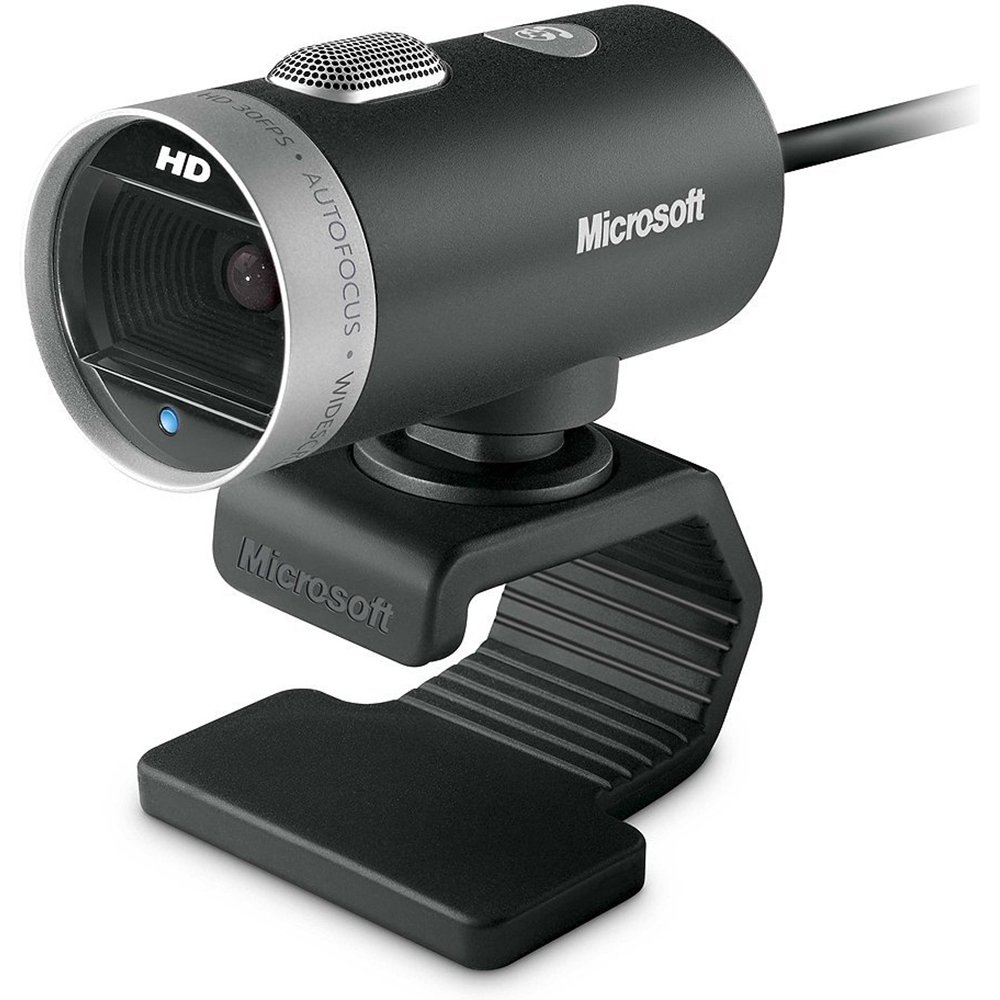
Image: The Microsoft LifeCam Cinema webcam, showing its main body, lens, microphone, and flexible stand with integrated USB cable.
3. Kurulum
- Konumlandırma Webkam: Place the LifeCam Cinema on top of your monitor or a flat surface. The flexible stand allows for stable placement.
- Bilgisayarınıza bağlanılıyor: Plug the integrated USB cable into an available USB port on your computer.
- Sürücü Kurulumu: Your operating system (Windows is supported) should automatically detect the device and install the necessary drivers. If prompted, follow the on-screen instructions. You may need to download the latest drivers from the official Microsoft support webEn iyi performans için site.
- Yazılım Kurulumu: Install any accompanying LifeCam software if desired, which may offer additional features or settings.

Image: The Microsoft LifeCam Cinema webcam securely positioned on top of a computer monitor, demonstrating its stable mounting design.
Video: An official product video demonstrating the features and usage of the Microsoft LifeCam Cinema webcam, including its 720p HD widescreen video, auto focus, high-precision glass element lens, ClearFrame Technology, and digital microphone.
4. Kullanım Talimatları
- Starting a Video Call: Open your preferred video conferencing application (e.g., Skype, Zoom, Microsoft Teams). The LifeCam Cinema should be automatically recognized as your primary camera and microphone.
- Konumun Ayarlanması: The webcam features 360° rotation, allowing you to easily adjust the camera angle without moving the base.
- Otomatik odaklama: The camera automatically adjusts focus to keep you sharp and clear during video calls.
- TrueColor Technology: This feature automatically adjusts exposure for bright and colorful video, even in varying lighting conditions.
- Digital Microphone: The built-in digital microphone provides clear audio capture. Ensure it is selected as the input device in your application settings if you experience audio issues.
5. Bakım
- Lensin Temizlenmesi: Optik cihazlar için özel olarak tasarlanmış, yumuşak ve tüy bırakmayan bir bez kullanarak fotoğraf makinesinin objektifini nazikçe silin. Aşındırıcı malzemelerden veya sert kimyasallardan kaçının.
- Vücudun Temizlenmesi: Silin webcam's body with a soft, damp cloth. Do not immerse the device in water or use excessive moisture.
- Depolamak: Kullanılmadığı zaman, saklayın webKamerayı temiz, kuru bir yerde, aşırı sıcaklıklardan ve doğrudan güneş ışığından uzakta saklayın.
- Kablo Bakımı: İç hasar oluşmasını önlemek için USB kablosunu aşırı derecede bükmekten veya döndürmekten kaçının.
6. Sorun Giderme
- Video/Kamera Algılanmadı:
- USB kablosunun hem USB hem de USB portuna güvenli bir şekilde takıldığından emin olun. webkamera ve bilgisayar.
- Fişini takmayı deneyin webfarklı bir USB bağlantı noktasına takın.
- Bilgisayarınızı yeniden başlatın.
- Bilgisayarınızın Aygıt Yöneticisi'ni (Windows) kontrol ederek şunların olup olmadığını görün: webcam is listed and if there are any driver issues. Reinstall drivers if necessary.
- Verify that your video conferencing software is configured to use the LifeCam Cinema as the video input device.
- Ses yok/Mikrofon çalışmıyor:
- Check your computer's sound settings to ensure the LifeCam Cinema microphone is selected as the default recording device.
- Verify that your video conferencing software is configured to use the LifeCam Cinema as the audio input device.
- Ensure the microphone is not muted in your system settings or within the application.
- Kötü Video Kalitesi:
- Kamera lensinin temiz olduğundan emin olun.
- İnternet bağlantı hızınızı kontrol edin; yavaş bağlantı video kalitesini etkileyebilir.
- Ensure adequate lighting in your environment. TrueColor Technology helps, but sufficient ambient light is always best.
- Sistem kaynaklarını tüketebilecek diğer uygulamaları kapatın.
7. Özellikler
| Özellik | Detay |
|---|---|
| Marka | Microsoft |
| Model Numarası | H5D-00001 |
| Video Yakalama Çözünürlüğü | 720p |
| Fotoğraf Sensörü Teknolojisi | CMOS |
| Bağlantı Teknolojisi | USB |
| Renk | Siyah |
| Özellikler | Low Light, Auto Focus, TrueColor Technology, Digital Microphone |
| Ürün Boyutları (D x G x Y) | 0.71"D x 2.19"G x 1.81"Y |
| Ürün Ağırlığı | 0.87 Pound |
| İşletim Sistemi | Pencereler |
| ViewAçı | 360 Degrees (rotation) |
| Görüntü Yakalama Hızı | 30 kare/saniye |
| Uyumlu Cihazlar | PCs with specified system requirements; Skype |
8. Garanti ve Destek
The Microsoft LifeCam Cinema (Model H5D-00001) comes with a 3 Yıl Sınırlı Garanti from the manufacturer, Microsoft.
For technical support, driver downloads, or further assistance, please visit the official Microsoft support websiteye gidin veya ürün ambalajınızda bulunan iletişim bilgilerine başvurun.
You can also find additional resources and FAQs on the Microsoft support pages for LifeCam products.