
1. Giriş
Satın aldığınız için teşekkür ederizasing the Korg GA30 Guitar and Bass Tuner. This ultra-compact, high-precision tuner is designed to provide accurate and stable tuning for both guitar and bass instruments. Please read this manual thoroughly to understand the features and proper operation of your GA30 tuner.
2. Ürün Bittiview
The Korg GA30 features an LCD needle-type meter for stable tuning, a Quinta Flat Tuning mode, support for 7-string guitar tunings, and a Sound Out function for reference tones. Its auto power-off function helps conserve battery life, providing approximately 100 hours of continuous use.
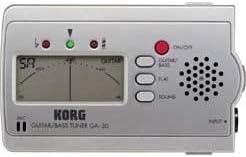
Şekil 1: Front panel of the Korg GA30 Tuner. This image displays the front panel of the Korg GA30 tuner, showing its LCD needle-type display, input jack, speaker, and control buttons for power, guitar/bass mode, flat tuning, and sound out.
Temel Özellikler:
- Ultra Kompakt Tasarım: Taşınabilir ve taşıması kolay.
- High Precision LCD Needle-Type Meter: Provides stable and accurate visual tuning.
- Quinta Flat Tuning Mode: Allows tuning 1 to 5 semitones flat.
- 7-String Guitar Support: Genişletilmiş ses aralığına sahip gitarları destekler.
- Sound Out Function: Produces a reference tone from the internal speaker.
- Otomatik Kapanma: Automatically shuts off to save battery life.
- Uzun Pil Ömrü: Approximately 100 hours of continuous operation.
3. Kurulum
3.1 Pil Kurulumu
- Ünitenin arkasında bulunan pil bölmesi kapağını açın.
- İki adet AAA pili, kutupların doğru olmasına dikkat ederek (+/-) takın.
- Pil bölmesi kapağını sıkıca kapatın.
3.2 Cihazınızı Bağlama
Connect your guitar or bass to the INPUT jack on the right side of the GA30 tuner using a standard 1/4-inch instrument cable.
3.3 Açma/Kapatma
Kırmızıya basın AÇIK/KAPALI button located on the front panel to turn the tuner on. Press and hold the AÇIK/KAPALI button for a few seconds to turn the tuner off. The tuner will automatically power off after a period of inactivity to conserve battery life.
4. Kullanım Talimatları
4.1 Selecting Instrument Mode (Guitar/Bass)
Basın GİTAR BAS'I button to toggle between Guitar mode and Bass mode. The selected mode will be indicated on the LCD display.
4.2 Standard Tuning
In either Guitar or Bass mode, play a single note on your instrument. The LCD needle will indicate the pitch. Adjust your instrument's tuning pegs until the needle is centered and the green indicator light illuminates, signifying accurate tuning.
4.3 Flat Tuning (Quinta Flat)
The GA30 allows for flat tuning from 1 to 5 semitones. Press the DÜZ button repeatedly to select the desired number of semitones flat (b, bb, bbb, bbbb, bbbbb). The selected flat setting will be displayed. Tune your instrument as you would in standard tuning, but the tuner will now register the pitch relative to the flat setting.
4.4 Sound Out Function
Basın SES button to activate the Sound Out function. The tuner will emit a reference tone from its internal speaker. Press the GİTAR BAS'I button to cycle through different reference notes. This feature is useful for tuning by ear. Press the SES button again to turn off the reference tone.
5. Bakım
5.1 Pil Değişimi
When the display becomes dim or the tuner does not power on, replace the batteries. Follow the steps in Section 3.1 for battery installation. Always use fresh AAA batteries and dispose of old batteries responsibly.
5.2 Temizlik
Wipe the unit with a soft, dry cloth. Do not use abrasive cleaners, waxes, or solvents, as these can damage the finish and internal components.
5.3 Depolama
If the unit will not be used for an extended period, remove the batteries to prevent leakage and potential damage. Store the tuner in a cool, dry place away from direct sunlight and extreme temperatures.
6. Sorun Giderme
- Güç Yok:
Check if the batteries are inserted correctly with the proper polarity. Replace with fresh batteries if necessary. - Yanlış Ayarlama:
Ensure your instrument is properly connected to the INPUT jack. Make sure you are playing a single, clear note. Check for external noise interference. - No Sound from Speaker (Sound Out):
Ensure the SOUND function is activated. Adjust the volume on your instrument if applicable (though the tuner's speaker volume is fixed). - Ekran loş:
Bu, pil gücünün düşük olduğunu gösterir. Pilleri değiştirin.
7. Özellikler
- Modeli: GA30
- Marka: Korg
- Tuning Scale: 12 notalı eşit mizaç
- Algılama Aralığı: A0 (27.50 Hz) – C8 (4186.01 Hz) (for a sine wave)
- Referans Aralığı: A4 = 430 – 450 Hz (1 Hz adımlarla)
- Düz Akort: 1 ila 5 yarım ton (Quinta Flat)
- Giriş Empedansı: 1 MΩ
- Bağlayıcılar: INPUT (1/4" mono jack)
- Güç Kaynağı: İki adet AAA pil (3V)
- Pil Ömrü: Approximately 100 hours (alkaline batteries)
- Boyutlar: (W x D x H) Approximately 102 x 60 x 16 mm (4.02 x 2.36 x 0.63 inches)
- Ağırlık: Approximately 99.79 g (3.52 oz) (including batteries)
- Üretici: Korg
- ASIN: B001VHQKSW
Ürün geliştirme amacıyla teknik özellikler önceden haber verilmeksizin değiştirilebilir.
8. Garanti ve Destek
Garanti bilgileri ve müşteri desteği için lütfen ürününüzle birlikte verilen garanti kartına bakın veya resmi Korg web sitesini ziyaret edin. website. Herhangi bir garanti talebi için satın alma belgeniz olarak satın alma makbuzunuzu saklayın.