
Technics SL-PD807
Technics SL-PD807 MASH 5 Diskli CD Çalar Kullanım Kılavuzu
Model: SL-PD807
giriiş
Satın aldığınız için teşekkür ederizasing the Technics SL-PD807 MASH 5 Disc CD Player. This manual provides detailed instructions for the proper setup, operation, and maintenance of your new audio component. Please read this manual thoroughly before using the unit to ensure optimal performance and longevity.
The SL-PD807 features a 5-disc carousel changer, allowing for extended playback without interruption, and incorporates MASH (Multi-stage Noise Shaping) D/A conversion for high-quality audio reproduction.
Önemli Güvenlik Bilgileri
- Güç Kaynağı: Ensure the unit is connected to an AC 120V, 60Hz power supply.
- Havalandırma: Havalandırma açıklıklarını kapatmayın. Aşırı ısınmayı önlemek için ünitenin etrafında yeterli hava akışı sağlayacak boşluk bırakın.
- Nem: Üniteyi yağmura veya neme maruz bırakmayın. Vazo gibi sıvı dolu nesneleri ünitenin üzerine koymayın.
- Temizlik: Temizlemeden önce cihazı prizden çıkarın. Temizlik için kuru bir bez kullanın.
- Servis: Bu ünitenin bakımını kendiniz yapmaya çalışmayın. Tüm bakım işlemlerini yetkili servis personeline yaptırın.
Paket İçeriği
Lütfen paketin içindeki tüm ürünlerin eksiksiz olduğundan emin olun:
- Technics SL-PD807 MASH 5 Disc CD Player
- Güç Kablosu
- RCA Ses Kabloları
Note: A remote control is not included with this unit.
Kurmak
1. Paketten çıkarma
Carefully remove the CD player and all accessories from the packaging. Retain the packaging materials for future transport or storage.
2. Yerleşim
Place the CD player on a stable, level surface away from direct sunlight, heat sources, and excessive dust or vibrations. Ensure there is sufficient space around the unit for proper ventilation.

Şekil 1: Ön view of the Technics SL-PD807 CD Player with included RCA cables.
3. Bağlantılar
Connect the CD player to your amplifier or receiver using the supplied RCA audio cables.
- Connect one end of the RCA audio cables (red and white plugs) to the 'LINE OUT' jacks on the rear of the SL-PD807.
- Connect the other end of the RCA audio cables to an available 'CD IN' or 'AUX IN' input on your amplifier/receiver. Match the red plug to the 'R' (right) input and the white plug to the 'L' (left) input.
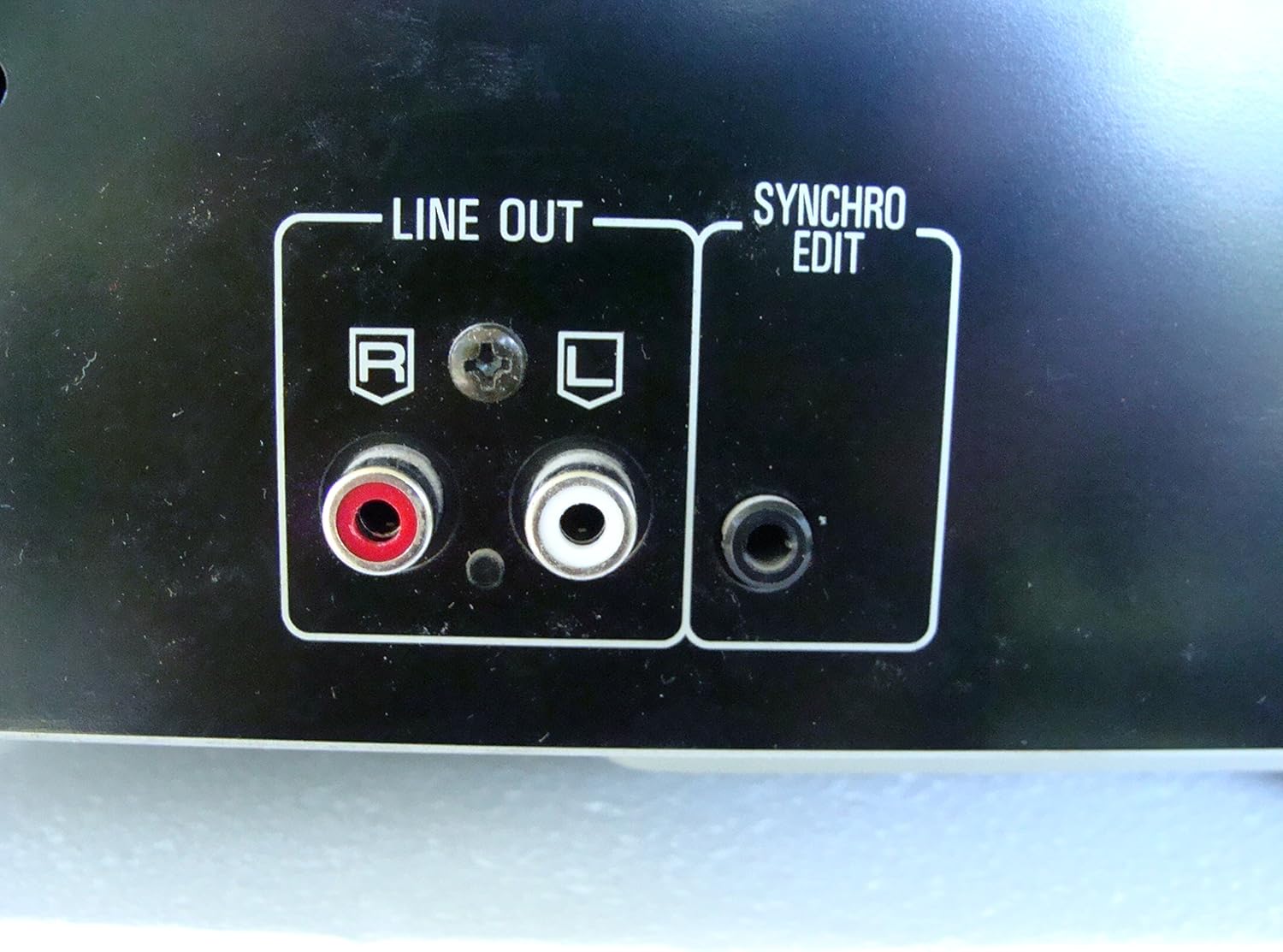
Şekil 2: Rear panel connections, highlighting the 'LINE OUT' (RCA) and 'SYNCHRO EDIT' ports.
- Plug the power cord into the AC inlet on the rear of the CD player, then plug the other end into a standard AC wall outlet.
Kullanım Talimatları
1. Güç Açma/Kapatma
Basın GÜÇ button located on the front left of the unit to turn the CD player on or off.
2. Yükleme Diskleri
The SL-PD807 features a 5-disc carousel. Press the AÇIK/KAPALI button to open the disc tray. Place up to five CDs onto the numbered disc slots with the label side facing up. Press AÇIK/KAPALI Tepsiyi kapatmak için tekrar tuşuna basın.

Şekil 3: Front panel controls including disc tray, display, and playback buttons.
3. Temel Oynatma
- Oynamak: Basın OYNAMAK button (►) to start playback.
- Duraklama: Basın DURAKLAT button (⏸) to temporarily stop playback. Press again to resume.
- Durdur: Basın DURMAK Oynatmayı durdurmak için düğmeye (■) basın.
- Parçaları Atla: Basın ATLAMAK buttons (⏭︎ / ⏮︎) to skip to the next or previous track.
- Aramak: tuşunu basılı tutun ARAMAK buttons (⏪︎ / ⏩︎) to fast forward or rewind within a track.
4. Disc Exchange
You can exchange discs while another disc is playing. Press the DİSK ATLAMA button to rotate the carousel to an empty slot or a disc you wish to remove/replace. The currently playing disc will continue to play until you select a new disc to play.
5. Oynatma Modları
- Rastgele oyun: Basın RASTGELE button to play tracks on the current disc or all loaded discs in a random order.
- Program Oynatma: Kullanın PROGRAM button to create a custom playback sequence of tracks from the loaded discs. Refer to the on-screen display for programming steps.
- Tekrar Oynat: Basın TEKRARLAMAK Geçerli parçayı, geçerli diski veya tüm diskleri tekrarlamak için kullanılan düğme.
Bakım
1. Ünitenin Temizlenmesi
Wipe the exterior of the unit with a soft, dry cloth. For stubborn stains, slightly dampen the cloth with water and a mild detergent, then wipe dry. Do not use abrasive cleaners, benzene, thinner, or alcohol, as these can damage the finish.

Şekil 4: Top surface of the unit, illustrating areas that may require cleaning or show wear.
2. Disk Bakımı
- Oyun yüzeyinde parmak izi kalmaması için diskleri kenarlarından tutun.
- Keep discs clean. Wipe from the center outwards with a soft, lint-free cloth if necessary.
- Diskleri toz ve çiziklerden korumak için kutularında saklayın.
Sorun giderme
If you experience problems with your CD player, please consult the following table before seeking service.
| Sorun | Olası Neden | Çözüm |
|---|---|---|
| Güç yok | Güç kablosu güvenli bir şekilde bağlanmamış. | Üniteye ve duvar prizine giden güç kablosunun bağlantısını kontrol edin. |
| Ses yok | RCA audio cables not connected correctly. AmpAmplifikatör/alıcı girişi seçilmedi. | Ensure RCA cables are securely connected to both the CD player and ampAmperörünüzdeki doğru girişi seçin. ampkaldırıcı/alıcı. |
| Disc does not play / Skipping | Disc is dirty or scratched. Disc is inserted incorrectly. | Clean the disc with a soft, lint-free cloth. Ensure the disc is placed label-side up in the tray. Try another disc. |
| Carousel does not rotate | Obstruction in the disc tray. | Ensure no foreign objects are obstructing the carousel mechanism. |
Özellikler
The following are the technical specifications for the Technics SL-PD807 MASH 5 Disc CD Player:
| Özellik | Şartname |
|---|---|
| Model Adı | SL-PD807 |
| Üretici | Teknikler |
| Disk Kapasitesi | 5 Diskler |
| Güç Gereksinimleri | AC 120V, 60Hz, 13W |
| Paket Boyutları | 17 x 17 x 5 inç |
| Ürün Ağırlığı | 15.02 pound |
| Bağlantı Teknolojisi | Yardımcı, Kızılötesi |
| Özel Özellik | Atlamayı Önleyici Koruma |

Şekil 5: Product label displaying model number and power specifications.
Garanti ve Destek
For information regarding warranty coverage and customer support for your Technics SL-PD807 CD Player, please refer to the warranty card included with your purchase or visit the official Technics website. If you require further assistance, please contact Technics customer service.
Ask a question about this manual
Ask about setup, troubleshooting, compatibility, parts, safety, or missing instructions. Manuals+ will review the question and use this page’s manual context to help answer it.