
Ürün Bittiview
The Master Lock 653D is a resettable 4-digit combination padlock designed for indoor use, ideal for gym and school lockers. It features a durable 2-inch (50mm) wide metal body and a 1/4-inch (6mm) diameter hardened steel shackle, providing resistance against cutting and sawing. The lock's soft-touch bottom and sides ensure a no-slip grip. This model allows users to set their own combination for enhanced security and convenience.

Image: Master Lock 653D highlighting its key features: hardened steel shackle for extra cut resistance, soft touch body for a no-slip grip, side window for easy viewing of numbers, and the ability to set your own combination.
Kurulum: Kombinasyonunuzu Ayarlamak
Your Master Lock 653D comes with a factory preset combination, typically 0-0-0-0. Follow these steps to set your personalized 4-digit combination:
- Kilidi açın: Ensure the lock is open. If it's currently locked, dial the current combination (factory default is 0-0-0-0) and pull up the shackle.
- Rotate Shackle (Step 1): With the shackle in the open position, rotate it 90 degrees counter-clockwise.
- Press and Rotate Shackle (Step 2): Press the shackle down firmly into the lock body. While holding it down, rotate it another 90 degrees counter-clockwise (total 180 degrees from the initial open position).
- Yeni Kombinasyon Ayarla: While the shackle is held down and rotated, set your desired 4-digit combination by turning the dials. Ensure the numbers are clearly aligned in the viewpencere.
- Geri Dönüş Kelepçesi: Release the shackle, then turn it back to its original open position.
- Yeni Kombinasyonu Test Edin: Scramble the dials and then dial your new combination to ensure it opens correctly. Your new combination is now set.

Image: Step-by-step diagram illustrating how to reset the 4-digit combination on the Master Lock 653D padlock.
Kilidi Çalıştırma
- Açmak için: Dial your 4-digit combination, ensuring each number is aligned with the indicators. Pull the shackle upwards to open the lock.
- Kapatmak: With the shackle open, insert it back into the lock body. Scramble the dials to secure the lock.
Bakım
To ensure the longevity and smooth operation of your Master Lock 653D, consider the following maintenance tips:
- Temizlik: Kilit gövdesini ve kilit halkasını yumuşak bir bezle silin.amp Kir ve lekeleri temizlemek için bez kullanın. Aşındırıcı temizleyicilerden kaçının.
- Yağlama: Periodically apply a small amount of graphite lubricant or a silicone-based spray to the shackle mechanism and dials to maintain smooth movement.
- Depolamak: Store the lock in a dry environment when not in use to prevent rust, especially if used in humid conditions.
Sorun giderme
- Lock will not open: Ensure the correct 4-digit combination is entered and that each number is precisely aligned in the viewing window. If unsure of the combination, refer to the "Setup: Setting Your Combination" section for resetting instructions (if the lock is currently open).
- Shackle is stiff or difficult to move: Apply a small amount of lubricant (as described in Maintenance) to the shackle entry points and work the shackle up and down several times.
- Lock does not fit my locker: The Master Lock 653D has specific dimensions. Refer to the "Specifications" section to verify if the shackle clearance and body width are compatible with your locker's hasp. Some lockers may have narrow hasps that prevent the lock from fitting flush.

Resim: Eskiamples of appropriate uses for the Master Lock 653D, including school lockers, gym lockers, and cabinets, with a clear indication that it is not suitable for outdoor use.
Özellikler
| Özellik | Detay |
|---|---|
| Marka | Ana Kilit |
| Model Numarası | 653D |
| Kilit Tipi | Şifreli kilit |
| Kombinasyon | 4 Haneli, Sıfırlanabilir |
| Gövde Malzemesi | Metal with soft touch bottom and sides |
| Kelepçe Malzemesi | Sertleştirilmiş Çelik |
| Kelepçe Çapı | 1/4 inç (6 mm) |
| Kelepçe Uzunluğu | 15/16 inç (24 mm) |
| Gövde Genişliği | 2 inç (50 mm) |
| Ürün Boyutları (U x G x Y) | 8.12 x 3.69 x 1.75 inç |
| Ürün Ağırlığı | 0.4 Pound |
| Önerilen Kullanım | Indoor, Lockers (Gym, School), Cabinets |
| Renkler | Assorted (Red, Blue, Yellow, Orange) |
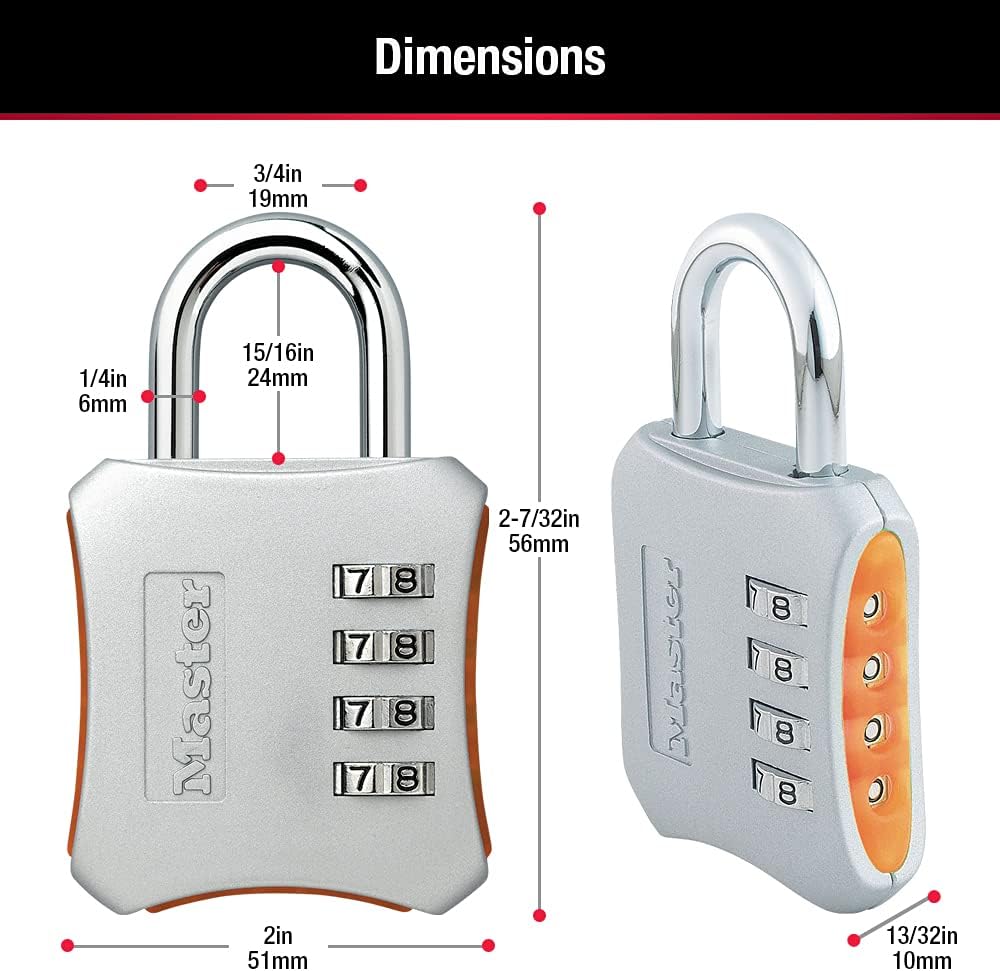
Image: Detailed dimensions of the Master Lock 653D, including body width, shackle diameter, and shackle length.
Garanti ve Destek
The Master Lock 653D Resettable Combination Locker Lock comes with a Sınırlı Ömür Boyu Garanti, providing assurance of its quality and durability. For warranty claims, product support, or further assistance, please visit the official Master Lock websitesine bakın veya müşteri hizmetleri departmanıyla iletişime geçin.
Resmi Webalan: www.masterlock.com


