
Ürün Bittiview
The Western Digital My Book Essential external hard drive provides 1 terabyte (1TB) of storage capacity. Designed for data backup and archiving, this device features a high-speed USB 2.0 interface for broad compatibility and efficient data transfer. Its design allows it to power on and off in conjunction with your computer, contributing to energy efficiency.
Temel Özellikler:
- Basit Kurulum: Plug-and-play functionality for immediate use.
- Kompakt Tasarım: Occupies minimal desk space, similar to a paperback book.
- Enerji Verimliliği: Automatically enters standby mode after 10 minutes of inactivity to conserve power.
- USB 2.0 Arayüzü: Offers convenient and compatible connectivity with various computers.
- PC and Mac Compatible: Supports Windows 2000/XP/Vista and Mac OS X 10.4.8 or later.
Kutuda Neler Var?
Ürün paketinizde aşağıdaki tüm öğelerin bulunduğundan emin olun:
- Western Digital My Book Essential WDBAAF0010HBK Hard Drive
- USB kablosu
- AC Adaptörü
- Hızlı Kurulum Kılavuzu
Kurulum Talimatları
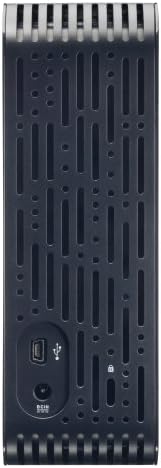
- AC Adaptörünü bağlayın: Plug the AC adapter into the power port on the back of the My Book Essential drive. Connect the other end of the AC adapter to a power outlet.
- USB Kablosunu bağlayın: Connect one end of the supplied USB cable to the USB 2.0 port on the back of the My Book Essential drive. Connect the other end of the USB cable to an available USB port on your computer.
- Güç Açık: The drive is designed to power on automatically with your computer. Ensure your computer is powered on. The drive's indicator light will illuminate.
- İlk Tanıma: Your operating system (Windows or Mac OS) should automatically detect and install the necessary drivers for the drive. This process may take a few moments.
- Sürücüye Erişim: Once installed, the drive will appear as a new storage device in 'My Computer' (Windows) or 'Finder' (Mac OS). You can now begin transferring files.
Note: For detailed operating system-specific instructions or if the drive is not recognized, refer to the included Quick Install Guide or the Western Digital support webalan.
Kullanım Talimatları
The Western Digital My Book Essential drive functions as an external storage device for your computer. It is ideal for backing up important files, storing large media libraries, and freeing up space on your computer's internal hard drive.
Veri Transferi:
- Aktarmak için files, simply drag and drop them to and from the My Book Essential drive icon in your computer's file kaşif.
- For optimal performance, ensure the USB cable is securely connected to a USB 2.0 port on your computer.
Güç yönetimi:
- The drive is designed to turn on and off with your computer. When your computer is shut down or put to sleep, the drive will also enter a low-power state.
- After 10 minutes of inactivity, the drive will automatically enter standby mode to save energy. It will resume normal operation when accessed.
Güvenli Kaldırma:
Always use the "Safely Remove Hardware" option (Windows) or drag the drive icon to the Trash/Eject (Mac OS) before disconnecting the USB cable to prevent data corruption.
Bakım
Proper maintenance ensures the longevity and reliable performance of your external hard drive.
- Fiziksel Bakım: Sürücüyü sabit, iyi havalandırılan bir alanda tutun. Aşırı sıcaklıklara, doğrudan güneş ışığına veya neme maruz bırakmaktan kaçının. Havalandırma deliklerini kapatmayın.
- Temizlik: Sürücünün dış yüzeyini temizlemek için yumuşak, kuru bir bez kullanın. Sıvı temizleyiciler veya aerosoller kullanmayın.
- Veri Yedekleme: Regularly back up critical data stored on the external drive to another location (e.g., cloud storage, another hard drive) to prevent data loss in case of unforeseen issues.
- Donanım Yazılımı Güncellemeleri: Western Digital desteğini periyodik olarak kontrol edin webModeliniz için mevcut herhangi bir yazılım güncellemesi için siteyi ziyaret edin.
Sorun giderme
If you encounter issues with your My Book Essential drive, try the following steps:
- Sürücü Algılanmadı:
- AC adaptörünün hem sürücüye hem de çalışan bir elektrik prizine güvenli bir şekilde bağlı olduğundan emin olun.
- Verify the USB cable is firmly connected to both the drive and your computer's USB port. Try a different USB port or cable if available.
- Bilgisayarınızı yeniden başlatın.
- Check your computer's Disk Management (Windows) or Disk Utility (Mac OS) to see if the drive is recognized but unformatted or unallocated.
- Yavaş Veri Aktarımı:
- Ensure you are using a USB 2.0 port. While compatible with USB 1.1, performance will be significantly slower.
- Büyük iş yükleri sırasında birden fazla zorlu uygulamayı çalıştırmaktan kaçının file Transferler.
- Check for background processes that might be using system resources or disk I/O.
- Sürüş Lambası Yanmıyor:
- Confirm the AC adapter is connected and the power outlet is active.
- If connected to a computer, ensure the computer is powered on and not in sleep mode.
For further assistance, consult the Quick Install Guide or visit the Western Digital support webalan.
Özellikler
| Özellik | Detay |
|---|---|
| Model Adı | My Book Essential Edition 2.0 |
| Model Numarası | WDH1U10000N |
| Dijital Depolama Kapasitesi | 1024 GB (1 TB) |
| Sabit Disk Arayüzü | USB 2.0 |
| Bağlantı Teknolojisi | USB |
| Sabit Disk Form Faktörü | 3.5 inç |
| Sabit Disk Açıklaması | Masaüstü |
| Uyumlu Cihazlar | Masaüstü |
| Kurulum Türü | Tak ve Çalıştır |
| Renk | Siyah |
| Sabit Disk Dönüş Hızı | 7200 RPM |
| Okuma Hızı | Saniyede 60 Megabayt |
| Medya Hızı | 30 MB/s |
| Muhafaza Malzemesi | Hard Plastic or Metal |
| Ürün Ağırlığı | 3.3 Pound |
| Sistem Gereksinimleri | Available USB port, Windows 2000/XP/Vista, Mac OS X 10.4.8 or later |
Garanti ve Destek
The Western Digital My Book Essential drive comes with a 1 yıllık sınırlı garanti. For warranty claims, technical support, or to access additional resources such as drivers and software, please visit the official Western Digital support webalan.
Çevrimiçi destek: support.wdc.com
Ürün Görselleri




Ürün Videoları
WD Hard Drives: Essential vs. Home Edition Comparison
This video provides a comparison between the Western Digital My Book Essential and Home Edition hard drives, highlighting their physical differences and connectivity options. It helps users understand the specific features of the Essential model in context.