
1. Giriş
Thank you for choosing the TFA Dostmann Digital Weather Station 35.1065. This device provides accurate indoor temperature, humidity, time, date, and a weather trend forecast. Please read this manual carefully before using the device to ensure proper operation and to prevent damage.
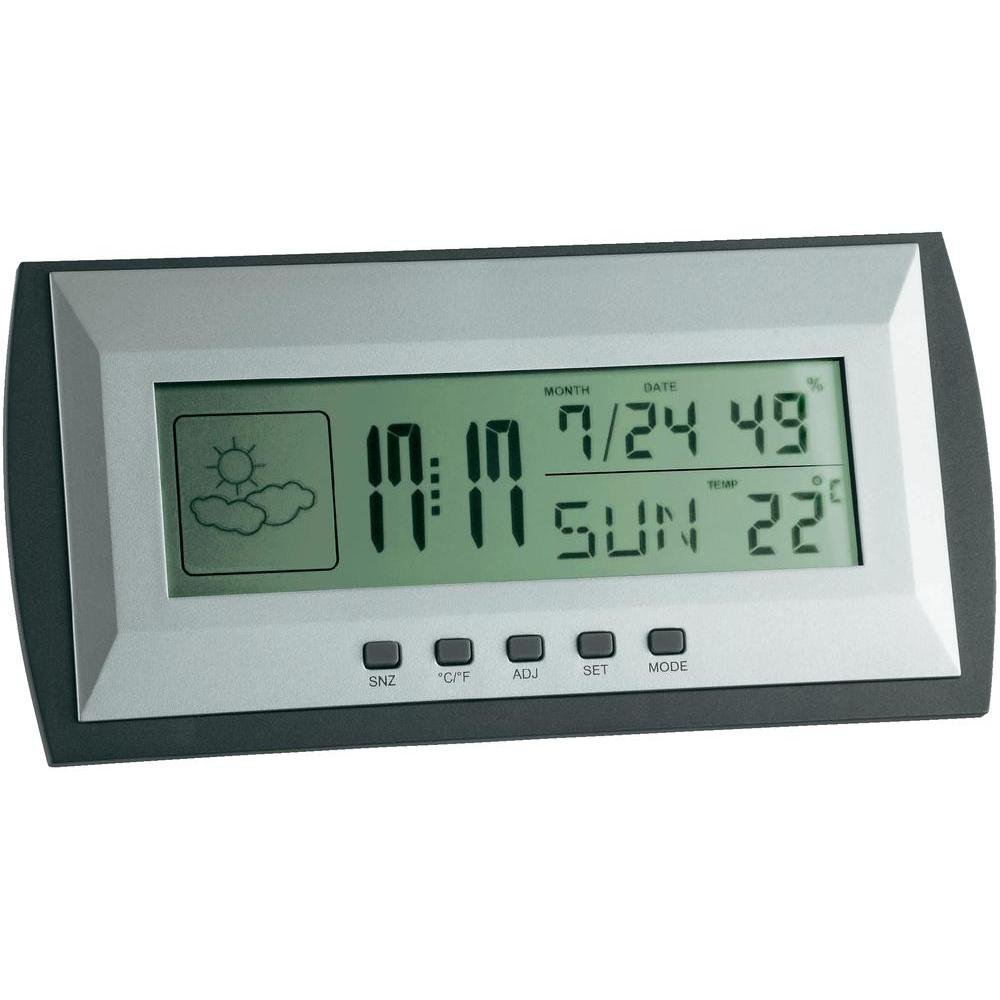
Figure 1: TFA Dostmann Digital Weather Station 35.1065 on a wooden desk. This image shows the weather station displaying time, date, and weather information in a typical home or office setting.
2. Güvenlik Bilgileri
- Bu kılavuzu ileride başvurmak üzere saklayın.
- Cihazı aşırı sıcaklıklara, titreşimlere veya darbelere maruz bırakmayın.
- Doğrudan güneş ışığından ve nemden kaçının.
- Cihazı suya daldırmayın.
- Cihazı kendiniz tamir etmeye veya değiştirmeye çalışmayın. Servis için yetkili personele başvurun.
- Kullanılmış pilleri yerel düzenlemelere göre atın.
3. Kurulum
3.1 Paket İçeriği
Tüm öğelerin mevcut olduğundan emin olun:
- TFA Dostmann Digital Weather Station 35.1065
- 2 x AA Pil
- Kullanım Kılavuzu (bu belge)
3.2 Pil Kurulumu
- Locate the battery compartment cover on the back of the weather station.
- Kapağı kaydırarak açın.
- Insert two (2) AA batteries, observing the correct polarity (+ and - markings).
- Pil bölmesi kapağını sıkıca kapatın.
Cihaz otomatik olarak açılacak ve ilk ölçümleri gösterecektir.
3.3 Initial Settings (Time, Date, Temperature Unit)
Upon first power-on or after battery replacement, you may need to set the time, date, and preferred temperature unit.
- Basılı tutun AYARLAMAK button for a few seconds to enter setting mode. The digit to be set will flash.
- Kullanın Sıfat button to adjust the flashing value (e.g., hour, minute, year, month, day).
- Basın AYARLAMAK button again to confirm the setting and move to the next parameter.
- Repeat steps 2 and 3 until all desired settings (time, date) are configured.
- Santigrat (°C) ve Fahrenheit (°F) arasında geçiş yapmak için tuşuna basın. °C/°F düğme.
4. Hava İstasyonunun Çalıştırılması
4.1 Ekran Üstüview
The LCD display shows various information:
- Zaman: Mevcut saat, 12 saatlik veya 24 saatlik formatta.
- Tarih: Current month, day, and day of the week.
- Sıcaklık: Indoor temperature, displayed in °C or °F.
- Nem: Indoor humidity percentage.
- Weather Forecast Icon: Indicates a trend forecast (e.g., sunny, cloudy, rainy). This is a prediction based on atmospheric pressure changes and may not always reflect actual weather.
4.2 Düğme Fonksiyonları
- SNZ (Snooze): Alarmın erteleme işlevini etkinleştirir.
- °C/°F: Santigrat ve Fahrenheit sıcaklık gösterimi arasında geçiş yapar.
- ADJ (Adjust): Used to adjust values during setting mode.
- AYARLAMAK: Enters and confirms settings.
- TARİFİ: Switches between different display modes (e.g., time, alarm time).
4.3 Alarmı Ayarlama
- Basın MOD button repeatedly until the alarm time is displayed.
- Basılı tutun AYARLAMAK Düğmeye basın. Alarm saati yanıp sönmeye başlayacaktır.
- Kullanın Sıfat İstediğiniz alarm saatini ayarlamak için düğmeye basın.
- Basmak AYARLAMAK Onaylamak ve tutanaklara geçirmek için.
- Kullanmak Sıfat İstenilen alarm dakikasını ayarlamak için.
- Basmak AYARLAMAK Alarm ayarını onaylamak ve çıkmak için.
- Alarmı etkinleştirmek/devre dışı bırakmak için, Sıfat button while the alarm time is displayed. An alarm icon will appear/disappear.
5. Bakım
5.1 Temizlik
Cihazı yumuşak bir bezle temizleyin.amp cloth. Do not use abrasive cleaners or solvents. Ensure no water enters the device.
5.2 Pil Değişimi
When the display becomes dim or the device stops functioning, replace the batteries. Follow the steps in Section 3.2. Always replace both batteries at the same time with new AA batteries.
5.3 Depolama
If the device will not be used for an extended period, remove the batteries to prevent leakage and damage. Store in a cool, dry place.
6. Sorun Giderme
| Sorun | Olası Neden | Çözüm |
|---|---|---|
| Ekranda görüntü yok veya ekran loş. | Piller zayıf veya yanlış takılmış. | Pilleri yenileriyle değiştirin, kutupların doğru olmasına dikkat edin. |
| Yanlış saat/tarih. | Saat/tarih doğru ayarlanmamış. | Refer to Section 3.3 to set the time and date. |
| Yanlış sıcaklık/nem ölçümleri. | Cihaz ısı kaynaklarının, havalandırma deliklerinin yakınına veya doğrudan güneş ışığına maruz kalacak şekilde yerleştirildi. | Relocate the weather station to a stable indoor environment away from extreme temperature fluctuations. Allow time for readings to stabilize. |
| Weather forecast icon seems incorrect. | Weather forecast is a trend prediction based on atmospheric pressure, not a real-time forecast. | Understand that the icon indicates a general trend over the next 12-24 hours, not current conditions. |
7. Özellikler

Figure 2: TFA Dostmann Digital Weather Station 35.1065 with dimensions. This image provides a detailed view of the device, including its width (18 cm), height (9 cm), and depth (3.81 cm).
- Marka: TFA Dostmann
- Modeli: 35.1065
- Güç Kaynağı: Battery-powered (2 x AA batteries, included)
- Malzeme: Plastik
- Özel Özellikler: Trend forecast
- Görüntüleme Türü: LCD
- Ürün Boyutları (D x G x Y): 3.8 cm x 18 cm x 9 cm
- Ürün Ağırlığı: 164 Gram
- Dahil Bileşenler: Weather station, batteries, user manual
- Önerilen Kullanım: Ev ofisi
- Belirli Kullanımlar: Tarih, Nem, Sıcaklık, Saat
- Menşei ülke: Çin
8. Garanti ve Destek
For warranty information, please refer to the documentation provided at the time of purchase or visit the official TFA Dostmann website. For technical support or further assistance, please contact TFA Dostmann customer service through their official channels.
Official TFA Dostmann Webalan: www.tfa-dostmann.de