
1. Ürün Bittiview
This manual provides essential information for the safe and proper use of your Equip CEE 7/7 (SCHUKO) to C13 Power Cable. This cable is designed to connect electronic devices requiring a C13 power input to a standard CEE 7/7 (SCHUKO) wall outlet.
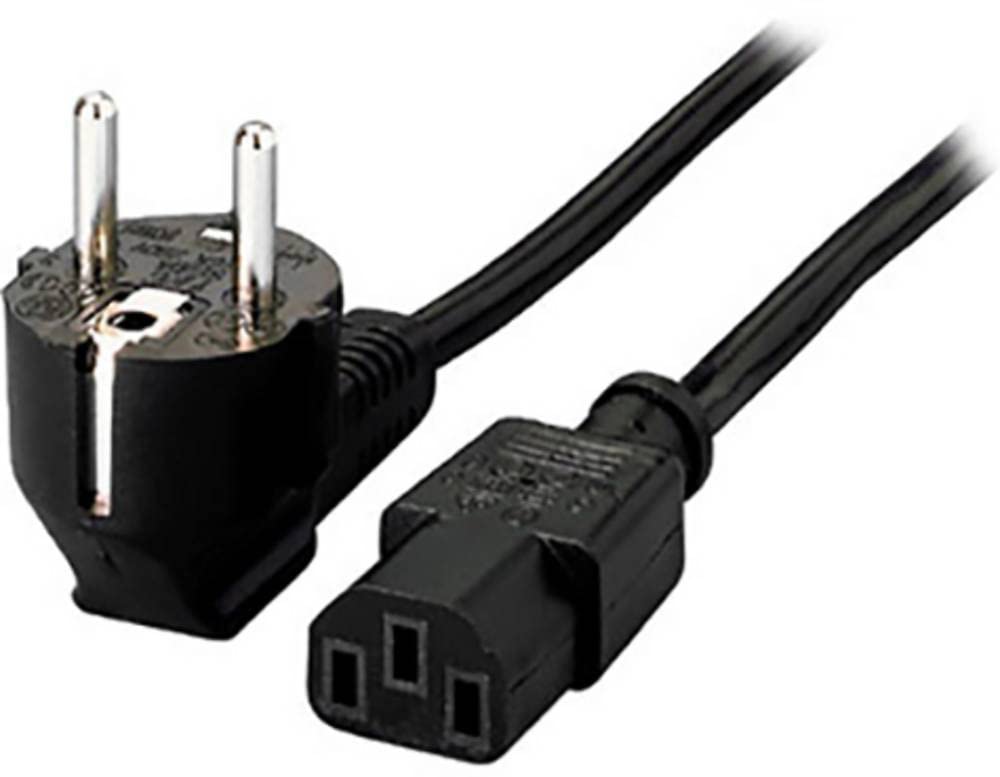
Figure 1: Equip CEE 7/7 (SCHUKO) to C13 Power Cable. The image shows the male CEE 7/7 (Schuko) plug with two round pins and grounding clips, and the female C13 connector, commonly used for computers and monitors.
Temel Özellikler:
- C13 socket x 1
- 1 x Schuko (CEE 7/7) plug
- Conductor: 0.75 mm² (24/0.19 mm)
- Kablo uzunluğu: 1.1 m
2. Güvenlik Talimatları
Please read and understand these safety instructions before using the power cable. Failure to follow these instructions may result in electric shock, fire, or damage to equipment.
- Hasarlı, yıpranmış veya telleri açıkta kalmışsa kabloyu kullanmayın.
- Ses seviyesini garantileyintage and current ratings of the connected device are compatible with the power supply and cable.
- Elektrik prizlerine aşırı yüklenmeyin.
- Keep the cable away from water, heat sources, and sharp objects.
- Kabloyu değiştirmeye veya onarmaya çalışmayın. Yardım için yetkili personele başvurun.
- Always grasp the plug, not the cable, when disconnecting from an outlet or device.
3. Kurulum ve Bağlantı
Follow these steps to properly connect your device using the Equip power cable:
- Kabloyu inceleyin: Before connecting, visually inspect the power cable for any signs of damage, such as cuts, abrasions, or bent pins. Do not use a damaged cable.
- Cihaza Bağlan: Insert the C13 connector (female end) firmly into the corresponding C14 inlet on your electronic device (e.g., computer, monitor, printer). Ensure a snug fit.
- Güç Çıkışına Bağlan: Insert the CEE 7/7 (SCHUKO) plug (male end) into a standard, grounded CEE 7/7 wall power outlet. Ensure the plug is fully inserted.
- Güç Açık: Once both ends are securely connected, you may power on your device.

Figure 2: C13 Connector. This image shows the C13 female connector, which plugs into the C14 inlet of electronic devices.
4. Kullanım Talimatları
This power cable is designed for simple plug-and-play operation. Once connected as described in the "Setup and Connection" section, it provides power to your device.
- Ensure the cable is not kinked, pinched, or run under heavy objects that could damage it.
- Avoid pulling on the cable to disconnect it. Always use the molded plug to remove it from the outlet or device.
- Do not use the cable in wet or damp koşullar.
5. Bakım ve Özen
Proper maintenance ensures the longevity and safe operation of your power cable.
- Temizlik: Disconnect the cable from all power sources before cleaning. Wipe the cable and plugs with a dry, soft cloth. Do not use liquid cleaners or solvents.
- Depolamak: When not in use, coil the cable loosely. Avoid tight coiling or bending, which can damage the internal wires. Store in a cool, dry place away from direct sunlight and extreme temperatures.
- Denetleme: Periodically inspect the cable for any signs of wear, damage, or discoloration. Replace the cable immediately if any damage is observed.
6. Sorun Giderme
If you encounter issues with your power cable, refer to the following common troubleshooting steps:
| Sorun | Olası Neden | Çözüm |
|---|---|---|
| Cihaz açılmıyor. | Kablo tam olarak bağlanmamış. | Ensure both the C13 connector and the CEE 7/7 plug are fully inserted into their respective ports. |
| Cihaz açılmıyor. | Elektrik prizi aktif değil. | Test the power outlet with another known working device. Check circuit breakers. |
| Cihaz açılmıyor. | Hasarlı kablo. | Inspect the cable for visible damage. If damaged, replace the cable immediately. |
| Intermittent power. | Bağlantı koptu. | Ensure all connections are secure. Avoid moving the cable while the device is in operation. |
Sorun giderme adımları sorunu çözmezse, kullanmayı bırakın ve müşteri desteğiyle iletişime geçin.
7. Özellikler
| Model Numarası | 112120 |
| Bağlayıcı Tip 1 | CEE 7/7 (SCHUKO) Male |
| Bağlayıcı Tip 2 | IEC C13 Female |
| İletken Boyutu | 0.75 mm² (24/0.19 mm) |
| Kablo Uzunluğu | 1.1 metre (yaklaşık 3.6 fit) |
| Ürün Boyutları | 1.44 x 1.44 x 70.87 inches (approximate cable dimensions) |
| Ürün Ağırlığı | 7 ons (0.2 Kilogram) |
| Marka | Donatmak |
| Üretici | Digital Data Communications |
8. Garanti ve Destek
For warranty information or technical support, please refer to the official Equip webSiteden satın alabilir veya perakendecinizle iletişime geçebilirsiniz. Satın alma belgenizi satın alma belgesi olarak saklayın.
Üretici: Digital Data Communications
Marka: Donatmak
İletişim Bilgileri: Lütfen ziyaret edin Equip official webalan Destek ve iletişim bilgileri için.


