
1. Giriş
The Behringer Minimix Mix800 is an ultra-compact karaoke machine designed for studio and stage applications. It features a revolutionary Voice Canceller, an integrated digital echo/reverb processor, two independent microphone channels, and a dedicated 2-band EQ for vocal enhancement.
2. Güvenlik Talimatları
- Güç Kaynağı: Yalnızca belirtilen güç adaptörünü kullanın. Yanlış sestagÜniteye zarar verebilir ve garantiyi geçersiz kılabilir.
- Nem: Do not expose the unit to rain or moisture. Avoid placing liquids near the device.
- Havalandırma: Yeterli havalandırma sağlayın. Havalandırma açıklıklarını kapatmayın.
- Servis: Cihazın bakımını kendiniz yapmaya çalışmayın. Tüm bakım işlemlerini yetkili personele yaptırın.
- Temizlik: Sadece kuru bezle temizleyin.
3. Kontroller ve Konektörler
3.1 Ön Panel

Şekil 1: Ön Panel Üstüview of the Minimix Mix800
- MIC LEVEL 1 & 2: Rotary controls to adjust the input level for Microphone Input 1 and 2.
- CLIP Indicators: Red LEDs that illuminate when the input signal is too high, indicating potential clipping. Reduce the MIC LEVEL if these light up.
- MIC INPUT 1 & 2: 1/4-inch TS jack inputs for connecting microphones.
- EQ HIGH: Adjusts the high-frequency content of the microphone signals.
- EQ DÜŞÜK: Adjusts the low-frequency content of the microphone signals.
- FX SEVİYESİ: Controls the amount of echo/reverb effect applied to the microphone signals.
- ECHO/REVERB Button: Activates or deactivates the integrated digital effects processor.
- 24 BIT Indicator: Lights up when the 24-bit digital effects processor is active.
- VOICE CANCELLER Button: Activates or deactivates the voice canceller function.
- IN/OUT Indicator: Lights up when the main output is active.
- ÇIKIŞ SEVİYESİ: Rotary control to adjust the overall output volume of the Mix800.
- CLIP Meter: LED meter displaying the output signal level. Aim for levels around 0 dB for optimal performance without clipping.
- Güç düğmesi: Üniteyi açar veya kapatır.
3.2 Arka Panel
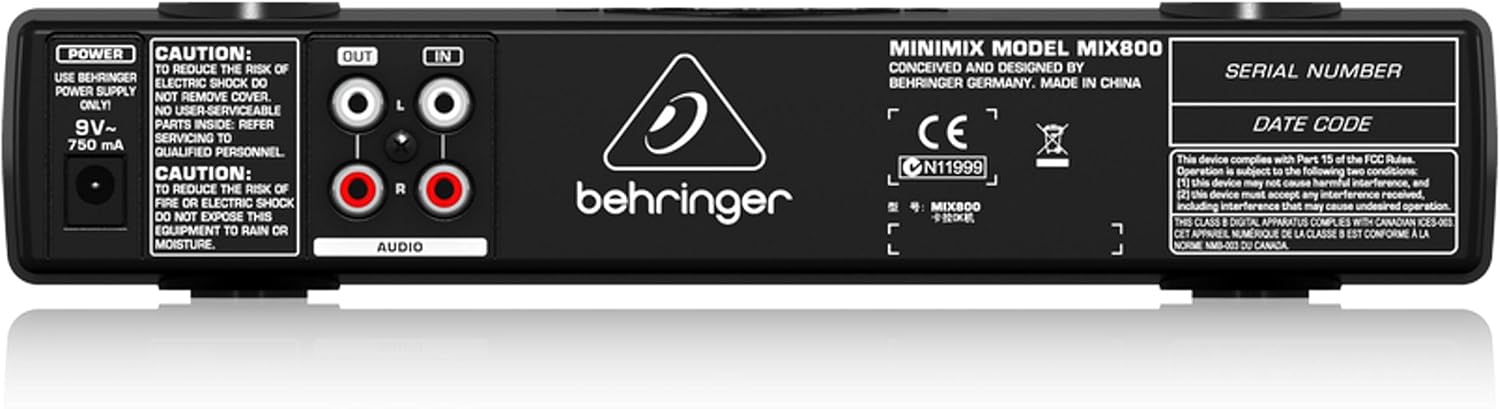
Şekil 2: Arka Panel Üzeriview of the Minimix Mix800
- GÜÇ Girişi: Connection for the external 9V~ 750mA power adapter.
- SES ÇIKIŞI (Sol/Sağ): RCA outputs for connecting the Mix800 to an amplifier, powered speakers, or a recording device.
- AUDIO IN (L/R): RCA inputs for connecting an external audio source, such as a CD player, media player, or computer.
4. Kurulum
Follow these steps to set up your Behringer Minimix Mix800:
- Ses Kaynağını Bağlayın: Connect your external audio source (e.g., CD player, computer, smartphone) to the AUDIO IN (L/R) RCA inputs on the rear panel using appropriate RCA cables.
- Çıkışı Bağla: Bağlan SES ÇIKIŞI (Sol/Sağ) RCA outputs on the rear panel to your amplifier, powered speakers, or sound system using RCA cables.
- Mikrofonları bağlayın: Plug your microphones into the MIC GİRİŞİ 1 Ve MIC GİRİŞİ 2 1/4-inch jacks on the front panel.
- Gücü bağlayın: Connect the supplied 9V~ 750mA power adapter to the GÜÇ input on the rear panel, then plug the adapter into a suitable power outlet.
- Güç Açık: Basın GÜÇ button on the front panel to turn on the Mix800.
5. Kullanım Talimatları
Once set up, you can begin using your Minimix Mix800:
- Adjust Microphone Levels: Speak into your microphones and slowly turn up the MIC LEVEL 1 Ve MIC LEVEL 2 controls. Adjust until the sound is clear and loud, but ensure the KLİP indicators do not light up consistently. Occasional flashes are acceptable.
- Ekolayzırı Ayarlayın: Kullanın EQ YÜKSEK Ve EQ DÜŞÜK controls to shape the tone of your vocals. Increase EQ HIGH for brighter vocals, and EQ LOW for more warmth or bass.
- Efektleri Uygula: Basın ECHO/REVERB button to activate the digital effects. Adjust the FX DÜZEYİ knob to control the amount of echo or reverb added to your vocals.
- Use Voice Canceller: Basın SES İPTAL EDİCİ button to attempt to remove vocals from the incoming stereo audio source. Note that the effectiveness of this feature can vary depending on the original audio track.
- Set Output Level: Ayarla ÇIKTI SEVİYESİ knob to control the overall volume sent to your sound system. Monitor the CLIP Meter bozulmayı önlemek için.
6. Bakım
- Temizlik: Disconnect the power before cleaning. Use a soft, dry cloth to wipe the exterior of the unit. Do not use liquid cleaners or solvents.
- Depolamak: Uzun süre kullanılmadığı zamanlarda, cihazı kuru ve tozsuz bir ortamda saklayın.
- Kablo Bakımı: Ensure all cables are free from kinks or damage. Avoid pulling cables forcefully from their connectors.
7. Sorun Giderme
| Sorun | Olası Neden | Çözüm |
|---|---|---|
| Ses çıkışı yok | Power off; incorrect connections; output level too low; ampkaldırıcı kapalı. | Check power, all cable connections (input/output), increase OUTPUT LEVEL, ensure amplifier açık. |
| Mikrofon çalışmıyor | Mic level too low; faulty microphone/cable; mic not fully inserted. | Increase MIC LEVEL, test with another microphone/cable, ensure mic cable is fully inserted and making proper contact. |
| Bozuk ses | Giriş/çıkış seviyeleri çok yüksek (kırpma). | Reduce MIC LEVEL or OUTPUT LEVEL until CLIP indicators/meter no longer show consistent clipping. |
| Voice Canceller ineffective | Original audio track not suitable for voice cancellation. | The effectiveness varies greatly with the source material. This is a characteristic of the technology. |
8. Özellikler
| Özellik | Detay |
|---|---|
| Model Adı | MINIMIX MIX800 |
| Ürün Boyutları (U x G x Y) | 9.55" x 4.72" x 1.89" |
| Ürün Ağırlığı | 1.3 pound |
| Mikrofon Girişleri | 2 x 1/4" TS Jacks |
| Ses girişleri | RCA (Sol/Sağ) |
| Ses çıkışları | RCA (Sol/Sağ) |
| Etkileri | Digital Echo/Reverb (24-bit) |
| Eşitleme | 2-band (High, Low) |
| Güç Kaynağı | 9V~ 750mA (external adapter) |
9. Resmi Ürün Videosu
Video 1: Manufacturer's overview of the Behringer Minimix Mix800, demonstrating its features and capabilities.
10. Garanti ve Destek
For detailed warranty information, please refer to the official Behringer webalan: http://www.music-group.com/warranty.aspx. For technical support or service inquiries, please contact Behringer customer service.