
1. Giriş
Satın aldığınız için teşekkür ederizasing the GPX CDP6806DT Personal CD Player. This manual provides important safety instructions, operational guidelines, and maintenance procedures to ensure optimal performance and longevity of your device. Please read this manual thoroughly before using the product and retain it for future reference.
2. Güvenlik Bilgileri
Önemli Güvenlik Talimatları
- Üniteyi suya veya neme maruz bırakmayın.
- Üniteyi radyatör, kalorifer ızgarası, soba veya diğer cihazlar (dahil) gibi ısı kaynaklarının yakınına yerleştirmekten kaçının. amp(ısı üreten)
- Üniteyi sökmeye veya değiştirmeye çalışmayın. Tüm servis işlemlerini yetkili servis personeline yaptırın.
- Use only the specified batteries (2 x AA batteries). Ensure correct polarity when inserting batteries.
- Ünite uzun süre kullanılmayacaksa pilleri çıkarın.
- İşitme hasarını önlemek için uzun süre yüksek ses seviyesinde dinlemekten kaçının.
- Üniteyi sadece kuru bir bezle temizleyin.
3. Paket İçeriği
Carefully unpack your GPX CDP6806DT Personal CD Player and ensure all items are present:
- GPX CDP6806DT Personal CD Player
- Kullanım Kılavuzu (bu belge)
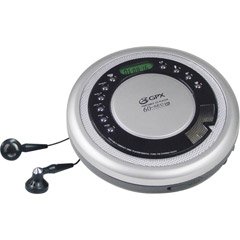
Figure 1: GPX CDP6806DT Personal CD Player. This image illustrates the compact design and general appearance of the device.
4. Kontroller ve Özellikler
Familiarize yourself with the controls and features of your GPX CDP6806DT for optimal use.
- LCD Ekran: 6-digit display for track number, time, and FM frequency.
- PLAY/PAUSE (►/−): Press to start or pause CD playback.
- DUR (■): Press to stop CD playback.
- SKIP/SEARCH (◀◀/▶▶): Press to skip tracks. Hold to search within a track.
- SES DÜZEYİ (+/-): Ses çıkış seviyesini ayarlar.
- MODE/PROG: Selects playback mode (Repeat, Random) or programs CD tracks.
- FM TUNER (ON/OFF/BAND): Switches to FM radio mode, turns FM on/off, or changes FM band.
- PRESET (+/-): Navigates saved FM radio presets.
- CD Bölmesi: Area for inserting audio CDs.
- Pil Bölmesi: Located on the bottom, holds 2 AA batteries.
- Kulaklık Jakı (3.5 mm): Özel dinleme için kulaklıkları bağlar.
Figure 2: GPX CDP6806DT Controls Layout. This image provides a visual reference for the location of various buttons and ports on the device.
5. Kurulum
5.1 Pil Kurulumu
The GPX CDP6806DT requires two (2) AA batteries (not included) for portable operation.
- Cihazın alt kısmında bulunan pil bölmesini bulun.
- Pil bölmesi kapağını kaydırarak açın.
- Pil yuvasının içindeki işaretlere uyarak doğru kutupları (+ ve -) kullanarak iki adet AA pil takın.
- Pil bölmesi kapağını sıkıca kapatın.
5.2 Kulaklık Bağlama
For private listening, connect your 3.5mm stereo headphones (not included) to the headphone jack located on the side of the unit.
6. Kullanım Talimatları
6.1 CD Oynatma
The unit supports CD and CD-R/RW disc formats.
- Open the CD compartment lid by gently pressing the OPEN button (if present, or lifting the lid).
- CD'yi etiket yüzü yukarı bakacak şekilde orta milin üzerine yerleştirin.
- CD bölmesinin kapağını tık sesi duyana kadar sıkıca kapatın.
- Basın OYNAT/DURAKLAT (►/−) button to begin playback. The track number and elapsed time will appear on the LCD display.
- Oynatmayı duraklatmak için OYNAT/DURAKLAT (►/−). Devam etmek için tekrar basın.
- Çalmayı durdurmak için DUR (■) düğme.
- Sonraki parçaya atlamak için tuşuna basın SKIP/SEARCH (▶▶).
- To go back to the beginning of the current track, press SKIP/SEARCH (◀◀) once. Press twice to go to the previous track.
- To search rapidly forward or backward within a track, hold down SKIP/SEARCH (▶▶) or (◀◀) sırasıyla.
- kullanarak ses seviyesini ayarlayın. SES (+/-) kontrolleri.
6.2 FM Radyo Çalışması
The unit features a digital FM tuner with station presets.
- Kaydırın FM ALICISI switch to the ON position or press the BANT FM moduna girmek için düğmesine basın.
- Basın SKIP/SEARCH (▶▶) or (◀◀) İstenilen frekansı manuel olarak ayarlamak için düğmeler.
- To auto-scan and save stations, hold down the OYNAT/DURAKLAT (►/−) button (or refer to specific instructions for auto-scan if available on the device).
- To recall saved presets, use the PRESET (+/-) düğmeler.
6.3 CD Programming (24-Track)
You can program up to 24 tracks to play in a specific order.
- CD durdurulmuşken, tuşuna basın MODE/PROG button. "PROG" will flash on the display.
- Kullanın SKIP/SEARCH (▶▶) or (◀◀) buttons to select the first track you wish to program.
- Basmak MODE/PROG again to confirm the selection. The display will show the program number and the next available program slot.
- Repeat steps 2 and 3 to add up to 24 tracks to your program.
- After programming all desired tracks, press OYNAT/DURAKLAT (►/−) programlanmış oynatmayı başlatmak için.
- Programı kapatmak için tuşuna basın. DUR (■) düğmesine iki kez basın.
6.4 Anti-Skip Protection (ASP)
The GPX CDP6806DT features a 60-second Anti-Skip Protection system. This system buffers audio data to minimize interruptions caused by minor shocks or vibrations during CD playback. The ASP activates automatically when a CD is playing.
7. Bakım
7.1 Ünitenin Temizlenmesi
- Ünitenin dışını yumuşak ve kuru bir bezle silin.
- Aşındırıcı temizleyiciler, cilalar veya çözücüler kullanmayın.
- If the CD lens needs cleaning, use a specialized CD lens cleaner disc or a soft, lint-free cloth designed for optical lenses.
7.2 Pil Bakımı
- Cihaz uzun süre kullanılmayacaksa, sızıntıyı önlemek için pilleri çıkarın.
- Eski ve yeni pilleri veya farklı pil türlerini karıştırmayın.
- Kullanılmış pilleri yerel düzenlemelere uygun şekilde sorumlu bir şekilde atın.
8. Sorun Giderme
If you experience issues with your GPX CDP6806DT, please consult the following table for common problems and solutions.
| Sorun | Olası Neden / Çözüm |
|---|---|
| Ünite açılmıyor. | Check if batteries are inserted correctly with proper polarity. Ensure batteries are fresh and not depleted. |
| Kulaklıktan ses gelmiyor. | Ensure headphones are fully plugged into the headphone jack. Increase the volume level. Test with another pair of headphones. |
| CD'de atlamalar oluyor veya oynatma kesintiye uğruyor. | Ensure the CD is clean and free of scratches or smudges. Clean the CD with a soft, lint-free cloth. Ensure the unit is on a stable surface or held steadily during use. |
| CD does not play. | Ensure the CD is inserted correctly with the label side up. Close the CD compartment lid completely. Check if the CD is a supported format (CD, CD-R/RW). |
| FM radyo alımı zayıf. | Extend the headphone cable as it acts as the antenna. Try moving to a different location. |
9. Özellikler
- Marka: GPX
- Modeli: CDP6806DT
- Desteklenen Disk Biçimleri: CD, CD-R/RW
- Atlama Önleyici Koruma: 60 saniye
- Görüntülemek: 6 basamaklı LCD
- Radyo: Digital FM Tuner with Presets
- CD Programming: 24 yollu
- Güç Kaynağı: 2 x AA Pil (dahil değildir)
- Bağlantı: 3.5mm Headphone Jack (Auxiliary)
10. Garanti ve Destek
For detailed warranty information, please refer to the warranty card included with your original product packaging. For technical support, service inquiries, or to purchase replacement parts, please visit the official GPX webSiteyi ziyaret edin veya ürün dokümanınızda yer alan iletişim bilgilerini kullanarak müşteri hizmetleri departmanıyla iletişime geçin.
Garanti talepleri için lütfen satın alma belgenizi saklayın.