
giriiş
This manual provides essential information for the safe and efficient use of your ONKYO INTEC205 C-705FX CD Player. Please read it thoroughly before operating the unit and keep it for future reference.
The ONKYO INTEC205 C-705FX CD Player is designed for superior sound quality, incorporating advanced audio technologies. It features patented VLSC (Vector Linear Shaping Circuitry) to completely eliminate digital noise during D/A conversion, ensuring pure audio reproduction. The unit also utilizes a 192kHz/24bit Advanced Multi-bit DAC (Cirrus Logic CS4398) to faithfully convert digital signals to analog, preserving subtle musical nuances with an excellent signal-to-noise ratio. Furthermore, the "Direct Digital Pass" system uses high-purity cables for digital audio output, preventing noise interference and contributing to clear sound reproduction.
Güvenlik Önlemleri
- Üniteyi yağmura veya neme maruz bırakmayın.
- C'yi açmayınasing; tüm servis işlemlerini kalifiye personele yaptırın.
- Aşırı ısınmayı önlemek için yeterli havalandırmayı sağlayın.
- Üniteyi ısı kaynaklarının yakınına veya doğrudan güneş ışığına maruz bırakmayın.
- Yalnızca belirtilen güç kaynağını kullanın.
Paket İçeriği
Paketin içinde tüm öğelerin mevcut olduğundan emin olun:
- ONKYO INTEC205 C-705FX CD Player Unit
- Güç Kablosu
- Uzaktan Kumanda (varsa)
- RCA Audio Cable (if included)
- Kullanım Kılavuzu (bu belge)
Kurmak
1. Yerleşim
Place the CD player on a stable, level surface away from direct sunlight, heat sources, and excessive dust or vibration. Ensure adequate space around the unit for ventilation.
2. Bağlantılar
Connect the CD player to your amplifier or receiver using appropriate audio cables.
- Analog Ses Bağlantısı: Use an RCA audio cable to connect the ANALOG OUT jacks on the CD player to the CD IN or AUX IN jacks on your amplifier. Match the red plug to the right channel (R) and the white plug to the left channel (L).
- Dijital Ses Bağlantısı (İsteğe bağlı): For digital audio output, use either a digital coaxial cable or an optical digital cable.
- koaksiyel: Connect the DIGITAL OUT (COAXIAL) jack on the CD player to the COAXIAL DIGITAL IN jack on your ampcankurtaran.
- Optik: Connect the DIGITAL OUT (OPTICAL) jack on the CD player to the OPTICAL DIGITAL IN jack on your ampcankurtaran.
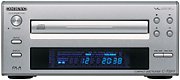 Resim: Ön view of the ONKYO INTEC205 C-705FX CD Player, showing the disc tray, display, and control buttons. This image illustrates the general appearance of the unit.
3. Güç Bağlantısı
After all audio connections are made, plug the power cord into the AC INlet on the rear of the CD player, then plug the other end into a suitable wall outlet.
Kullanım Talimatları
1. CD Yükleme
- Basın GÜÇ üniteyi açmak için düğmeye basın.
- Basın AÇIK/KAPALI Disk tepsisini açmak için düğmesine basın.
- Place a CD with the label side facing up into the disc tray.
- Basın AÇIK/KAPALI button again to close the disc tray. The unit will read the disc.
2. Temel Oynatma
- OYNA (►): Oynatmayı başlatmak için basın.
- PAUSE (‖): Press to temporarily stop playback. Press again to resume.
- DUR (■): Oynatmayı durdurmak için basın.
- ATLA (►►| / |◄◄): Press to skip to the next track or return to the beginning of the current track. Press twice to go to the previous track.
- HIZLI İLERİ/GERİ SARMA: Hold down the SKIP buttons during playback to fast forward or rewind through the track.
3. Ön Panel Kontrolleri
The front panel includes buttons for Power, Open/Close, Play, Pause, Stop, and Skip. The display shows track number, elapsed time, and other playback information.
4. Remote Control (if applicable)
If your unit came with a remote control, refer to its specific instructions for advanced functions such as programming, repeat play, and random play.
Bakım
1. Ünitenin Temizlenmesi
Wipe the exterior of the unit with a soft, dry cloth. Do not use abrasive cleaners, waxes, or solvents as they may damage the finish. Never spray cleaning liquids directly onto the unit.
2. Disk İşleme
- Oyun yüzeyinde parmak izi kalmaması için diskleri kenarlarından tutun.
- Keep discs clean. Wipe them with a soft, lint-free cloth from the center outwards.
- Diskleri toz ve çiziklerden korumak için kutularında saklayın.
- Do not expose discs to direct sunlight or high temperatures.
Sorun giderme
If you experience problems with your CD player, consult the following table before seeking professional service.
| Sorun | Olası Neden | Çözüm |
|---|---|---|
| Güç yok | Güç kablosu güvenli bir şekilde bağlanmamış. | Üniteye ve duvar prizine giden güç kablosunun bağlantısını kontrol edin. |
| Ses yok | Ses kabloları doğru şekilde bağlanmamış; AmpAmplifikatör girişi seçilmedi. | Ses kablosu bağlantılarını doğrulayın. Ses sisteminizde doğru girişi seçin. ampcankurtaran. |
| Disc does not play / Skipping | Disc is dirty or scratched; Disc inserted incorrectly; Unit needs warm-up time. | Clean the disc. Insert the disc with the label side up. Allow the unit to warm up for a few minutes before playing. |
| Disc tray opens/closes too quickly | Sensitive tray mechanism. | This can be a characteristic of the unit. Ensure the disc is placed quickly and correctly. |
| LCD display not lighting up | Internal connection issue or display malfunction. | If the unit otherwise functions, this may indicate a display panel issue. Contact customer support. |
Özellikler
| Özellik | Detay |
|---|---|
| Marka | Onkyo |
| Model Numarası | C-705FX |
| Renk | Gümüş |
| Ürün Ağırlığı | Yaklaşık 2821 gram |
| Uyumlu Cihazlar | Konuşmacılar, Ampcankurtaranlar |
| Kulaklık girişi | 3.5 mm jak |
| Anahtar Teknolojiler | VLSC (Vector Linear Shaping Circuitry), 192kHz/24bit Advanced Multi-bit DAC (Cirrus Logic CS4398), Direct Digital Pass |
| Playback Type | Yalnızca oynatma |
Garanti ve Destek
For warranty information and customer support, please refer to the official Onkyo website or contact your local Onkyo dealer. Keep your purchase receipt as proof of purchase for warranty claims.