
1. Giriş
Satın aldığınız için teşekkür ederizasing the GPX BCD2004 Boombox. This portable audio system features a top-loading CD player and an AM/FM tuner, designed for versatile audio playback. This manual provides essential information for setting up, operating, and maintaining your device to ensure optimal performance and longevity.
2. Güvenlik Bilgileri
- Talimatları okuyun: Carefully read all operating instructions before using the unit.
- Talimatları Saklayın: Bu kılavuzu ileride başvurmak üzere saklayın.
- Su ve Nem: Bu cihazı damlayan veya sıçrayan suya maruz bırakmayın. Vazo gibi sıvı dolu nesneleri cihazın üzerine koymayın.
- Havalandırma: Uygun havalandırmayı sağlayın. Havalandırma açıklıklarını kapatmayın.
- Sıcaklık: Radyatörler, ısıtma petekleri, sobalar veya diğer cihazlar (dahil olmak üzere) gibi ısı kaynaklarının yakınına koymayın. amp(ısı üreten)
- Güç Kaynakları: Use only the power source indicated on the appliance.
- Piller: Follow battery safety guidelines. Do not mix old and new batteries, or different types of batteries. Remove batteries if the unit is not used for extended periods.
- Servis: Tüm bakımları yetkili servis personeline yaptırın.
3. Paket İçeriği
Lütfen paketinizde aşağıdaki öğelerin bulunduğundan emin olun:
- GPX BCD2004 Boombox Unit
- AC Güç Kablosu
- Kullanıcı Kılavuzu
4. Kontroller ve Özelliklerview
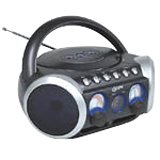
Şekil 1: Ön view of the GPX BCD2004 Boombox. This image shows the overall design of the boombox, including the speaker grilles and the general layout of the front panel.
Familiarize yourself with the main controls and features of your boombox:
- CD Bölmesi: Top-loading bay for inserting CDs.
- Fonksiyon Anahtarı: Selects between CD, AM, FM, and OFF modes.
- Ses Kontrolü: Rotary dial to adjust the audio output level.
- Ayarlama Kadranı: Rotary dial for selecting AM or FM radio frequencies.
- Oynat/Duraklat Düğmesi: Starts or temporarily stops CD playback.
- Durdurma düğmesi: CD oynatmayı durdurur.
- Atla/Ara Düğmeleri (◀◀ / ▶▶): Skips to the previous/next track or searches within a track.
- Program Düğmesi: Used to program a sequence of tracks for CD playback.
- Tekrar Düğmesi: Repeats the current track or the entire CD.
- AM/FM Antenna: Telescopic antenna for FM reception, internal antenna for AM.
- AC Güç Girişi: Jack for connecting the AC power cord.
- Pil Bölmesi: Located on the bottom or rear for 'C' batteries.
- Fold-down Carrying Handle: Kolay taşınabilirlik için.
5. Kurulum
5.1 Ünitenin Güçlendirilmesi
Your GPX BCD2004 Boombox can be powered by either AC power or batteries.
AC Güç İşlemi
- Ensure the Function Switch is in the OFF position.
- Insert the small end of the AC power cord into the AC power input jack on the back of the unit.
- AC güç kablosunun diğer ucunu standart bir AC duvar prizine (120V ~ 60Hz) takın.
Pil Gücü Çalışması
Taşınabilir kullanım için, boombox 8 adet 'C' boy pil gerektirir (piller dahil değildir).
- Ensure the Function Switch is in the OFF position.
- Cihazın alt veya arka tarafında bulunan pil bölmesi kapağını açın.
- Insert 8 'C' size batteries, observing the correct polarity (+ and -) as indicated inside the compartment.
- Pil bölmesi kapağını sıkıca kapatın.
- Not: When operating on battery power, disconnect the AC power cord from the unit.
6. Operating the CD Player
The GPX BCD2004 is compatible with standard audio CDs, CD-R, and CD-RW discs.
6.1 CD Yükleme
- Lift the CD compartment door located on the top of the unit.
- Place a CD onto the center spindle with the label side facing up.
- Gently close the CD compartment door until it clicks shut.
6.2 Temel CD Çalma
- İşlev Anahtarını CD konumuna getirin.
- The CD player will begin to read the disc. The track number will typically display.
- Press the PLAY/PAUSE (▶/██) button to start playback.
- Adjust the Volume Control to your desired listening level.
- To pause playback, press the PLAY/PAUSE (▶/██) button. Press it again to resume.
- To stop playback, press the STOP (■) button.
6.3 Skipping and Searching Tracks
- Parçayı Atla: During playback, press the SKIP/SEARCH FORWARD (▶▶) button to go to the next track. Press the SKIP/SEARCH BACKWARD (◀◀) button to go to the beginning of the current track, or press it twice to go to the previous track.
- Search Within Track: During playback, press and hold the SKIP/SEARCH FORWARD (▶▶) or SKIP/SEARCH BACKWARD (◀◀) button to fast forward or rewind through the current track. Release the button to resume normal playback.
6.4 Program Play
You can program up to 16 tracks to play in a specific order.
- In STOP mode, press the PROGRAM button. The program indicator will flash.
- Use the SKIP/SEARCH buttons (◀◀ / ▶▶) to select your desired first track.
- Press the PROGRAM button again to confirm the selection.
- Repeat steps 2 and 3 to add up to 16 tracks to your program list.
- After programming all desired tracks, press the PLAY/PAUSE (▶/██) button to start programmed playback.
- To clear the program, press the STOP (■) button twice.
6.5 Repeat Play
During CD playback, press the REPEAT button:
- Bir kez basın Tekrar 1 (repeats the current track).
- Press twice for Tümünü Tekrarla (repeats the entire CD or programmed tracks).
- Press a third time to cancel repeat function.
7. Operating the AM/FM Radio
7.1 Tuning to Radio Stations
- Set the Function Switch to either the AM or FM position.
- Adjust the Tuning Dial to select your desired radio station.
- Adjust the Volume Control to your desired listening level.
7.2 Improving Radio Reception
- FM Alımı: Extend the telescopic antenna fully and adjust its position for the best reception.
- Sabah Resepsiyonu: The unit has a built-in AM antenna. Rotate the entire boombox for optimal AM reception.
8. Bakım
8.1 Ünitenin Temizlenmesi
- Ünitenin dışını yumuşak bir bezle silin.amp bezle silin. Aşındırıcı temizleyiciler veya çözücüler kullanmayın.
- CD objektifi için özel bir CD objektif temizleme diski veya optik objektifler için özel olarak tasarlanmış yumuşak, tüy bırakmayan bir bez kullanın.
8.2 Pil Bakımı
- Ünite uzun süre kullanılmayacaksa, sızıntıyı önlemek için pilleri çıkarın.
- Kullanılmış pilleri yerel düzenlemelere uygun şekilde sorumlu bir şekilde atın.
9. Sorun Giderme
If you experience issues with your boombox, please refer to the following common problems and solutions:
| Sorun | Olası Neden | Çözüm |
|---|---|---|
| Güç yok | AC cord not connected; Batteries dead or incorrectly inserted; Function switch OFF. | Check AC cord connection; Replace batteries or check polarity; Set Function switch to CD, AM, or FM. |
| CD çalmıyor | CD inserted incorrectly; CD dirty or scratched; CD compartment door open; Function switch not on CD. | Insert CD with label side up; Clean or replace CD; Close CD door securely; Set Function switch to CD. |
| Zayıf radyo alımı | Anten uzatılmamış/ayarlanmamış; Sinyal zayıf. | Extend and adjust FM antenna; Rotate unit for AM reception; Try a different location. |
| Ses yok veya düşük ses seviyesi | Volume too low; Unit in pause mode. | Increase volume; Press Play/Pause button to resume playback. |
10. Özellikler
- Modeli: BCD2004
- Marka: GPX
- CD Uyumluluğu: CD, CD-R, CD-RW
- Radyo Tuner: Sabah/FM
- Güç Kaynağı: AC 120V ~ 60Hz veya 8 adet 'C' pil (dahil değildir)
- Konuşmacılar: 2 Full-range speakers
- Boyutlar (yaklaşık): 33.02 x 27.94 x 17.02 cm (U x G x Y)
- Ağırlık (yaklaşık): 2.18 kilo
- Özellikler: 16-track programming, Repeat play, Song skip/search, Fold-down carrying handle
11. Garanti ve Destek
This GPX BCD2004 Boombox comes with a 90 günlük garanti Orijinal satın alma tarihinden itibaren geçerlidir. Bu garanti, normal kullanım koşullarında malzeme ve işçilik kusurlarını kapsar.
For warranty service or technical support, please refer to the contact information provided with your purchase documentation or visit the official GPX website. Please have your model number (BCD2004) and proof of purchase ready when contacting support.