
giriiş
This manual provides detailed instructions for the installation, operation, and maintenance of your Western Digital 80 GB External USB 2.0 Hard Drive, model WDXUB800BBNN. This external storage device offers high-speed data transfer and convenient backup features, designed for both PC and Macintosh systems.

Resim: Ön view of the Western Digital 80 GB External USB 2.0 Hard Drive.
Ürün Özellikleri
- Dual-option Backup: Select between automatic or on-the-spot data backup methods.
- USB 2.0 Arayüzü: Provides a high-speed connection for efficient data transfer.
- Safe Shutdown Feature: Ensures all data is safely transferred before the drive powers off, activated via the front-mounted power button.
- Dönme Hızı: Operates at 7200 RPM for fast performance.
- Preformatted: Ready for use immediately upon connection.
- Sessiz Çalışma: Engineered for near-silent performance.
- Esnek Yerleştirme: Can be positioned vertically or horizontally and is stackable.
- Isı Dağılımı: Designed with a cool, heat-dissipating case.
Paket İçeriği
Paketinizin aşağıdaki öğeleri içerdiğini doğrulayın:
- 80 GB USB 2.0 External Hard Drive
- 6-foot (1.8m) USB 2.0 Certified Cable
- Software CD (includes Dantz Retrospect Express backup software)
- Güç Kablolu AC Adaptör
- Vertical Stands
- Feet for Horizontal Placement
- Hızlı Kurulum Kılavuzu
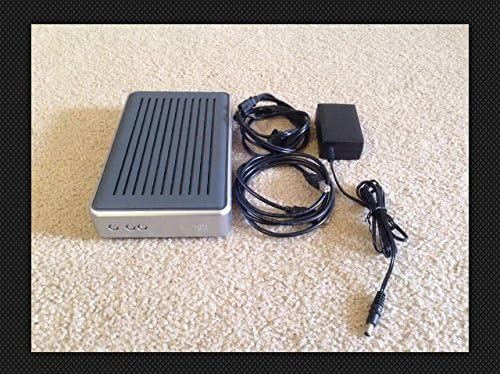
Image: Contents of the Western Digital 80 GB External USB 2.0 Hard Drive package, including the drive, cables, and power adapter.
Sistem Gereksinimleri
PC Kullanıcıları
- Kullanılabilir USB Bağlantı Noktası
- Windows 98SE, Me, 2000, or XP
Macintosh Users
- Kullanılabilir USB Bağlantı Noktası
- Mac OS v9.2.2 or Mac OS X v10.2.8+
Kurulum Talimatları
- Gücü bağlayın: Connect the AC adapter to the drive and then plug it into a power outlet.
- USB Kablosunu Bağlayın: Connect one end of the USB 2.0 cable to the drive and the other end to an available USB port on your computer.
- Güç Açık: Press the front-mounted power button on the drive. The drive is preformatted and should be recognized automatically by your operating system.
- Yazılım Kurulumu (Opsiyonel): Insert the included Software CD into your computer's optical drive. Follow the on-screen instructions to install Dantz Retrospect Express backup software if desired. This software provides advanced backup functionalities.

Image: Front panel of the drive, highlighting the power and backup buttons.
Kullanım Talimatları
Veri Transferi
Once connected and recognized by your computer, the drive will appear as a removable storage device. You can drag and drop files to and from the drive, or use your operating system's copy/paste functions to manage data.
Yedekleme Seçenekleri
- Manuel Yedekleme: Simply copy files to the drive as needed.
- Software-Assisted Backup: Utilize the Dantz Retrospect Express software (if installed) to configure automatic backup schedules or perform on-the-spot backups with advanced options.
Güvenli Kapatma
To prevent data corruption, always use the Safe Shutdown feature. Press the front-mounted power button to initiate a safe shutdown. This ensures all data transfers are complete before the drive powers down.
Atama
The drive can be placed vertically using the included stands or horizontally using the provided feet. Ensure adequate ventilation around the drive to maintain optimal operating temperature.
Bakım
- Temizlik: Sürücünün dışını temizlemek için yumuşak ve kuru bir bez kullanın. Sıvı temizleyiciler veya çözücüler kullanmayın.
- Çevre: Operate the drive in a clean, dry environment, away from direct sunlight, extreme temperatures, and strong magnetic fields.
- Havalandırma: Ensure the ventilation slots are not obstructed to allow for proper heat dissipation.
- Veri Bütünlüğü: Regularly back up critical data to multiple locations to prevent data loss.
Sorun giderme
- Sürücü Algılanmadı:
- Güç adaptörünün hem sürücüye hem de çalışan bir elektrik prizine güvenli bir şekilde bağlı olduğundan emin olun.
- Verify the USB cable is firmly connected to both the drive and your computer's USB port. Try a different USB port or cable if available.
- Bilgisayarınızı yeniden başlatın.
- Check your computer's Disk Management (Windows) or Disk Utility (Mac) to see if the drive is listed but not assigned a drive letter or mounted.
- Yavaş Performans:
- Ensure you are using a USB 2.0 port for optimal speed. Connecting to a USB 1.1 port will result in slower transfer rates.
- Arka planda çalışan gereksiz uygulamaları kapatın.
- Clicking Sounds:
Unusual clicking sounds may indicate a potential hardware issue. Immediately back up any critical data and contact Western Digital support if this occurs.
Özellikler
| Model Numarası | WDXUB800BBNN |
| Dijital Depolama Kapasitesi | 80 GB |
| Sabit Disk Arayüzü | USB 2.0 |
| Bağlantı Teknolojisi | USB |
| Sabit Disk Dönüş Hızı | 7200 RPM |
| Uyumlu Cihazlar | Masaüstü Bilgisayarlar |
| Ürün Boyutları | 12.75 x 6.44 x 7.88 inç |
| Ürün Ağırlığı | 4.35 pound |
| Üretici | Batı Dijital |
| İlk Mevcut Tarih | 8 Ekim 2004 |
Garanti ve Destek
For information regarding warranty coverage, technical support, or service, please refer to the warranty card included with your product or visit the official Western Digital support webalan. Garanti talepleri için satın alma makbuzunuzu saklayın.
Çevrimiçi destek: www.westerndigital.com/support