
1. Giriş
This manual provides instructions for the setup, operation, and maintenance of your Bose MediaMate Computer Speakers. These speakers are designed to enhance the audio experience for your computer, whether for music, movies, or gaming. The compact design and upward-angled sound projection optimize audio delivery for desktop use, occupying minimal desk space.
2. Güvenlik Bilgileri
Please read and follow all safety instructions before using this product to prevent electric shock, fire, or injury. Keep this manual for future reference.
- Hoparlörleri suya veya neme maruz bırakmayın.
- Do not place the speakers near heat sources such as radiators, heat registers, stoves, or other apparatus (including amp(ısı üreten)
- Yalnızca üretici tarafından belirtilen aparatları/aksesuarları kullanın.
- Yıldırımlı havalarda veya uzun süre kullanılmayacaksa bu cihazın fişini çekin.
- Tüm servisleri kalifiye servis personeline yaptırın. Cihaz herhangi bir şekilde hasar gördüğünde, örneğin güç kaynağı kablosu veya fişi hasar gördüğünde, cihaza sıvı döküldüğünde veya içine nesneler düştüğünde, cihaz yağmura veya neme maruz kaldığında, normal şekilde çalışmadığında veya düşürüldüğünde servis gereklidir.
3. Paket İçeriği
Paketinizde tüm öğelerin mevcut olduğundan emin olun:
- Bose MediaMate Computer Speakers (2 units)
- Güç Adaptörü
- Audio Cable (3.5mm stereo jack)
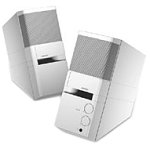
Image: The Bose MediaMate Computer Speakers in Gray. The image shows two compact speakers, one with visible volume and mix controls, and a headphone jack.
4. Kurulum
Follow these steps to set up your Bose MediaMate Computer Speakers:
- Atama: Place the speakers on a flat, stable surface on either side of your computer monitor. Ensure they are angled slightly upward towards your listening position for optimal sound.
- Ses Kablosunu Bağlayın: Connect the 3.5mm audio cable from the back of the primary speaker (the one with controls) to the audio output jack on your computer.
- Gücü bağlayın: Plug the power adapter into the power input on the primary speaker, then plug the adapter into a wall outlet.
- Güç Açık: Turn on the speakers using the volume knob. The power indicator light should illuminate.
5. Kullanım Talimatları
Once set up, operating your MediaMate speakers is straightforward:
- Ses Kontrolü: Use the large knob labeled "VOLUME" on the front of the primary speaker to adjust the overall sound level.
- Karışım Kontrolü: The "MIX" knob allows you to blend audio from two different sources if you have a second device connected to the auxiliary input.
- Kulaklık girişi: For private listening, plug your headphones into the headphone jack located on the front of the primary speaker. This will mute the speakers.
- Çift Giriş: The speakers feature dual inputs, allowing you to connect and mix two audio sources simultaneously. For example, you can connect your computer and a portable music player.
6. Bakım
Hoparlörlerinizin uzun ömürlü ve en iyi performansı göstermesi için:
- Temizlik: Use a soft, dry cloth to clean the exterior surfaces of the speakers. Do not use liquid cleaners or aerosols.
- Toz: Ses kalitesini etkileyebilecek toz birikimini önlemek için hoparlör ızgaralarını düzenli olarak tozdan arındırın.
- Depolamak: Hoparlörleri uzun süre saklayacaksanız, güç bağlantısını kesin ve serin ve kuru bir yerde saklayın.
7. Sorun Giderme
If you encounter issues with your Bose MediaMate speakers, refer to the following common problems and solutions:
| Sorun | Olası Neden | Çözüm |
|---|---|---|
| Ses yok |
|
|
| Bozuk ses |
|
|
| Sadece bir hoparlör çalışıyor |
|
|
8. Özellikler
- Marka: Bose
- Modeli: MediaMate
- Bağlantı: 3.5mm Audio Input, AC Power
- Ses Çıkışı: Stereo
- Hoparlör Tipi: Multimedya
- Malzeme: Metal
- Hoparlör Boyutu: 6 Centimeters (Audio Driver)
- Ürün Ağırlığı: 3 Pound
- Renk: Gri
9. Garanti ve Destek
Bose MediaMate Computer Speakers come with a limited warranty. For specific warranty details and duration, please refer to the warranty card included with your product or visit the official Bose webalan.
For technical support, product registration, or service inquiries, please contact Bose customer service:
- Telefon: 800-444-2673
- Webalan: www.bose.com
Please have your product model number (MediaMate) and purchase date available when contacting support.


