
1. Giriş
This manual provides essential information for the safe and efficient operation of your Crosley WR18 Mini Bubbler Jukebox. Please read these instructions thoroughly before using the unit and retain them for future reference.
The Crosley WR18 is a reproduction of a 1946-style jukebox, featuring percolating bubble tubes, neon lights, a front-loading compact disc player, FM radio, and stereo speakers. It is operated primarily via a 12-button remote control.
2. Güvenlik Talimatları
- Üniteyi yağmura veya neme maruz bırakmayın.
- Havalandırma açıklıklarını kapatmayın.
- Ünitenin sağlam ve düz bir yüzeye yerleştirildiğinden emin olun.
- Şimşekli fırtınalarda veya uzun süre kullanılmadığında ünitenin fişini çekin.
- Tüm bakımları yetkili servis personeline yaptırın.
3. Kurulum
3.1 Paketten Çıkarma ve Yerleştirme
Carefully remove the jukebox from its packaging. Place the unit on a flat, stable surface away from direct sunlight, heat sources, and excessive dust or moisture. Ensure there is adequate space around the unit for ventilation.
3.2 Güç Bağlantısı
Connect the AC power cord to the power input on the back of the unit, then plug it into a standard wall outlet. The unit is designed for 120V AC, 60Hz power supply.
3.3 Uzaktan Kumanda Kurulumu
Insert two AAA batteries (not included) into the remote control, observing the correct polarity. The remote control is essential for operating most functions of the jukebox.
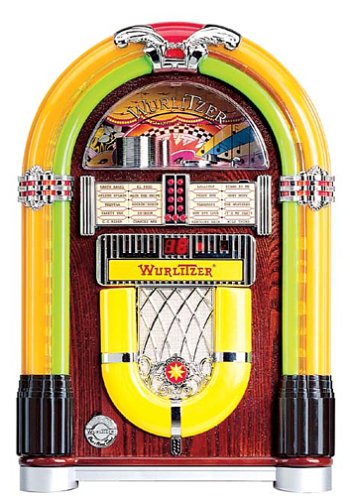
Şekil 1: Ön view of the Crosley WR18 Mini Bubbler Jukebox. This image shows the main unit with its distinctive bubble tubes, neon lights, and speaker grilles. The CD player slot is visible below the main display area.
4. Kullanım Talimatları
4.1 Güç Açma/Kapatma
Basın GÜÇ Uzaktan kumandadaki düğme ile cihazı açıp kapatabilirsiniz.
4.2 CD Çaların Çalışması
- Basın CD button on the remote to select CD mode.
- Basın AÇIK/KAPALI button on the remote to open the CD tray.
- Place a compact disc, label side up, into the tray.
- Basmak AÇIK/KAPALI again to close the tray. The unit will begin reading the disc.
- Kullanın OYNAT/DURDUR Oynatmayı başlatmak veya duraklatmak için düğmeye basın.
- Kullanın ILERİ ATLAMAK (|>>) veya GERİ ATLA (<<|Parçalar arasında gezinmek için kullanılan düğmeler.
- The PROGRAM function allows you to create a custom playback order for tracks. Refer to the remote control diagram for specific programming steps.
- The TEKRARLAMAK function allows you to repeat the current track or the entire disc.
4.3 FM Radyo Çalışması
- Basın FM button on the remote to select FM radio mode.
- Extend the external FM antenna located at the back of the unit for optimal reception. Adjust its position for clearer sound.
- Kullanın AYARLAMAK (+) veya AYAR AŞAĞI (-) buttons on the remote to manually tune to desired radio stations.
4.4 Ses Kontrolü
kullanarak ses seviyesini ayarlayın. SESİ ARTTIR (+) Ve SESİ AZALT (-) buttons on the remote control. Note that all volume adjustments are made via the remote.
4.5 Neon Lights and Bubble Tubes
The genuine multicolored neon lights and percolating bubble tubes activate automatically when the unit is powered on, enhancing the retro aesthetic. There are no separate controls for these features.
5. Bakım
5.1 Kabinin Temizlenmesi
Wipe the handcrafted hardwood cabinet with a soft, dry cloth. For stubborn marks, a slightly damp Bez kullanılabilir ve hemen kurutulmalıdır. Aşındırıcı temizleyicilerden veya çözücülerden kaçının.
5.2 CD Çalar Bakımı
To ensure optimal performance, keep the CD tray and lens clean. Use a specialized CD lens cleaner disc periodically. Avoid touching the CD lens directly.
5.3 Bubble Tubes and Neon Lights
The bubble tubes and neon lights are sealed units and require no user maintenance. If any issues arise with these components, contact customer support.
6. Sorun Giderme
| Sorun | Olası Neden | Çözüm |
|---|---|---|
| Güç yok | Güç kablosu bağlı değil; priz aktif değil. | Güç kablosunun prize sağlam bir şekilde takılı olduğundan emin olun; prizi başka bir cihazla test edin. |
| Ses yok | Volume too low; incorrect mode selected | Increase volume using remote; ensure correct mode (CD/FM) is selected. |
| CD çalmıyor | Disc inserted incorrectly; disc dirty/scratched; CD mode not selected | Reinsert disc correctly; clean disc; select CD mode. |
| Zayıf FM alımı | Antenna not extended/positioned correctly | Fully extend and adjust the external FM antenna. |
| Uzaktan kumanda çalışmıyor | Batteries depleted; line of sight blocked; remote malfunction | Replace batteries; ensure no obstructions between remote and unit; if remote remains unresponsive, contact customer support as many functions are remote-only. |
7. Özellikler
- Model Numarası: WR18
- Ürün Ölçüleri: 12 x 22 x 16 inches (Width x Height x Depth)
- Ürün Ağırlığı: 16.8 pound
- Üretici: Crosley Radyosu
- Ses Özellikleri: Stereo sound with two 4-inch speakers and built-in ampcankurtaran
- Medya Oynatma: CD player with program and repeat functions, FM radio with external antenna
- Estetik Özellikler: Handcrafted hardwood cabinet, genuine multicolored neon lights, bubble tube accents
- Kontrol: 12-button mini jukebox remote control
8. Garanti ve Destek
The Crosley WR18 Mini Bubbler Jukebox typically comes with a manufacturer's warranty. Based on user reports, the Crosley warranty period is 90 days. Please note that for warranty service, you may be responsible for shipping the unit back to the manufacturer and an additional fee for return shipping and handling after repair.
For technical support, warranty claims, or service inquiries, please contact Crosley Radio customer service directly. Refer to the contact information provided with your product packaging or visit the official Crosley webEn güncel destek detayları için siteyi ziyaret edin.