
giriiş
This manual provides detailed instructions for the setup, operation, and maintenance of your Audiovox CE-122 Personal CD Player with Car Kit. Please read this manual thoroughly before using your device to ensure proper functionality and to maximize your listening experience.
The Audiovox CE-122 is a portable CD player designed for versatile use, featuring a Digital Anti-Shock System (DASS) for uninterrupted playback during movement, a 22-track programmable memory, and a bass boost function. It includes a complete car kit for in-vehicle use.
Paket İçeriği
Aşağıda listelenen tüm öğelerin paketinizde bulunduğunu doğrulayın:
- Audiovox CE-122 Portable CD Player
- Kulaklıklar
- AC Adaptörü
- Araba Adaptörü
- Kaset Adaptörü
- Kullanıcı Kılavuzu (bu belge)
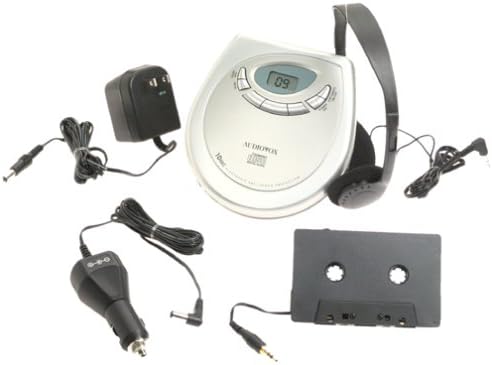
Resim: The Audiovox CE-122 portable CD player shown with all its accessories, including headphones, AC adapter, car adapter, and cassette adapter.
Ürün Özellikleri
- Plays audio CD and CD-R/RW discs.
- AC/DC operation for home and portable use.
- Complete car kit included for in-vehicle audio.
- Digital Anti-Shock System (DASS) provides up to 20 seconds of skip protection.
- 22-track programmable memory for custom playback sequences.
- Bass boost feature for enhanced audio.
- Forward and reverse search functions.
- Repeat and pause functions.
- Key hold switch to prevent accidental button presses.
- Line out jack for connecting to external audio systems.
- Auto power off function to conserve battery life.
- Dual stereo headphone jack for shared listening.
- Built-in charger for rechargeable batteries (rechargeable batteries not included).
Kurmak
1. Pillerin Takılması
The CD player operates on 4 AA batteries (included). For rechargeable batteries (not included), ensure they are inserted correctly for charging.
- Ünitenin altında bulunan pil bölmesi kapağını açın.
- Bölmenin içindeki işaretlere dikkat ederek, doğru kutuplara (+/-) 4 adet AA pil takın.
- Pil bölmesi kapağını sıkıca kapatın.
2. Connecting Power (AC Adapter)
For home use or to charge rechargeable batteries:
- Plug the small end of the AC adapter into the DC IN 4.5V jack on the CD player.
- AC adaptörünün diğer ucunu standart bir duvar prizine takın.
- If using rechargeable batteries, select the 'charge' function (if available on your model) to begin charging.
3. Kulaklık Bağlama
Plug the headphones into one of the two headphone jacks on the side of the CD player.

Resim: Yakın çekim view of the headphones included with the Audiovox CE-122 CD player.
4. Car Kit Setup
To use the CD player in your vehicle:
- Plug the car adapter into your vehicle's cigarette lighter or 12V power outlet.
- Connect the small end of the car adapter to the DC IN 4.5V jack on the CD player.
- Insert the cassette adapter into your vehicle's cassette player.
- Connect the audio cable from the cassette adapter to the LINE OUT jack on the CD player.
- Ensure your car stereo is set to the cassette function to hear the CD player's audio.
Kullanım Talimatları
1. CD Takma
- CD bölmesi kapağını açmak için OPEN düğmesine basın.
- Place a CD (audio CD or CD-R/RW) onto the center spindle with the label side facing up.
- CD'yi yerine oturana kadar yavaşça bastırın.
- CD bölmesinin kapağını yerine oturana kadar sıkıca kapatın.

Resim: The Audiovox CE-122 portable CD player with its lid open, revealing the disc compartment where a CD is placed.
2. Temel Oynatma
- Oynamak: Basın OYNAT/DURDUR button to start playback. The track number will appear on the display.
- Duraklama: Basın OYNAT/DURDUR button during playback to pause. Press again to resume.
- Durdur: Basın DURMAK Oynatmayı durdurmak için düğmesine basın.
3. Track Navigation
- Parçayı Atla: Basın ILERİ ATLAMAK (►►) veya GERİ ATLA (◄◄) buttons to move to the next or previous track.
- Aramak: Basılı tutun ILERİ ATLAMAK (►►) veya GERİ ATLA (◄◄) buttons during playback to fast forward or rewind within a track.
4. Tekrarlama Fonksiyonu
Basın TEKRARLAMAK Tekrarlama modları arasında geçiş yapmak için düğme:
- Tekrar 1: Geçerli parçayı tekrarlar.
- Tümünü tekrarla: Disk üzerindeki tüm parçaları tekrarlar.
- Tekrarlama Kapalı: Disables repeat function.
5. Programmable Memory
You can program up to 22 tracks to play in a specific order:
- CD durdurulmuşken, tuşuna basın PROGRAM düğme.
- Kullanın ILERİ ATLAMAK (►►) veya GERİ ATLA (◄◄) buttons to select the desired track.
- Basmak PROGRAM again to add the track to the memory.
- Repeat steps 2 and 3 for up to 22 tracks.
- Basmak OYNAT/DURDUR to start playback of the programmed sequence.
6. Bas Güçlendirme
Basın BAS KUVVETLENDİRME Bas güçlendirme özelliğini etkinleştirmek veya devre dışı bırakmak için kullanılan düğme.
7. Key Hold Switch
Kaydırın TUTMAK switch to the ON position to disable all buttons, preventing accidental operation during transport.
8. Digital Anti-Shock System (DASS)
The DASS provides up to 20 seconds of skip protection. This feature is automatically active during playback to ensure smooth audio even during movement.
9. Otomatik Kapanma
The unit will automatically power off after a period of inactivity or when a CD finishes playing to conserve battery life.

Resim: The Audiovox CE-122 portable CD player, a silver-colored device with a digital display and control buttons, shown alongside its black over-ear headphones.
Bakım
1. Cleaning the CD Player
- Cihazın dış yüzeyini yumuşak, kuru bir bezle silin. Aşındırıcı temizleyiciler veya çözücüler kullanmayın.
- To clean the lens, use a specialized CD lens cleaner disc. Do not touch the lens directly.
2. Pil Bakımı
- Ünite uzun süre kullanılmayacaksa, sızıntıyı önlemek için pilleri çıkarın.
- Tüm pilleri aynı anda değiştirin; eski ve yeni pilleri veya farklı pil türlerini karıştırmayın.
3. Depolama
CD çaları serin, kuru bir yerde, doğrudan güneş ışığından ve aşırı sıcaklıklardan uzakta saklayın.
Sorun giderme
If you encounter issues with your Audiovox CE-122, please refer to the following common problems and solutions:
- Güç Yok:
• Check if batteries are inserted correctly and are not depleted. Replace if necessary.
• Ensure the AC adapter or car adapter is securely connected and the power source is active. - CD Çalmıyor / Disk Hatası:
• Ensure the CD is inserted correctly with the label side up.
• Check if the CD is scratched or dirty. Clean the CD with a soft, lint-free cloth.
• Make sure the CD compartment lid is fully closed.
• The disc format may not be supported (e.g., data CD instead of audio CD or CD-R/RW). - Skipping During Playback:
• While the DASS provides protection, severe shocks or vibrations can still cause skipping. Try to keep the player stable.
• Ensure the CD is clean and free of scratches.
• Low battery power can sometimes affect anti-shock performance. Replace or recharge batteries. - Ses Yok:
• Check headphone connection and ensure they are fully plugged in.
• Ses seviyesini ayarlayın.
• If using the car kit, ensure the car stereo is set to the correct input (cassette function) and volume is up. - Yanıt Vermeyen Düğmeler:
• olup olmadığını kontrol edin: TUTMAK switch is in the ON position. Slide it to OFF to enable buttons.
Özellikler
| Model Numarası | CE-122 |
| Desteklenen Disk Formatları | Audio CD, CD-R/RW (MP3 compatible) |
| Şoka Karşı Koruma | 20 seconds (Digital Anti-Shock System) |
| Programlanabilir Bellek | 22 parça |
| Güç Kaynağı | 4 x AA batteries, AC adapter (4.5V DC), Car adapter (12V DC) |
| Bağlantı | Auxiliary (Line Out), Dual Headphone Jacks |
| Boyutlar (Yaklaşık) | 11.1 x 7.8 x 3.2 inç (Paket) |
| Ağırlık (Yaklaşık) | 1.5 pound |
Garanti ve Destek
For warranty information and customer support, please refer to the documentation provided at the time of purchase or contact Audiovox customer service. Keep your proof of purchase for warranty claims.